







Question: Locate the Bootstrap classes for the table. Remove the classes that make it bordered and striped @model List @{ ViewBag.Title = My Movies; } Movie
Locate the Bootstrap classes for the table. Remove the classes that make it bordered and striped
@model List
Movie List
Add New Movie
| Name | Year | Genre | Rating | |
|---|---|---|---|---|
| @movie.Name | @movie.Year | @movie.Genre.Name | @movie.Rating | Edit Delete |
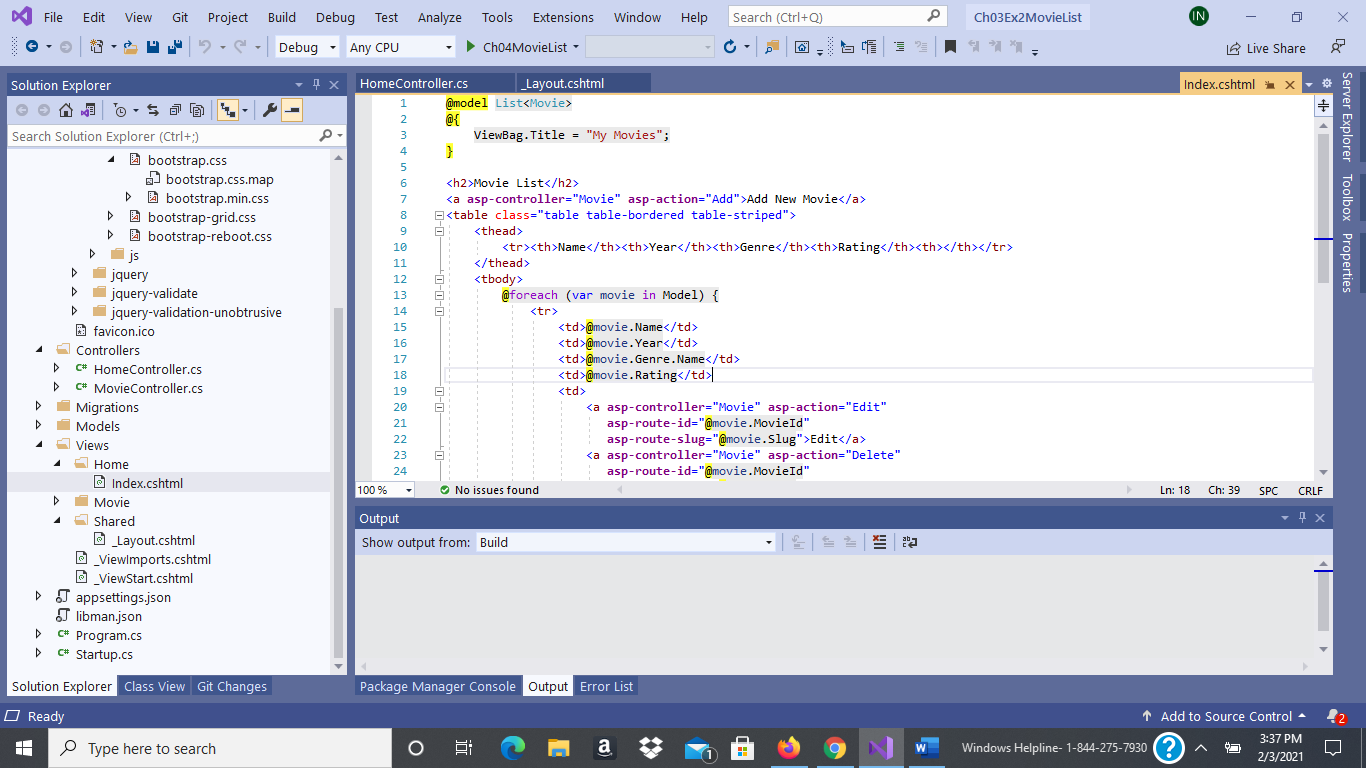
File Edit View Git Build Debug Test Analyze Tools Extensions Window Help Search (Ctrl+Q) Ch03Ex2MovieList IN Project 2-5 Debug Any CPU Ch04MovieList - F 1 . Live Share Index.cshtml * X. 1 x HomeController.cs _Layout.cshtml @model ListMovie List
Add New Movie B
Name Year Genre Rating @movie. Name @movie. Year @movie.Genre. Name @movie.Rating || Edit
Step by Step Solution
There are 3 Steps involved in it

Get step-by-step solutions from verified subject matter experts
 Study Help