







Question: Look at the Status column (column E) for the first few items on the inventory report. Does the output of the function created by the
-
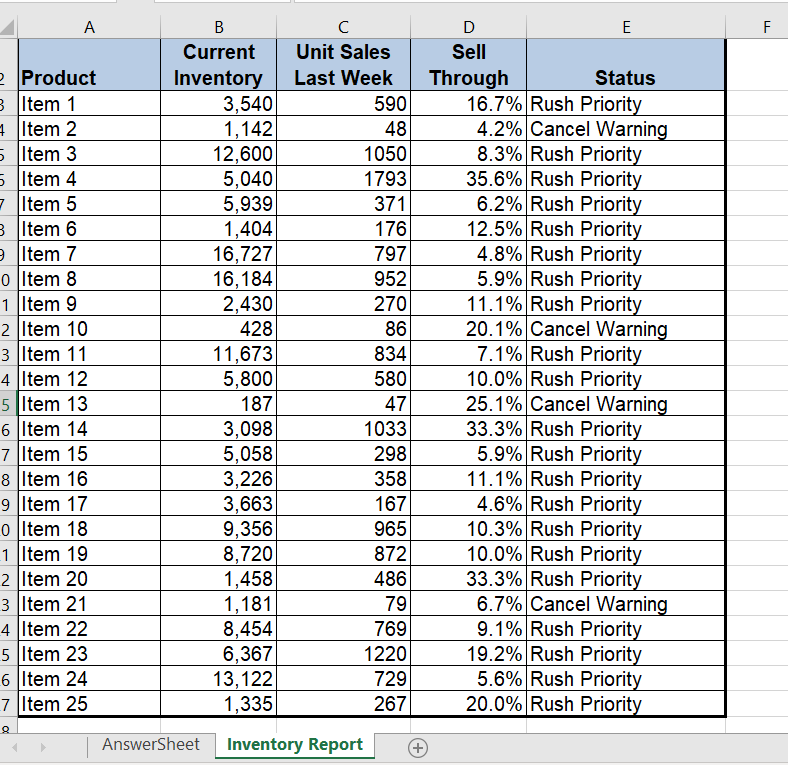
Look at the Status column (column E) for the first few items on the inventory report. Does the output of the function created by the analyst make sense given the companys guidelines for managing inventory? Document your observation in the AnswerSheet worksheet.
-
Evaluate the construction of the IF function in the Status column for the first item. Does the function accurately evaluate the Sell Through percentages in column D? Document your observation in the AnswerSheet worksheet.
-
The company suggests that if the unit sales for an item are greater than 100 and the sell through rate is greater than or equal to 20% that a rush priority be placed on any orders. Does the IF function in the Status column accurately account for this condition? Document your observation in the AnswerSheet worksheet.
-
Enter a new IF function in the Status column to accurately assess the inventory for each item based on the companys inventory policies. Make any other adjustments to the worksheet so that it is easy to see all items that require Rush Priorities as well Cancel Warnings.
Step by Step Solution
There are 3 Steps involved in it

Get step-by-step solutions from verified subject matter experts
 Study Help