







Question: main.py Load defu 1 #write the code for the following 2 Exercise 1 3 #Ask the user to input a name using an input statement
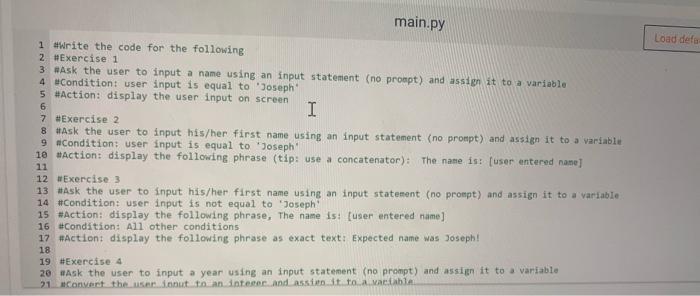
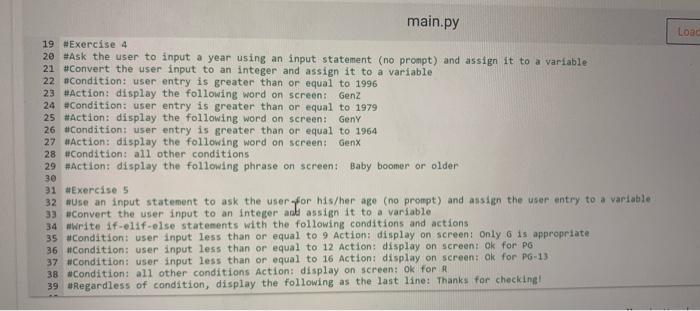
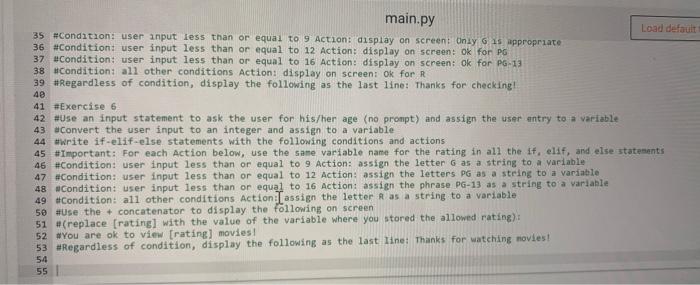
main.py Load defu 1 #write the code for the following 2 Exercise 1 3 #Ask the user to input a name using an input statement (no prompt) and assign it to a variable 4 Condition: user input is equal to 'Joseph 5 #Action: display the user input on screen 6 I 7 #Exercise 2 8 #Ask the user to input his/her first name using an input statement (no prompt) and assign it to a variable 9 #Condition: user input is equal to Joseph 10 #Action: display the following phrase (tip: use a concatenator): The name is: [user entered name] 11 12 #Exercise 3 13 #Ask the user to input his/her first name using an input statement (no prompt) and assign it to a variable 14 #Condition: user input is not equal to 'Joseph 15 #Action: display the following phrase, The name is: user entered name] 16 #Condition: All other conditions 17 #Action display the following phrase as exact text: Expected name was Joseph! 18 19 #Exercise 4 20 Ask the user to input a year using an input statement (no prompt) and assign it to a variable 21. Convert the user innut to an integrand assist tolvable Load main.py 19 Exercise 4 20 #Ask the user to input a year using an input statement (no prompt) and assign it to a variable 21 #Convert the user input to an integer and assign it to a variable 22 #Condition: user entry is greater than or equal to 1996 23 #Action: display the following word on screen Genz 24 #Condition: user entry is greater than or equal to 1979 25 #Action: display the following word on screen: Geny 26 #Condition: user entry is greater than or equal to 1964 27 #Action: display the following word on screen: Genx 28 #Condition: all other conditions 29 #action: display the following phrase on screen: Baby boomer or older 30 31 Exercise 5 32 #Use an input statement to ask the user for his/her age (no prompt) and assign the user entry to a variable 33 Convert the user input to an integer and assign it to a variable 34 wwrite if-elif-else statements with the following conditions and actions 35 #Condition: user input less than or equal to 9 Action: display on screen: Only 6 is appropriate 36 #Condition: user input less than or equal to 12 Action: display on screen: Ok for PG 37 #Condition: user input less than or equal to 16 Action: display on screen: Ok for PG-13 38 Condition: all other conditions Action: display on screen: ok for A 39 Regardless of condition, display the following as the last line: Thanks for checking! main.py 35 #Condition: user input less than or equal to 9 Action display on screen: Only 15 appropriate Load default 36 #Condition: user input less than or equal to 12 Action: display on screen: Ok for PG 37 #Condition: user input less than or equal to 16 Action: display on screen: Ok for PG-13 38 #Condition: all other conditions Action: display on screen: ok for R 39 #Regardless of condition, display the following as the last line: Thanks for checking! 40 41 #Exercise 6 42 #Use an input statement to ask the user for his/her age (no prompt) and assign the user entry to a variable 43 Convert the user input to an integer and assign to a variable 44 #write if-elif-else statements with the following conditions and actions 45 #Important: For each Action below, use the same variable name for the rating in all the if, elif, and else statements 46 #Condition: user input less than or equal to 9 Action: assign the letter G as a string to a variable 47 #Condition: user input less than or equal to 12 Action assign the letters PG as a string to a variable 48 #Condition: user input less than or equal to 16 Action: assign the phrase PG-13 as a string to a variable 49 #Condition: all other conditions Action I assign the letter R as a string to a variable 50 #Use the concatenator to display the following on screen 51 #(replace (rating with the value of the variable where you stored the allowed rating): 52 "You are ok to view [rating) movies! 53 #Regardless of condition, display the following as the last line: Thanks for watching movies! 54 55
Step by Step Solution
There are 3 Steps involved in it

Get step-by-step solutions from verified subject matter experts
 Study Help