







Question: Make a diagonal displayed message using linux in c language. the code I already have is here: #include #include #include #include #include #include #define LINESIZE
Make a diagonal displayed message using linux in c language.
the code I already have is here:
#include
#include
#include
#include
#include
#include
#define LINESIZE 16
//use one command line argument
int main(int argc, char *argv[]){
if(argc != 2){
printf("Usage: diagonal ");
return -1;
}
//create a file so that 16 rows of empty will appear with od -c command
int fd = open("diagonal.out", O_CREAT | O_WRONLY);
printf("fd = %d ", fd);
char space = ' ';
for(int line = 0; line
for(int column = 0; column
write(fd, &space, 1);
//0, 17, 34
int n = strlen(argv[1]);
for(int i = 0; i
{
lseek(fd, (LINESIZE+1)*i, SEEK_SET);
write(fd, &argv[1][i], 1);
}
close(fd);
}
this code only prints out the first word "Jey" but I need it to print the rest of the 3 words. Please expand the code and get the correct output.
The output should be like:
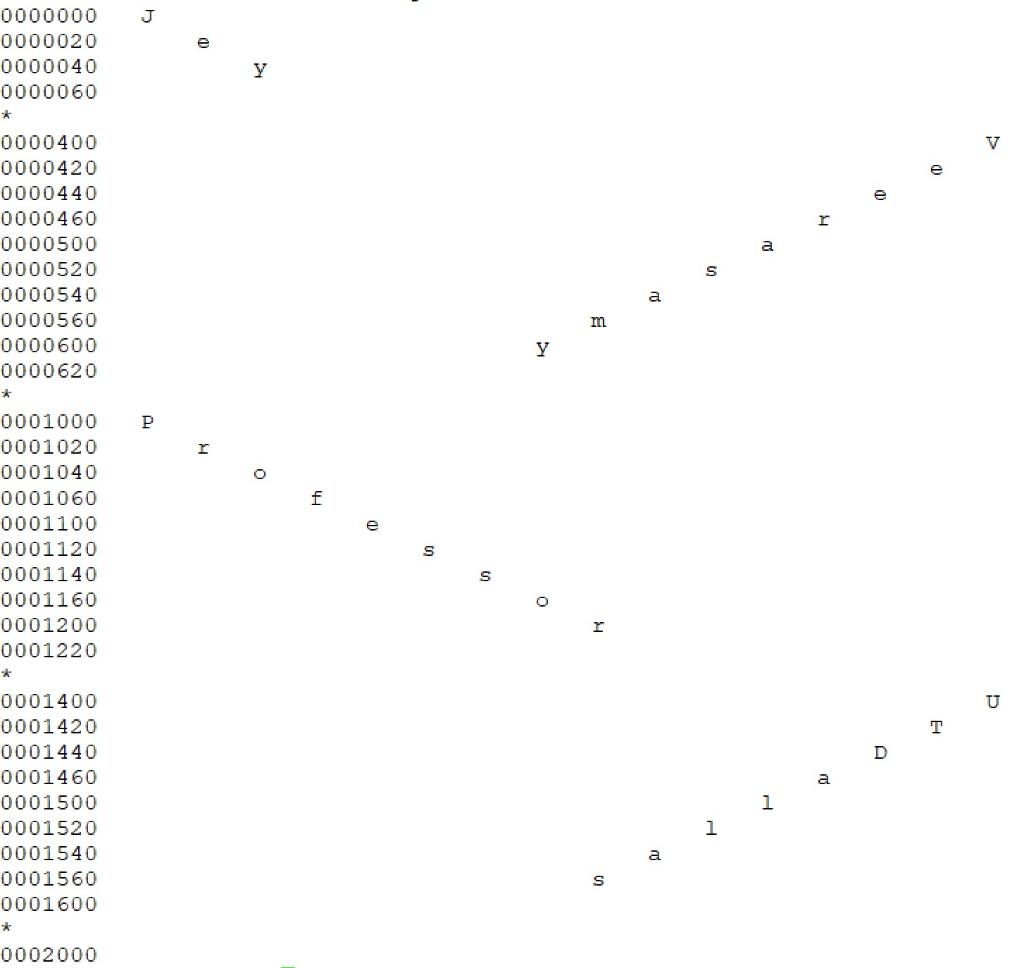
The command line you'll need are:
gcc diagonal2.c -o diagonal2
diagonal2 Jey Veerasamy Professor UTDallas
od -c diagonal2.out
J V m 0000000 0000020 0000040 0000060 * 0000400 0000420 0000440 0000460 0000500 0000520 0000540 0000560 0000600 0000620 * 0001000 0001020 0001040 0001060 0001100 0001120 0001140 0001160 0001200 0001220 Y P O f S S U T D a 1 0001400 0001420 0001440 0001460 0001500 0001520 0001540 0001560 0001600 * 0002000 1 a S
Step by Step Solution
There are 3 Steps involved in it

Get step-by-step solutions from verified subject matter experts
 Study Help