







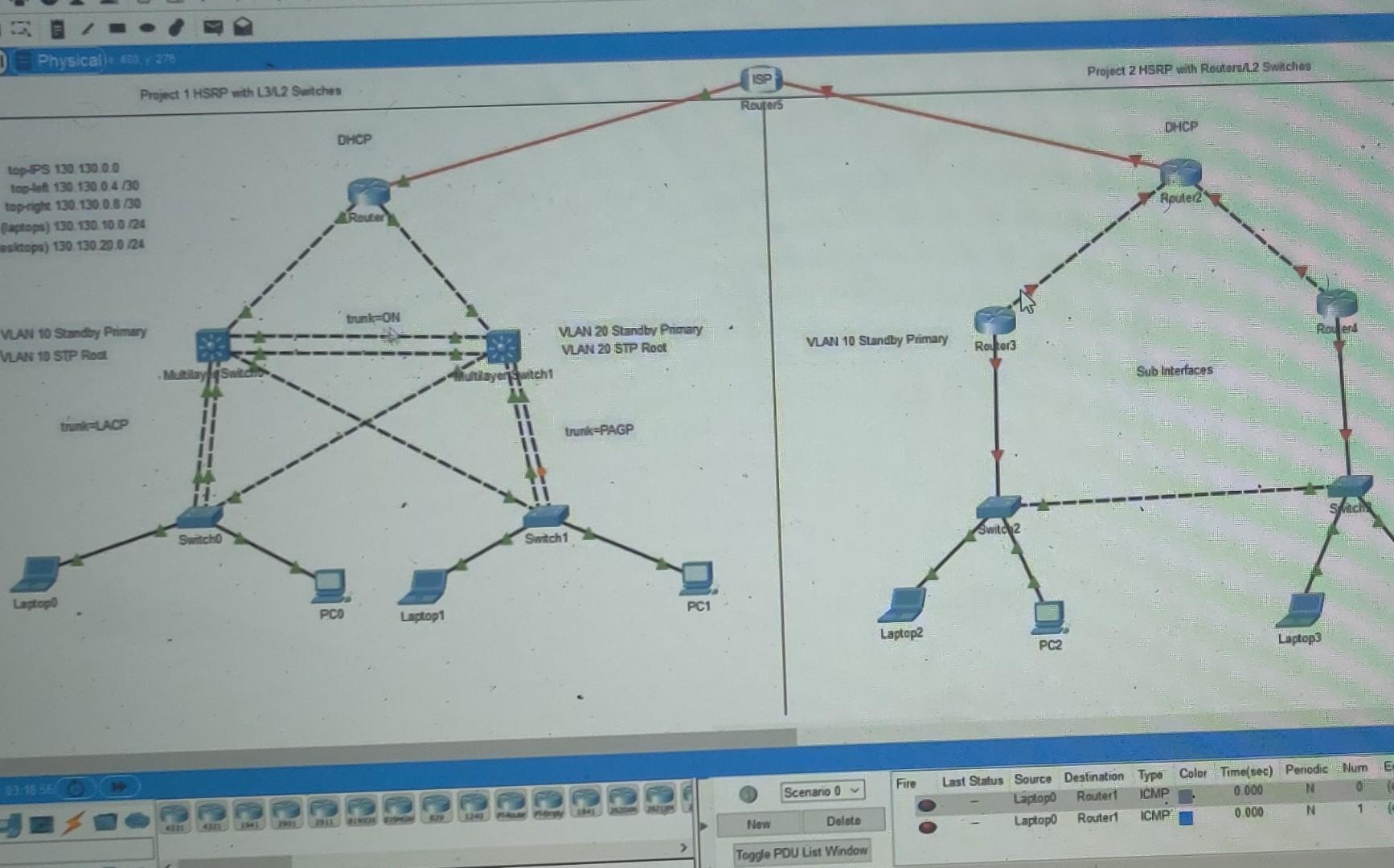
Question: Make a topology based on the image above and make sure each device directly connected can communicate and use trunking also instead of using the
Make a topology based on the image above and make sure each device directly connected can communicate and use trunking also instead of using the IP address listed on the topology use the ones below.
The IP addresses for project 1 top-IPS should be 130.133.0.0 /30
Top-Left 130.133.0.4 /30
Top-Left 130.133.0.4 /30
Top-Right 130.133.0.8 /30
VLAN 10 (labtops) 130.133.10.0 /24
VLAN-20(desktops) 130.133.20.0 /24
The IP addresses for project 2 top-IPS 130.133.0.20 /30
Top-Left 130.133.0.12 /30
Top-Right 130.133.0.16 /30
VLAN 10 (labtops) 130.133.30.0 /24
VLAN-20(desktops) 130.133.40.0 /24
Physical): 2, 370 Project 2 HSRP with Reuters/L2 Switches SO Project 1 HSRP - L3/L2 Switches Routors DHCP DHCP top PS 130 130 0.0 top-let 130 130 04/30 top-right 130. 130.0 8 130 Claptops) 130 130 10 0 124 sidops) 130 130 20 0 24 Apute2 Router trunkON Roerd VLAN 10 Standby Primary VLAN 10 SUP Root VLAN 10 Standby Primary Router 3 VAN 20 Standby Primary VLAN 20 STP Root ultilayer witch MultilaySwitch Sub Interfaces trunkUACP trunk=PAGP Switz Switch Switch1 Laptop PC1 PCO Laptop1 Laptop2 PC2 Laptop3 Fire Scenario o Last Status Source Destination Type ColorTime(sec) Periodic Num E Laptop Router ICMP 0.000 N Laptopo Router ICMP 0.000 N 1 New Dalate Toggle PDU List Window Physical): 2, 370 Project 2 HSRP with Reuters/L2 Switches SO Project 1 HSRP - L3/L2 Switches Routors DHCP DHCP top PS 130 130 0.0 top-let 130 130 04/30 top-right 130. 130.0 8 130 Claptops) 130 130 10 0 124 sidops) 130 130 20 0 24 Apute2 Router trunkON Roerd VLAN 10 Standby Primary VLAN 10 SUP Root VLAN 10 Standby Primary Router 3 VAN 20 Standby Primary VLAN 20 STP Root ultilayer witch MultilaySwitch Sub Interfaces trunkUACP trunk=PAGP Switz Switch Switch1 Laptop PC1 PCO Laptop1 Laptop2 PC2 Laptop3 Fire Scenario o Last Status Source Destination Type ColorTime(sec) Periodic Num E Laptop Router ICMP 0.000 N Laptopo Router ICMP 0.000 N 1 New Dalate Toggle PDU List Window
Step by Step Solution
There are 3 Steps involved in it

Get step-by-step solutions from verified subject matter experts
 Study Help