







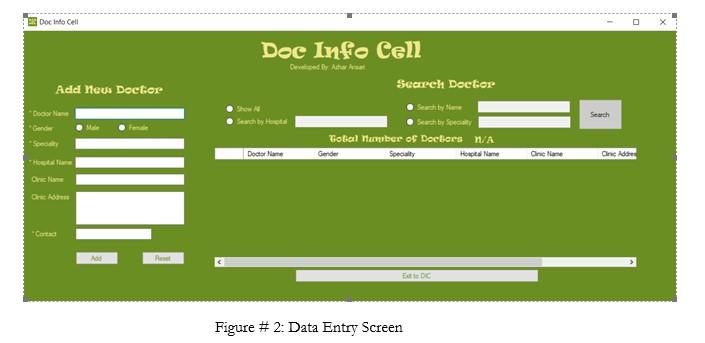
Question: MAKE TEST CASE Requirement # 2 System should have a Data Entry Screen enabling the users to enter the required data. See Figure # 2
MAKE TEST CASE
Requirement # 2
System should have a Data Entry Screen enabling the users to enter the required data. See Figure # 2 below.
Sub Requirements:
- The data entry screen should have two sections, namely:
- Add New Doctor
- Search a Doctor
- Adding a new doctor section allows user to add a new doctor.
- Adding a doctor requires user to fill certain fields out of which some are mandatory (marked with *)
- Record should not be added without providing the mandatory data.
- To add a record, Add button should be clicked.
- All validations should be performed on clicking Add button. For validations on clicking the Add button please refer the below given GUI matrix.
- Reset button enables user to refresh the form by making the fields empty.
- If user closes the application without clicking the Add button and partially filled form, system should prompt an error message having OK and Cancel buttons saying You have unsaved data. Clicking OK button will discard the changes.
- Clicking OK button will close the application without saving.
- Clicking Cancel button will remain on the same screen.
| Name | Purpose | Type | Mandatory | Data Type | Length | Validation(s) |
| Doctor Name | To record doctors name | Text Box | Yes | String | 100 characters | Generate an error message Doctor Name is required if not entered by the user. |
| Gender | To record the gender | Radio button | Yes | N/A | N/A | Generate an error message Please select gender if not selected by the user. |
| Specialty | To record the field of specialty | Text Box | Yes | String | 200 characters | Generate an error message Mention Specialty of the doctor if not entered by the user. |
| Hospital Name | To record hospitals name | Text Box | Yes | String | 250 characters | Generate an error message Hospital Name is required if not entered by the user. |
| Clinic Name | To record clinics name | Text Box | No | String | 200 characters | None |
| Clinic Address | To record clinics address | Text Box | No | String | 200 characters | None |
| Contact | To record contact number | Text Box | Yes | Numeric only | 15 digits | Generate an error message Contact number is required if not entered by the user. |
- Search Doctor Section allows user to search doctors on multiple criterion.
- Four filters to search a doctor are as follow:
- Search All
- Search By Name
- Search By Hospital
- Search by Specialty
- To search doctor(s), user has to select a filter first.
- Except Search All option, user has to provide the search text and click Search button.
- The resultant, if any, will be displayed in the grid below and total searched record count will also be shown to the user.
- All the validations will be performed on clicking Search button.
| Name | Purpose | Type | Mandatory | Data Type | Length | Validation(s) |
| Search By Hospital | To search a doctor by hospital | Text Box | Yes, if selected | String | 250 characters | Generate an error message Enter Hospital name to search if not entered by the user. |
| Search By Name | To search a doctor by name | Text Box | Yes, if selected | String | 100 characters | Generate an error message Enter Doctors name to search if not selected by the user. |
| Search By Specialty | To search a doctor by specialty | Text Box | Yes, if selected | String | 200 characters | Generate an error message Enter Specialty to search if not entered by the user. |
2 Docinto Cell Doc Info Cell Carded By Attornet Search Doctor Add News Docter "Deca Name Search Search by Season total number of Doctors w/A Gender Specialty Hot Name Doctor Name One Name Cinc Adres ON Ad *Conta A R EDC Figure # 2: Data Entry Screen
Step by Step Solution
There are 3 Steps involved in it

Get step-by-step solutions from verified subject matter experts
 Study Help