







Question: Make the following modifications to the spreadsheet Basic Excel 0 9 spreadsheet.xlsx . 1 . In Basic Excel 0 9 spreadsheet.xIsx, insert a row between
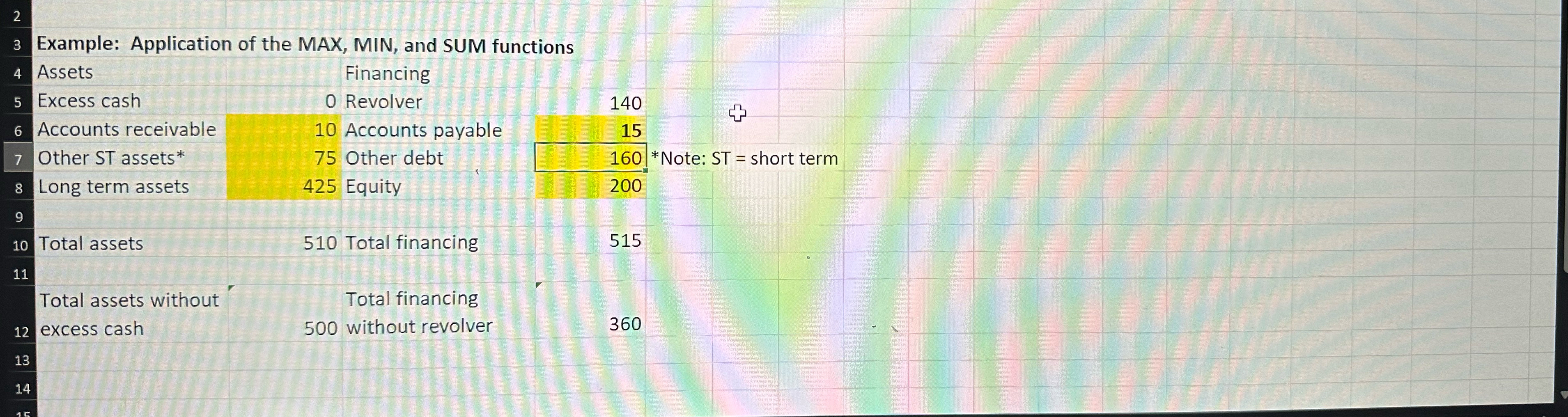
Make the following modifications to the spreadsheet Basic Excel spreadsheet.xlsx In Basic Excel spreadsheet.xIsx, insert a row between rows and In this new row, enter "Accounts receivable" in cell A and "Accounts payable" in cell C Highlight the cells B and D if they are not already highlighted Enter the following values in the following cells:cell Benter cell Denter Replace the text in cell A with your name. You may work on this in groups of up to four people if you prefer, or you may work by yourself. If you work in a group, please put all the group members names in cell A separated by commas This is the hard part and worth most of the points Determine whichef the formulas need to be modified for the spreadsheet to function properly.
Example: Application of the MAX, MIN, and SUM functions
Step by Step Solution
There are 3 Steps involved in it
1 Expert Approved Answer
Step: 1 Unlock

Question Has Been Solved by an Expert!
Get step-by-step solutions from verified subject matter experts
Step: 2 Unlock
Step: 3 Unlock
 Study Help