







Question: matlab (2) In this task, you will analyze 2-D arrays which are in image formats, choose one image. Follow the instructions, answer the questions, include
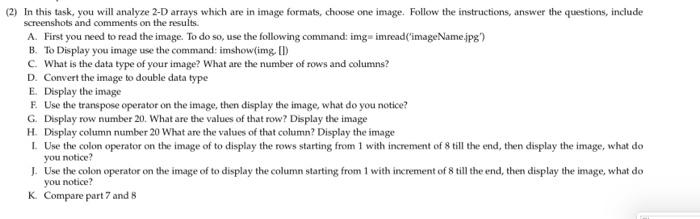
(2) In this task, you will analyze 2-D arrays which are in image formats, choose one image. Follow the instructions, answer the questions, include screenshots and comments on the results. A. First you need to read the image. To do so, use the following command img-imread("imageName.jpg) B.To Display you image use the command: imshow(img ) C. What is the data type of your image? What are the number of rows and columns? D. Convert the image to double data type E Display the image F. Use the transpose operator on the image then display the image, what do you notice? G Display row number 20. What are the values of that row? Display the image H. Display column number 20 What are the values of that column? Display the image 1. Use the colon operator on the image of to display the rows starting from 1 with increment of 8 till the end, then display the image, what do you notice? 1. Use the colon operator on the image of to display the column starting from 1 with increment of 8 till the end, then display the image, what do you notice? K Compare part 7 and 8
Step by Step Solution
There are 3 Steps involved in it

Get step-by-step solutions from verified subject matter experts
 Study Help