







Question: Matlab code help! I keep getting incorrect output values. Here is my code: function [erf_trapezoid, erf_GL3] = student_solution(x) % Define integrand integrand = @(x) (2/sqrt(pi))*exp(-x.^2);
Matlab code help!
I keep getting incorrect output values.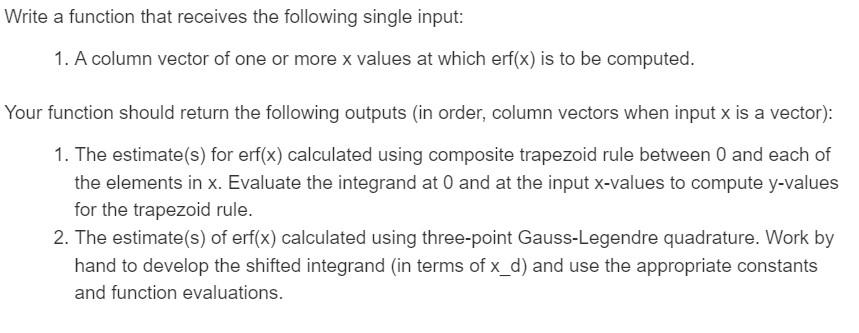
Here is my code:
function [erf_trapezoid, erf_GL3] = student_solution(x)
% Define integrand
integrand = @(x) (2/sqrt(pi))*exp(-x.^2);
% Preallocate output vectors
erf_trapezoid = zeros(length(x),1);
erf_GL3 = zeros(length(x),1);
% Define coefficients and arguments for Gauss-Legendre quadrature
c = [5/9 8/9 5/9];
x_arg = [-sqrt(3/5) 0 sqrt(3/5)];
% Compute erf using composite trapezoid rule and Gauss-Legendre quadrature
for i = 1:length(x)
x_val = [0 x(i)]'; % Include endpoints for trapezoid rule
y_val = integrand(x_val); % Evaluate integrand at x=0 and x(i)
erf_trapezoid(i) = trapz(x_val, y_val); % Use trapezoid rule to estimate integral
x_d = (x_arg+1)*x(i)/2; % Compute shifted x values for Gauss-Legendre quadrature
y_d = integrand(x_d); % Evaluate integrand at shifted x values
erf_GL3(i) = x(i)/2*sum(c.*y_d); % Use Gauss-Legendre quadrature to estimate integral
end
end
Vrite a function that receives the following single input: 1. A column vector of one or more x values at which erf(x) is to be computed. four function should return the following outputs (in order, column vectors when input x is a vector): 1. The estimate(s) for erf(x) calculated using composite trapezoid rule between 0 and each of the elements in x. Evaluate the integrand at 0 and at the input x-values to compute y-values for the trapezoid rule. 2. The estimate(s) of erf(x) calculated using three-point Gauss-Legendre quadrature. Work by hand to develop the shifted integrand (in terms of xd ) and use the appropriate constants and function evaluations
Step by Step Solution
There are 3 Steps involved in it

Get step-by-step solutions from verified subject matter experts
 Study Help