







Question: MATLAB Create a GUI as follows MATLAB FINAL EXAM Static text Tag Tx!! Listbox, Tag: /hs/ Black Blue Cyan Green Magenta Red Yellow OK Push
MATLAB 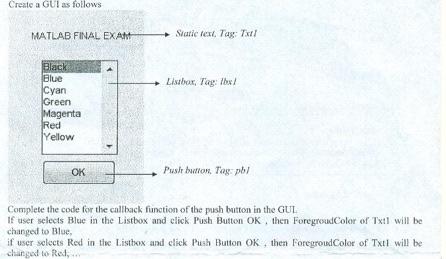
Create a GUI as follows MATLAB FINAL EXAM Static text Tag Tx!! Listbox, Tag: /hs/ Black Blue Cyan Green Magenta Red Yellow OK Push button. Tog pol Complete the code for the callback function of the push button in the GUL If user selects Blue in the Listbox and click Push Button OK, then Foregroud Color of Txil will be changed to Blue if user selects Red in the Listbox and click Push Button OK, then Foregroud Color of Txil will be changed to Red
Step by Step Solution
There are 3 Steps involved in it
1 Expert Approved Answer
Step: 1 Unlock

Question Has Been Solved by an Expert!
Get step-by-step solutions from verified subject matter experts
Step: 2 Unlock
Step: 3 Unlock
 Study Help