







Question: Matlab Format! This is my third time posting the same questions the other doesn't help.... The result is suppose to be 0. Starting from left
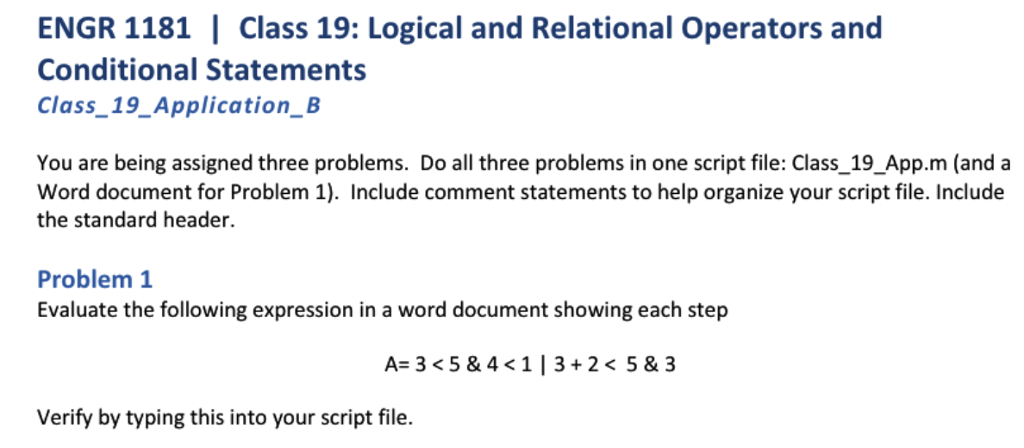 Matlab Format! This is my third time posting the same questions the other doesn't help.... The result is suppose to be 0. "Starting from left to right" and
| 0 -> 0000 |
| 3 -> 0011 |
| 0&3-> 0000 |
this part is not valid in Matlab. I like the most simplest answer, diffrenciate what i have to write in the script file and in Microsoft Word. Thank you!
Problem 1:
A = 3
Starting from left to right
Step 1: 3
Step 2: 4
Step 3: 3 1 & 0 results in 0 (False) (For AND both values should be True(1))
Step 4: 3+2 5
Step 5: 3+2 0 & 3 results in Bitwise operation ________________ | 0 -> 0000 | | 3 -> 0011 | |________________| | | | 0&3-> 0000 | ________________ Step 6: 0 | 0 results in 0 So the final result is 0
Problem 1:
clc; clear all;
A=1 7 & 4+3
A=1 | 5>7 & 4+3 2 & 1
Step 1. Evaluate subexpression 1 , since 1 is always less then 2, so result will be true which is equal to 1.
Step 2. Evaluate subexpression 5 > 7, since 5 is always less then 7, so result will be false which is equal to 0.
Step 3. Evaluate subexpression 4+3 , which is equal to 7, since 7 is always greater then 2 hence for this part result will be false or 0.
Step 4. Now the main expression becomes
A= true | false & false & true (notice here '1' means true and '0' means false; ' | ' means 'or' ; '&' means 'and' )
or we can say that, A = 1 | 0 & 0 & 1
Now in above expression
Step 4.a . calculate subexp. 0 & 0 = 0 ('and' operation will be done first, since it has higher precedence then 'or')
Step 4.b. Now the expression becomes 1 | 0 & 1, so again first evaluating the 'and' part 0 & 1 = 0
Step 4.c. Now the final expression becomes 1 | 0 which is equal to 1.
ENGR 1181 | Class 19: Logical and Relational Operators and Conditional Statements Class_19_Application_B You are being assigned three problems. Do all three problems in one script file: Class_19_App.m (and a Word document for Problem 1) Include comment statements to help organize your script file. Include the standard header. Problem1 Evaluate the following expression in a word document showing each step A= 3
Step by Step Solution
There are 3 Steps involved in it

Get step-by-step solutions from verified subject matter experts
 Study Help