







Question: matlab Function Name: camouflage Inputs 1. 2. 3. (double) A 1X6 vector representing ranges of values in the red, green and blue layers (char) The
 matlab
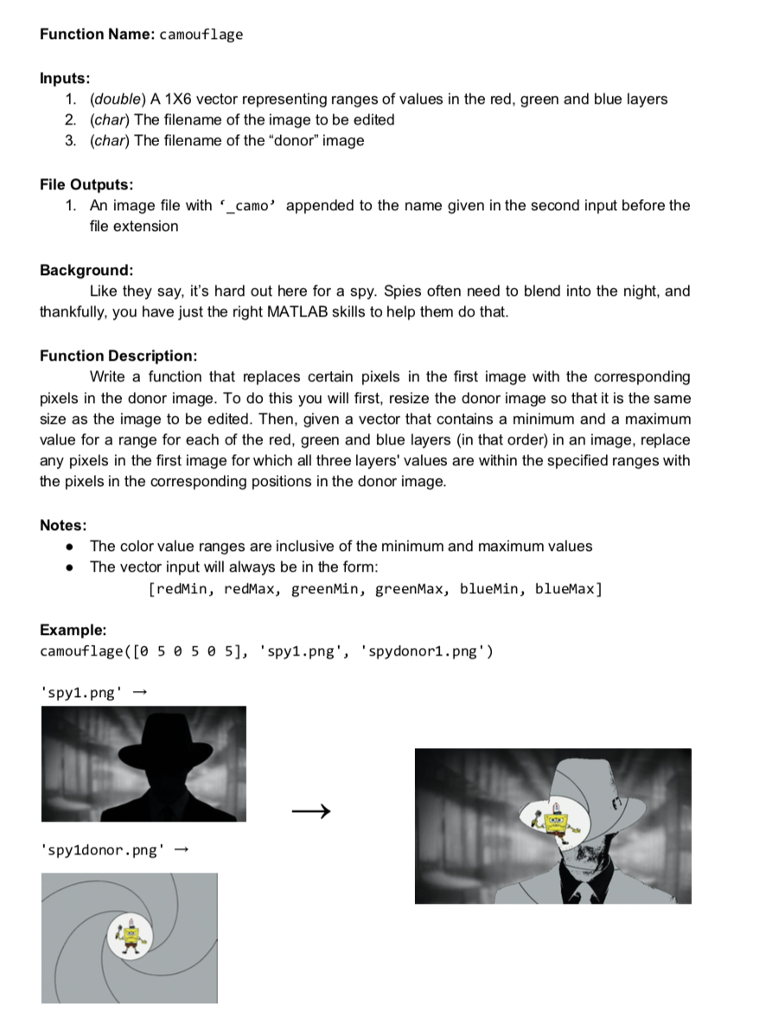
Function Name: camouflage Inputs 1. 2. 3. (double) A 1X6 vector representing ranges of values in the red, green and blue layers (char) The filename of the image to be edited (char) The filename of the "donor" image File Outputs 1. An imageile with "_camo' appended to the name given in the second input before the file extension Background thankfully, you have just the right MATLAB skills to help them do that Function Description Like they say, it's hard out here for a spy. Spies often need to blend into the night, and Write a function that replaces certain pixels in the first image with the corresponding pixels in the donor image. To do this you will first, resize the donor image so that it is the same size as the image to be edited. Then, given a vector that contains a minimum and a maximum value for a range for each of the red, green and blue layers (in that order) in an image, replace any pixels in the first image for which all three layers' values are within the specified ranges with the pixels in the corresponding positions in the donor image. Notes: The color value ranges are inclusive of the minimum and maximum values The vector input will always be in the form [redMin, redMax, greenMin, greenMax, blueMin, blueMax] Example camouflage([0 5 0 5 0 5], spy1.png spydonor1.png') spy1.png'- spy1donor.png' - Function Name: camouflage Inputs 1. 2. 3. (double) A 1X6 vector representing ranges of values in the red, green and blue layers (char) The filename of the image to be edited (char) The filename of the "donor" image File Outputs 1. An imageile with "_camo' appended to the name given in the second input before the file extension Background thankfully, you have just the right MATLAB skills to help them do that Function Description Like they say, it's hard out here for a spy. Spies often need to blend into the night, and Write a function that replaces certain pixels in the first image with the corresponding pixels in the donor image. To do this you will first, resize the donor image so that it is the same size as the image to be edited. Then, given a vector that contains a minimum and a maximum value for a range for each of the red, green and blue layers (in that order) in an image, replace any pixels in the first image for which all three layers' values are within the specified ranges with the pixels in the corresponding positions in the donor image. Notes: The color value ranges are inclusive of the minimum and maximum values The vector input will always be in the form [redMin, redMax, greenMin, greenMax, blueMin, blueMax] Example camouflage([0 5 0 5 0 5], spy1.png spydonor1.png') spy1.png'- spy1donor.png
Step by Step Solution
There are 3 Steps involved in it

Get step-by-step solutions from verified subject matter experts
 Study Help