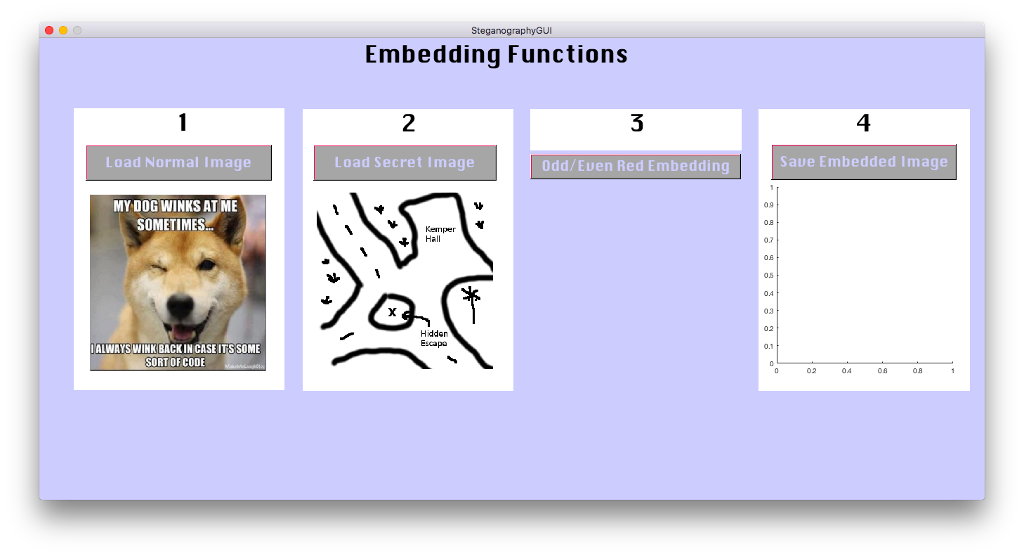
Question: MATLAB Hello! I'm currently working on a program that will hide an image in another. I am on part 2, but cannot get it to

MATLAB

Hello! I'm currently working on a program that will hide an image in another. I am on part 2, but cannot get it to work when I click Odd/Even Red Embedding. I have included the prompt, code, and GUI. Any help is appreciated, thank you!
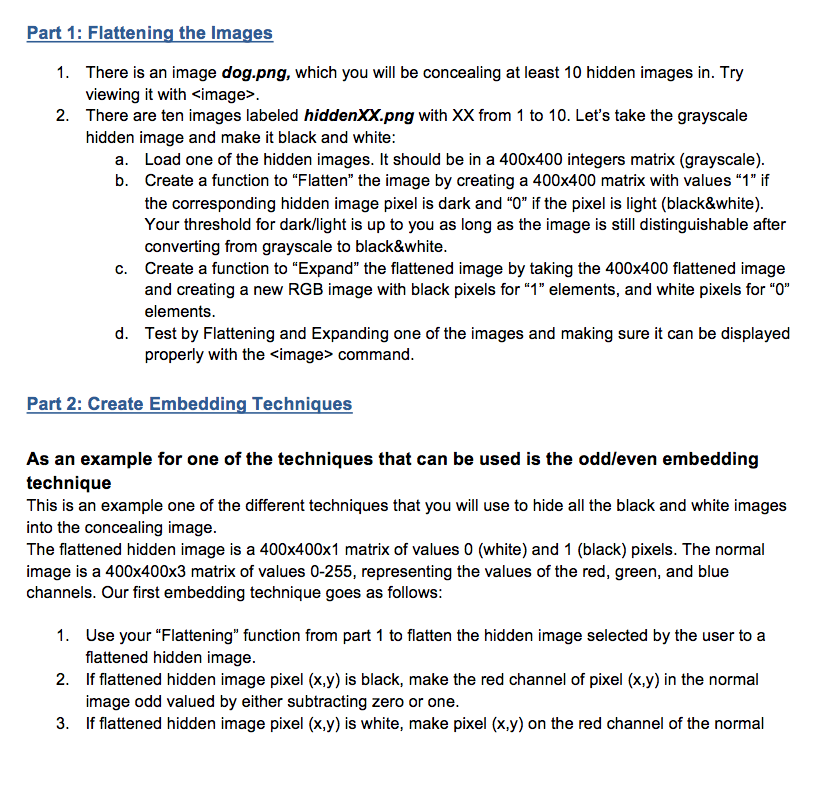
MATLAB Hello! I'm currently working on a program that will hide an

Function as stated in part 1:

function [BW] = flatten(img)

I = imread(img);

BW = imbinarize(I);
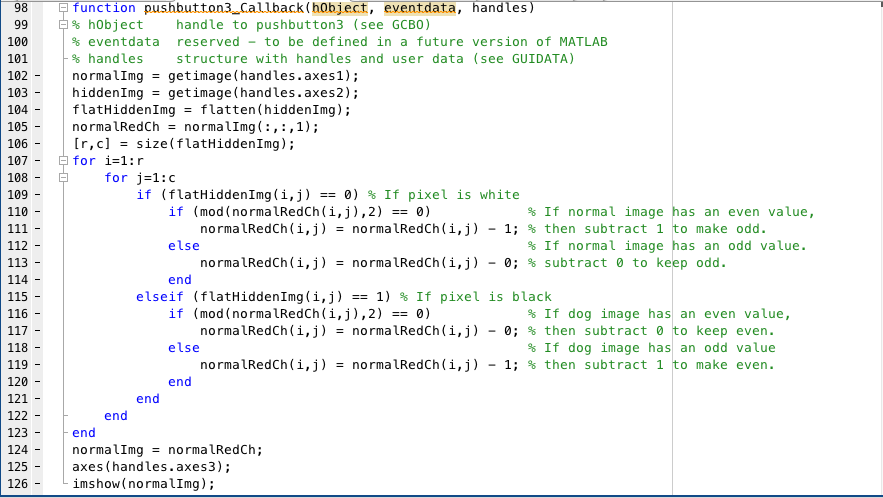
image in another. I am on part 2, but cannot get it

to work when I click Odd/Even Red Embedding. I have included theWon't display embedded image in 4th column.

code in text:

% --- Executes on button press in pushbutton3.

function pushbutton3_Callback(hObject, eventdata, handles)

% hObject handle to pushbutton3 (see GCBO)

% eventdata reserved - to be defined in a future version of MATLAB

% handles structure with handles and user data (see GUIDATA)

normalImg = getimage(handles.axes1);

hiddenImg = getimage(handles.axes2);

flatHiddenImg = flatten(hiddenImg);

normalRedCh = normalImg(:,:,1);

[r,c] = size(flatHiddenImg);

for i=1:r

for j=1:c

if (flatHiddenImg(i,j) == 0) % If pixel is white

if (mod(normalRedCh(i,j),2) == 0) % If normal image has an even value,

normalRedCh(i,j) = normalRedCh(i,j) - 1; % then subtract 1 to make odd.

else % If normal image has an odd value.

normalRedCh(i,j) = normalRedCh(i,j) - 0; % subtract 0 to keep odd.

end

elseif (flatHiddenImg(i,j) == 1) % If pixel is black

if (mod(normalRedCh(i,j),2) == 0) % If dog image has an even value,

normalRedCh(i,j) = normalRedCh(i,j) - 0; % then subtract 0 to keep even.

else % If dog image has an odd value

normalRedCh(i,j) = normalRedCh(i,j) - 1; % then subtract 1 to make even.

end

end

end

end

normalImg = normalRedCh;

axes(handles.axes3);

imshow(normalImg);

Part 1: Flattening the Images There is an image dog.png, which you will be concealing at least 10 hidden images in. Try viewing it with . 1. 2. There are ten images labeled hiddenXXpng with XX from 1 to 10. Let's take the grayscale hidden image and make it black and white: a. Load one of the hidden images. It should be in a 400x400 integers matrix (grayscale). b. Create a function to "Flatten" the image by creating a 400x400 matrix with values "1" if the corresponding hidden image pixel is dark and "O" if the pixel is light (black&white) Your threshold for dark/light is up to you as long as the image is still distinguishable after converting from grayscale to black&white Create a function to "Expand" the flattened image by taking the 400x400 flattened image and creating a new RGB image with black pixels for "1" elements, and white pixels for "O" elements Test by Flattening and Expanding one of the images and making sure it can be displayed properly with the simage> command. c. Part 2: Create Embedding Techniques As an example for one of the techniques that can be used is the odd/even embedding technique This is an example one of the different techniques that you will use to hide all the black and white images into the concealing image. The flattened hidden image is a 400x400x1 matrix of values 0 (white) and 1 (black) pixels. The normal image is a 400x400x3 matrix of values 0-255, representing the values of the red, green, and blue channels. Our first embedding technique goes as follows: 1. 2. 3. Use your "Flattening" function from part 1 to flatten the hidden image selected by the user to a flattened hidden image If flattened hidden image pixel (x.y) is black, make the red channel of pixel (x.y) in the normal image odd valued by either subtracting zero or one. If flattened hidden image pixel (x,y) is white, make pixel (x.y) on the red channel of the normal

Step by Step Solution

There are 3 Steps involved in it

1 Expert Approved Answer
Step: 1 Unlock blur-text-image
Question Has Been Solved by an Expert!

Get step-by-step solutions from verified subject matter experts

Step: 2 Unlock
Step: 3 Unlock

Students Have Also Explored These Related Databases Questions!