







Question: Matlab Hw help needed asap The file refered in the question is the excel file. The screenshot is attached. topic: input/output with fprintf 1 2
Matlab Hw help needed asap
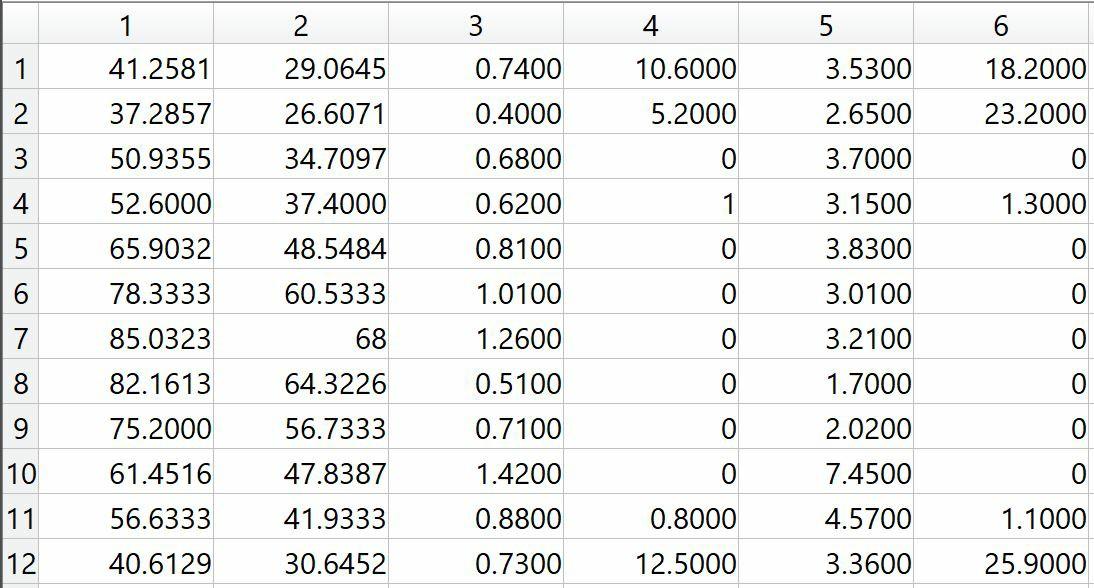
The file refered in the question is the excel file. The screenshot is attached.
topic: input/output with fprintf
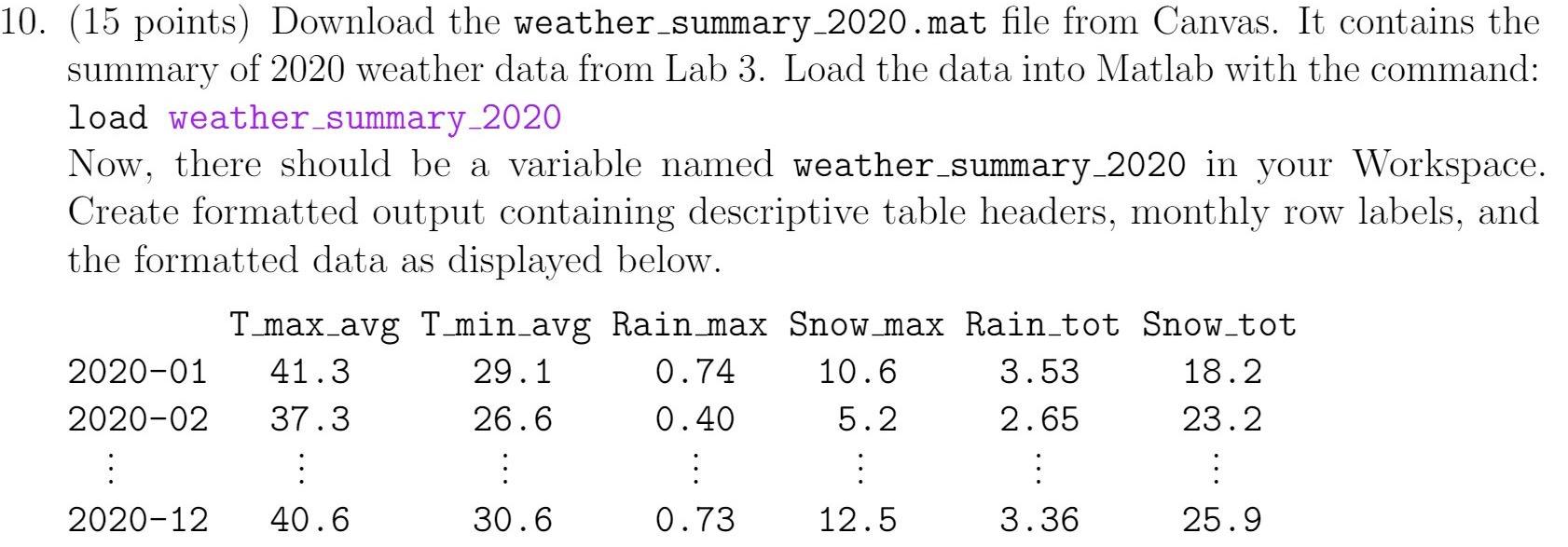
1 2 5 6 1 41.2581 29.0645 10.6000 37.2857 26.6071 0.7400 0.4000 0.6800 2 3 5.2000 18.2000 23.2000 0 0 4 0.6200 1 1.3000 50.9355 52.6000 65.9032 78.3333 85.0323 34.7097 37.4000 48.5484 60.5333 5 0 0 6 0 0 3.5300 2.6500 3.7000 3.1500 3.8300 3.0100 3.2100 1.7000 2.0200 7.4500 4.5700 3.3600 7 0 0 0.8100 1.0100 1.2600 0.5100 0.7100 1.4200 68 64.3226 8 82.1613 0 0 9 56.7333 0 0 10 47.8387 0 0 75.2000 61.4516 56.6333 40.6129 11 0.8800 41.9333 30.6452 0.8000 12.5000 1.1000 25.9000 12 0.7300 10. (15 points) Download the weather summary_2020.mat file from Canvas. It contains the summary of 2020 weather data from Lab 3. Load the data into Matlab with the command: load weather_summary_2020 Now, there should be a variable named weather_summary-2020 in your Workspace. Create formatted output containing descriptive table headers, monthly row labels, and the formatted data as displayed below. T_max_avg T_min_avg Rain max Snow_max Rain_tot Snow_tot 2020-01 41.3 29.1 0.74 10.6 3.53 18.2 2020-02 37.3 26.6 0.40 5.2 2.65 23.2 : : : : : : : 2020-12 40.6 30.6 0.73 12.5 3.36 25.9
Step by Step Solution
There are 3 Steps involved in it

Get step-by-step solutions from verified subject matter experts
 Study Help