







Question: MATLAB please! 1. The Lagrange interpolation formula, evaluates y p(), where is given and p is the (unique) degree-n polynomial that interpolates n+1 given coor-
MATLAB please!
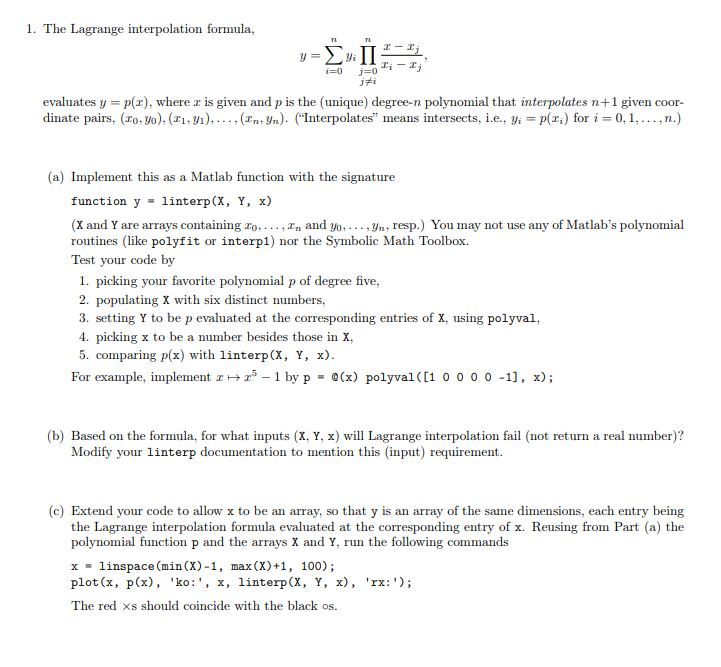
1. The Lagrange interpolation formula, evaluates y p(), where is given and p is the (unique) degree-n polynomial that interpolates n+1 given coor- dinate pairs. (zo, yo), (z'y), , (zn,Yn). ("Interpolates t means intersects, i.., yi-plz.) for i-0,1, , n.) (a) Implement this as a Matlab function with the signature function y linterp (X, Y, x) (X and Y are arrays containing o... In and yo, , yn, resp.) You may not use any of Matlab's polynomial routines (like polyfit or interp1) nor the Symbolic Math Toolbox. Test your code by 1. picking your favorite polynomial p of degree five, 2. populating X with six distinct numbers, 3. setting Y to be p evaluated at the corresponding entries of x. using polyval 4. picking x to be a number besides those in x. 5. comparing p(x) with linterp(X, Y, x) For example, plen-1 by p 0(x) polyval([1 o 0 0 0 -11, x); (b) Based on the formula, for what inputs (X, Y, x) wil Lagrange interpolation fail (not return a real number)? Modify your linterp documentation to mention this (input) requirement (c) Extend your code to allow x to be an array, so that y is an array of the same dimensions, each entry being the Lagrange interpolation formula evaluated at the corresponding entry of x. Reusing from Part (a) the polynomial function p and the arrays X and Y, run the following commands xlinspace (min (X)-1, max (X)+1, 100); plot (x , p(x), 'ko: ', x, linterp(X, Y, x), 'rx:'); The red s should coincide with the black os
Step by Step Solution
There are 3 Steps involved in it

Get step-by-step solutions from verified subject matter experts
 Study Help