







Question: Using MATLAB Please 1. Using the posted drawEarthMap.m, write Matlab code to plot two nonstop great circle routes, from Shanghai to Los Angeles and from

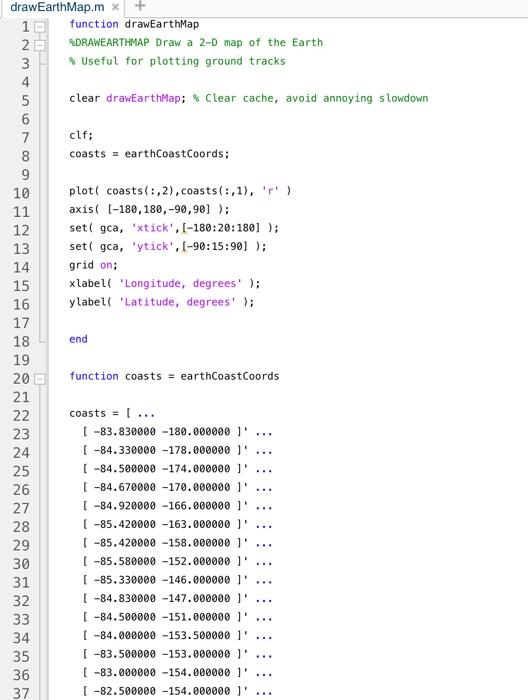
1. Using the posted drawEarthMap.m, write Matlab code to plot two nonstop great circle routes, from Shanghai to Los Angeles and from Mumbai to London, on a world map. (I recommend that instead of adding code to drawEarthMap.m, you call that function from your code.) Your result should be a single figure showing both routes on the map. Turn in your code listing and the figure. U AWNA CO drawEarth Map.mx 10 function drawEarthMap 2 DRAWEARTHMAP Draw a 2-D map of the Earth 3 Useful for plotting ground tracks 4 5 clear drawEarthMap; Clear cache, avoid annoying slowdown 6 7 clf; 8 coasts = earthCoastCoords; 9 10 plott coasts(:,2), coasts(:,1), 'r' ) 11 axis (-180, 180,-90,90]); 12 set( gca, ixtick', [-180:20:180] ); 13 set( gca, 'ytick', (-90:15:90] ); 14 grid on; 15 xlabel( "Longitude, degrees' ); 16 ylabell Latitude, degrees' ); 17 18 end 19 function coasts = earthCoastCoords 21 22 coasts = [... 23 [ -83.830000 -180.000000 1' ( -84.330000 -178.000000 1 25 [ -84.500000 -174.000000 1 26 ( -84.670000 -170.000000 27 [ -84.920000 -166.000000 1 28 (-85.420000 -163.000000 1' 29 [ -85.420000 -158.000000 1' 30 ( -85.580000 -152.000000 1 31 [ -85.330000 -146.000000 1 [-84.830000 -147.000000 1 33 [ -84.500000 -151.000000 ] 34 [ -84.000000 -153.500000 1 35 [ -83.500000 -153.000000 1 36 [ -83.000000 -154.000000 l ... 37 ( -82.500000 -154.000000 1' 20 24 ... 32 mmmmmm
Step by Step Solution
There are 3 Steps involved in it

Get step-by-step solutions from verified subject matter experts
 Study Help