







Question: MATLAB Problem 1 (100 pts) This week you will repeat the second problem from Week 8 (the problem is restated below for your convenience) but
MATLAB
Problem 1 (100 pts)
This week you will repeat the second problem from Week 8 (the problem is restated below for your convenience) but you will add a GUI for the user to control the execution of the program. Your program should do the following:
1. Create a figure that contains a plotting area and user interface controls
2. Allow the user to input the initial velocity of the projectile through the GUI
3. Allow the user to input the angle of the projectile through the GUI
4. Allow the user to choose whether to plot the solution considering the wind or without considering the wind
5. Allow the user to plot the chosen solution
Your GUI should have at least the features shown below:
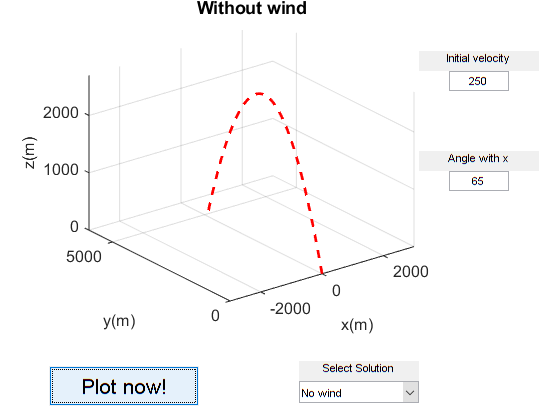
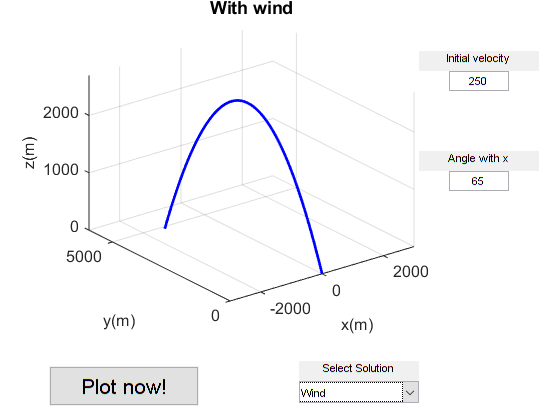
Problem statement
A projectile is fired with an initial velocity of 250 m/s at an angle  relative to the ground. The projectile is aimed directly in the y direction, as shown in the figure below. Because of a strong wind blowing in the negative x direction, the projectile also moves in this direction at a constant speed of 30 m/s.

The initial velocity of the projectile is
 and
and 
while in the x direction we have a constant  . The total flight time is
  .
.
The velocity of the projectile in the vertical direction (the other two are known) is given by

while the position is given by


Without wind Initial velocity 250 2000 Angle withx N 1000 65 5000 2000 2000 y(m) x(m) Select Solution Plot now! No wind Without wind Initial velocity 250 2000 Angle withx N 1000 65 5000 2000 2000 y(m) x(m) Select Solution Plot now! No wind
Step by Step Solution
There are 3 Steps involved in it

Get step-by-step solutions from verified subject matter experts
 Study Help