







Question: MatLab Question --- I'm trying to put these separate Red, Blue and Green channels into one RGB image . Why is it only showing me
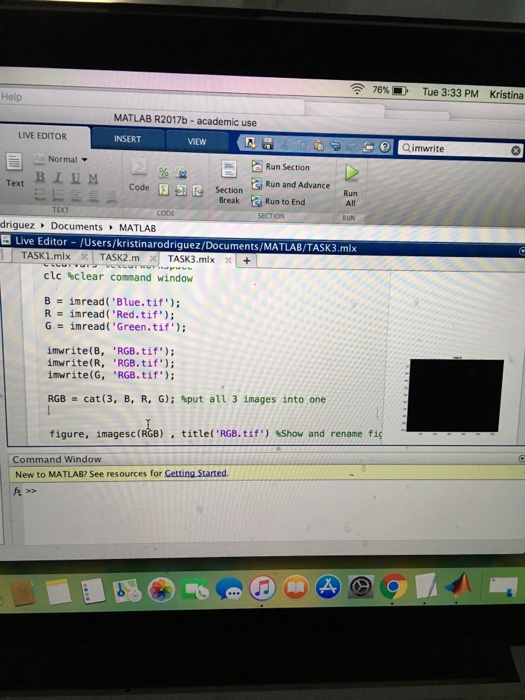
Help 76% Tue 3:33 PM Kristina MATLAB R2017b academic use LIVE EDITOR INSERT VIEW 2 Qimwrite 2Run Section Section -Normal BLUM Codeto End All Text Run and Advance Run Break Ru TEXT SECTION driguez Documents , MATLAB B Live Editor /Users/kristinarodriguez/Documents/MATLAB/TASK3.mlx TASK1.mlxx TASK2.m TASK3.mlx + clc %clear command window B imread('Blue . tif'); Rimread ( 'Red . tif'); G imread ("Green.tif.); imwrite(B, 'RGB.tif) imwrite(R, "RGB.tif) imwrite(G, RGB.tif); RGB = cat ( 3, B, R, G); tput au 3 images into one figure, imagesc(RGB)title( 'RGB. tif") Show and rename fi Command Window New to MATLAB? See resources for Getting Started. Help 76% Tue 3:33 PM Kristina MATLAB R2017b academic use LIVE EDITOR INSERT VIEW 2 Qimwrite 2Run Section Section -Normal BLUM Codeto End All Text Run and Advance Run Break Ru TEXT SECTION driguez Documents , MATLAB B Live Editor /Users/kristinarodriguez/Documents/MATLAB/TASK3.mlx TASK1.mlxx TASK2.m TASK3.mlx + clc %clear command window B imread('Blue . tif'); Rimread ( 'Red . tif'); G imread ("Green.tif.); imwrite(B, 'RGB.tif) imwrite(R, "RGB.tif) imwrite(G, RGB.tif); RGB = cat ( 3, B, R, G); tput au 3 images into one figure, imagesc(RGB)title( 'RGB. tif") Show and rename fi Command Window New to MATLAB? See resources for Getting Started
Step by Step Solution
There are 3 Steps involved in it

Get step-by-step solutions from verified subject matter experts
 Study Help