





Question: Matlab solution Function Name: malk Inputs: 1. (char) The filename of a text file containing your shopping list 2. (char) The filename of an Excel

Matlab solution Matlab solution Function Name: malk Inputs: 1. (char) The filename of a
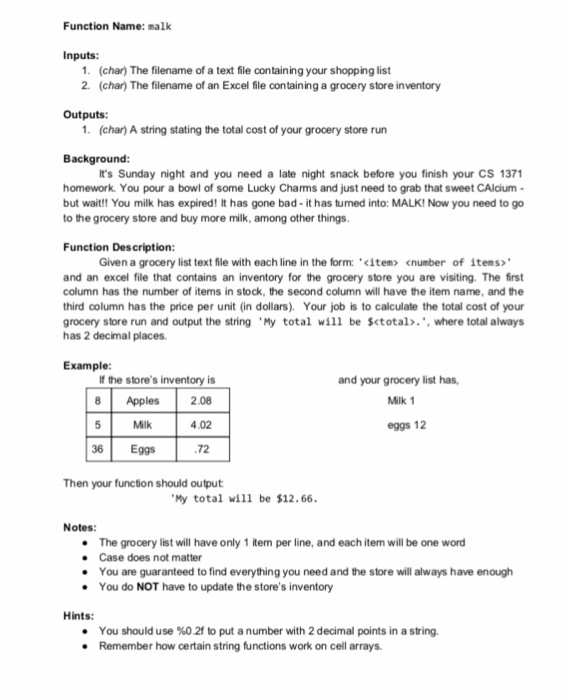
Function Name: malk Inputs: 1. (char) The filename of a text file containing your shopping list 2. (char) The filename of an Excel file containing a grocery store inventory Outputs: 1. (char) A string stating the total cost of your grocery store run Background: It's Sunday night and you need a late night snack before you finish your CS 1371 homework. You pour a bowl of some Lucky Chams and just need to grab that sweet CAlcium- but wait!! You milk has expired! It has gone bad- it has turned into: MALK! Now you need to go to the grocery store and buy more milk, among other things Function Description: Given a grocery list text file with each line in the form: ' cnumber of items> and an excel file that contains an inventory for the grocery store you are visiting. The first column has the number of items in stock, the second column will have the item name, and the third column has the price per unit (in dollars). Your job is to calculate the total cost of your grocery store run and output the string . My total will be %total. .. where total always has 2 decimal places Example: If the store's inventory is and your grocery list has, 8 Apples 2.08 4.02 72 Milk 1 Milk eggs 12 36 Eggs Then your function should output My total will be $12.66 Notes: The grocery list will have only 1 item per line, and each item will be one word .Case does not matter You are guaranteed to find everything you need and the store will always have enough . You do NOT have to update the store's inventory Hints: * You should use %02t to put a number with 2 decimal points in a string. . Remember how certain string functions work on cell arrays

Step by Step Solution

There are 3 Steps involved in it

1 Expert Approved Answer
Step: 1 Unlock blur-text-image
Question Has Been Solved by an Expert!

Get step-by-step solutions from verified subject matter experts

Step: 2 Unlock
Step: 3 Unlock

Students Have Also Explored These Related Databases Questions!