







Question: MATLAB The sample code below shows how to approximate the unit step and unit impulse functions using Matlab. Note that these are discrete-time approximations, which
MATLAB
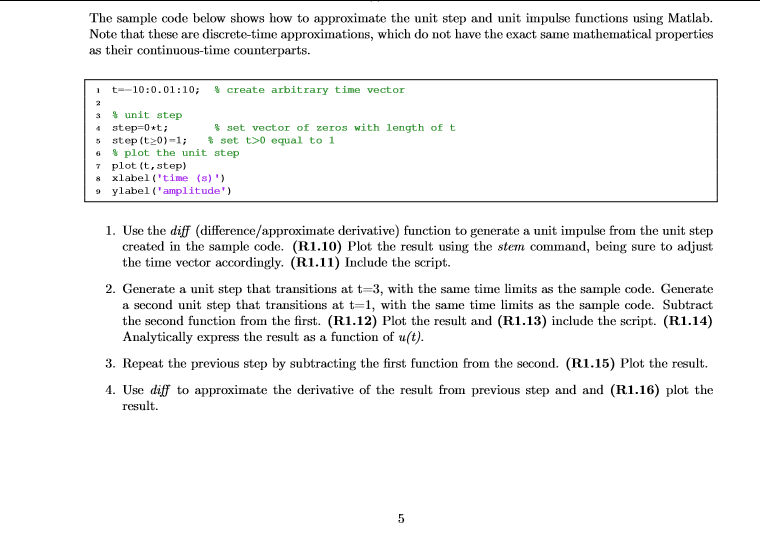
The sample code below shows how to approximate the unit step and unit impulse functions using Matlab. Note that these are discrete-time approximations, which do not have the exact same mathematical properties as their continuous-time counterparts. t--10:0.01:10; % create arb itrary time vector unit step 4 step-0*t 5 step (t20)-1; set t>0 equal to 1 6 % plot the unit step 7 plot (t, step) s xlabel 'time (s) ' % set vector of zeros with length of t ylabelamplitude 1. Use the diff (difference/approximate derivative) function to generate a unit impulse from the unit step created in the sample code. (R1.10) Plot the result using the stem command, being sure to adjust the time vector accordingly. (R1.11) Include the script. 2. Generate a unit step that transitions at t-3, with the same time limits as the sample code. Generate a second unit step that transitions at t-1, with the same time limits as the sample code. Subtract the second function from the first. (R1.12) Plot the result and (R1.13) include the script. (R1.14) Analytically express the result as a function of u(t) 3. Repeat the previous step by subtracting the first function from the second. (R1.15) Plot the result. 4. Use difj to approximate the derivative of the result from previous step and and (R1.16) plot the result
Step by Step Solution
There are 3 Steps involved in it

Get step-by-step solutions from verified subject matter experts
 Study Help