







Question: Task 1: Unit sample and unit step sequences. The following program can be used to generate a unit sample sequence. % Program 1, Generation of
![1 zeros(1,20)]; % Plot the unit sample sequence stem(nu); xlabel('Time index n');](https://dsd5zvtm8ll6.cloudfront.net/si.experts.images/questions/2024/09/66f4ebe458199_20366f4ebe3e266b.jpg)
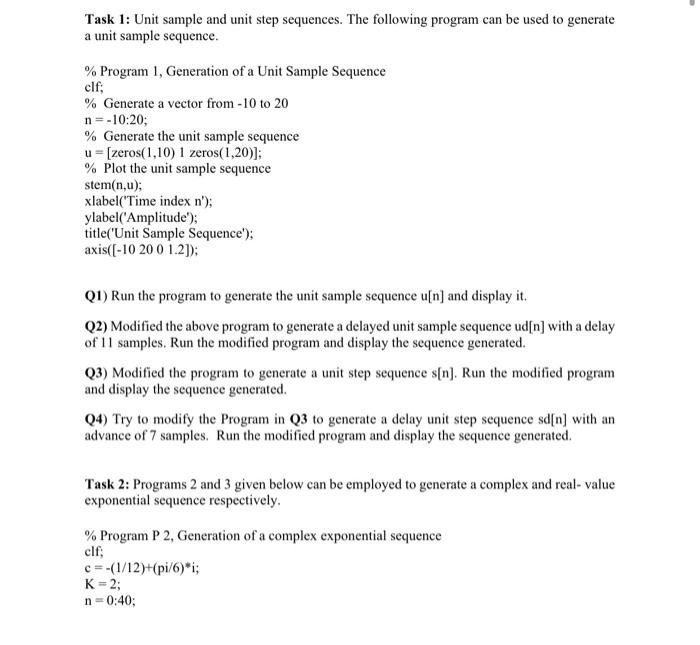
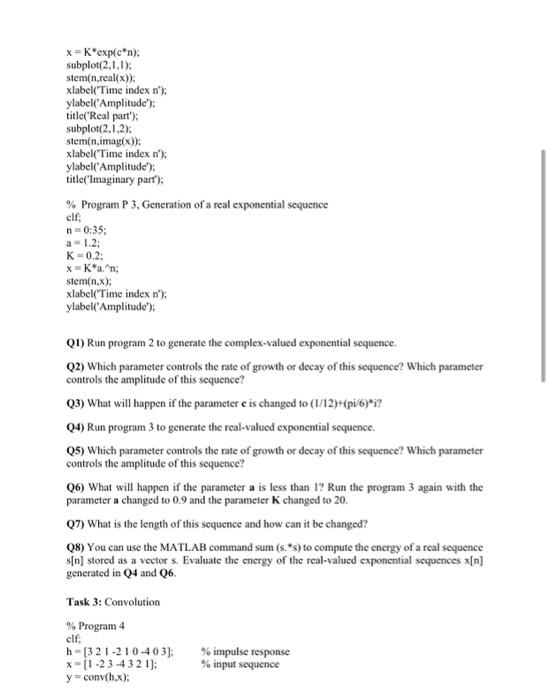
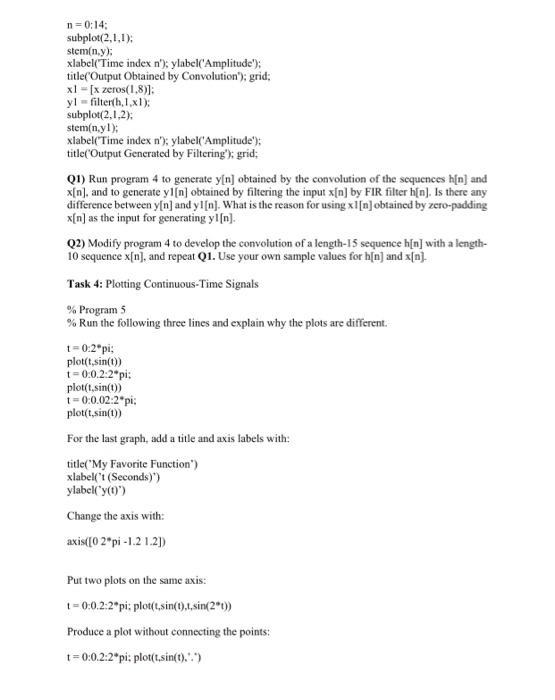
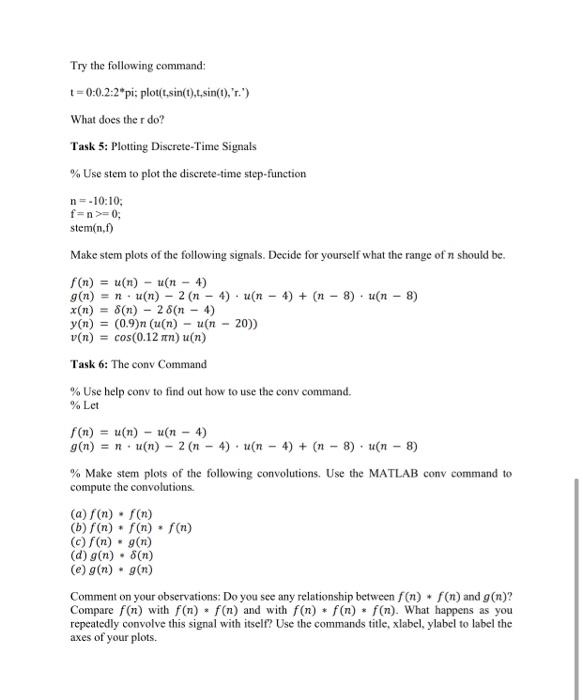
Task 1: Unit sample and unit step sequences. The following program can be used to generate a unit sample sequence. % Program 1, Generation of a Unit Sample Sequence clf; % Generate a vector from-10 to 20 n=-10:20; % Generate the unit sample sequence u = [zeros(1,10) 1 zeros(1,20)]; % Plot the unit sample sequence stem(nu); xlabel('Time index n'); ylabel('Amplitude"); title('Unit Sample Sequence'); axis([-10 200 1.2]); Q1) Run the program to generate the unit sample sequence u[n) and display it. Q2) Modified the above program to generate a delayed unit sample sequence ud[n] with a delay of 11 samples. Run the modified program and display the sequence generated. 03) Modified the program to generate a unit step sequence s[n). Run the modified program and display the sequence generated. Q4) Try to modify the Program in Q3 to generate a delay unit step sequence sd[n) with an advance of 7 samples. Run the modified program and display the sequence generated. Task 2: Programs 2 and 3 given below can be employed to generate a complex and real-value exponential sequence respectively. % Program P 2, Generation of a complex exponential sequence clf: c=-(1/12)+(pi/6)*i; K=2; n=0:40; x = K*exp(en): subplot(2,1,1); stem(n,realx) xlabel(Time index n'); ylabel("Amplitude'); title('Real part'): subplot(2.1.2); stemn,imag(x)); xlabel('Time index n'); ylabel('Amplitude"): title('Imaginary part'); % Program P 3. Generation of a real exponential sequence ell n0:35: a-1.2: K-0.2; x=Kan; stemin.x). xlabel(Time index n'); ylabel('Amplitude"); 1) Run program 2 to generate the complex-valued exponential sequence. (2) Which parameter controls the rate of growth or decay of this sequence? Which parameter controls the amplitude of this sequence? Q3) What will happen if the parameter e is changed to (1/12)+(pi/6)*i? (4) Run program 3 to generate the real-valued exponential sequence. (5) Which parameter controls the rate of growth or decay of this sequence? Which parameter controls the amplitude of this sequence? Q6) What will happen if the parameter a is less than 1? Run the program 3 again with the parameter a changed to 0.9 and the parameter K changed to 20 07) What is the length of this sequence and how can it be changed? Q8) You can use the MATLAB command sum (s. *s) to compute the energy of a real sequence s[n] stored as a vectors. Evaluate the energy of the real-valued exponential sequences x[n] generated in Q4 and 06. Task 3: Convolution % Program 4 elf: - [3 2 1 -210-403); % impulse response x-[-2 3-4 3 2 1); % input sequence y=conv(h.x): n=0:14: subplot(2,1,1); steminy): xlabel Time index n'); ylabel('Amplitude"); title('Output Obtained by Convolution'); grid: x1 -[x zeros(1,8)]: yl -filterth, 1x1); subplot(2.1.2); stem(nyl); xlabel(Time index n'); ylabel('Amplitude): title('Output Generated by Filtering'); grid; (1) Run program 4 to generate y[n] obtained by the convolution of the sequences h[n] and x{n)and to generate yi[n] obtained by filtering the input x[n] by FIR filter h[n). Is there any difference between y[n) and y1 [n]. What is the reason for using xl[n] obtained by zero-padding x[n] as the input for generating yi[n]. (2) Modify program 4 to develop the convolution of a length-15 sequence h[n] with a length- 10 sequence x[n), and repeat Q1. Use your own sample values for h[n] and x[n]. Task 4: Plotting Continuous-Time Signals % Program % Run the following three lines and explain why the plots are different 1 =0:2"pi: plot(t,sin(t)) =0.0.2.2"pi: plot(t.sin(t)) 10:0.02.2"pi: plot(t,sin(t)) For the last graph, add a title and axis labels with: title("My Favorite Function) xlabel("i (Seconds)) ylabel("yo') Change the axis with: axis( [02*pi-1.2 1.21) Put two plots on the same axis: 1 = 0:0.2.2*pi: plot(t,sin(t),1.sin(2t)) Produce a plot without connecting the points: t=0:02:2pi: plot(t.sin(t).'.) Try the following command: 1=0:0.2:2*pi: plout,sin(t).t.sin(), '.") What does the r do? Task 5: Plotting Discrete-Time Signals % Use stem to plot the discrete-time step-function n=-10:10; fan>=0; stem(n,f) Make stem plots of the following signals. Decide for yourself what the range of n should be. f(x) = a(n) - A(n - 4) g(n) = n a(n) - 2 (n - 4) (n 4) + (n 8) (n 8) x(1) 8(n) - 28(n - 4) y(n) = (0.9)n (un) - (n - 20)) v(n) = cos(0.12 mn)u(n) Task 6: The cony Command % Use help conv to find out how to use the conv command. % Let (n) = u(n) - (n - 4) g(n) = n a(n) - 2 (n - 4) tu(n - 4) + (n - 8) un - 8) % Make stem plots of the following convolutions. Use the MATLAB conv command to compute the convolutions (a) f(n) . f(n) (b) f(n) f(n) . f(n) () f(n) g(n) (d) g(n) . 8(n) (e) g(n) g(n) Comment on your observations: Do you see any relationship between f(n) + f(n) and g(n)? Compare f(n) with f(n) f(n) and with f(n) + f(n) f(n). What happens as you repeatedly convolve this signal with itself? Use the commands title, xlabel, ylabel to label the axes of your plots. Task 7: Noisy Sinewave (1) Generate a vector signal with 4 cycles of 1kHz sinewave at a sampling frequency of 44.1kHz and an amplitude of IV. Plot the signal on the screen and label the X and Y axes with the correct labels. Convert your MATLAB code into a function in an M-file. Q2) Use 'help to lookup the description of the built-in function randn(). Then, try to generate a normally distributed random noise signal, also at 44.1 KHz with the same number of samples as your sinewave. The rms value of the noise should be 0.1V. Add the noise to your original signal and plot it. Plot all three signals as a combined plot
Step by Step Solution
There are 3 Steps involved in it

Get step-by-step solutions from verified subject matter experts
 Study Help