







Question: MBA 6350 Week 2 Case Study - Data Visualization and Descriptive Statistics (Case Study #2) Case Study #2 is intended to test your knowledge of
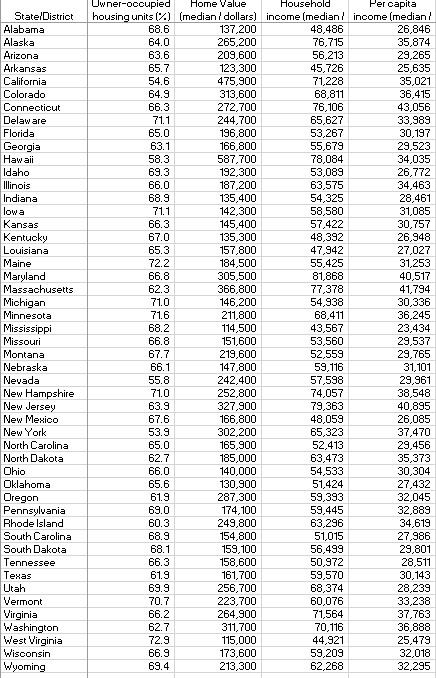
MBA 6350 Week 2 Case Study - Data Visualization and Descriptive Statistics (Case Study #2) Case Study #2 is intended to test your knowledge of how to summarize data into descriptive statistics and correlation analysis, as well as create histograms, boxplots, and scatterplots for the applicable variables. The data file contains estimated housing and income data for 2018 for each of the 50 US states per the American Community Survey. The data fields included are as follows: ? Owner-occupied housing units (%) - Pct Owner Occ ? Home Value (median / dollars) - Home Value ? Household income (median / dollars) - HH Inc ? Per capita income (median / dollars) - Per Cap Inc Prior to a more detailed analysis of the data, a company wants to get a good understanding of four of the variables: Home Value; HH Inc; Per Cap Inc; Pct Owner Occ (e.g. central tendency, variability, shape of the distribution, pattern of relationship between the variables). A company representative contracts with you to help with this process. To help the company get a better understanding of the data, you are asked to perform the following analysis steps: 1. Using Data>Data Analysis>Descriptive Statistics in Excel, calculate the mean, median, range and standard deviation of each variable and summarize the results in table. 2. Using Excel, create a frequency histogram for each variable to determine the shape of the distributions. Be sure to give each chart a title and label the axes clearly. 3. Using Excel, create boxplots for each variable. Be sure to give each chart a title and label the axes clearly. 4. Using Excel, create scatterplots of each variable with each other variable (hint: you should have 6 scatterplots). Be sure to give each chart a title and label the axes clearly. 5. Using Data>Data Analysis>Correlation in Excel, calculate the correlation coefficient each variable with each other variable. 6. In Word, write a summary report of the findings that includes the tables and charts from steps 1-5 and includes the following: MBA 6350 Week 2 Case Study - Data Visualization and Descriptive Statistics (Case Study #2) a. An introductory paragraph summarizes the purpose of the analysis. b. A section (1 or more paragraphs) describing what the tabular data from step 1 indicate about the central tendency, variability and distribution of each variable. For example, do the variables appear to be distributed in a symmetric or skewed pattern? c. A section (1 or more paragraphs) describing how the frequency histograms from step 2 and the boxplots from step 3 support and clarify the findings of the tabular data. Include in this section any evidence suggesting outliers in the data. d. A section (1 or more paragraphs) describing what the scatterplots from step 4 and correlations from step 5 indicate about the relationship between the various pairs of variables (e.g., are the variables related?, does the relationship appear to be linear or nonlinear?, is the direction of the relationship positive or negative?). e. A concluding paragraph summarizing the key findings of the analysis and making recommendations for the variable among HH Inc, Per Cap Inc and Pct Owner Occ that is most strongly correlated with Home Value. Submit a single Excel workbook showing all work for Steps 1-5 and a Word document of your summary report that addresses all parts of Step 6 and that also includes/interweaves all supporting tables and charts from Steps 1-5 (to tell a story with the data and through visualization means). Case Study #2 is due on Sunday by 11:59pm of Week 2.
Step by Step Solution
There are 3 Steps involved in it

Get step-by-step solutions from verified subject matter experts
 Study Help