







Question: Memory: 1 7 9 . 8 MB / 5 1 2 MB Housekeeping Before starting on this assignment, import the csci 2 6 library. Execute
Memory: MB MB
Housekeeping
Before starting on this assignment, import the csci library. Execute the cell below.
from csci import
Strings and byte strings
A string in python is a sequence of characters. A character is actually a Unicode character, whose integer values can range from to or so We've seen some Unicode values in Lesson For instance, the Unicode value for the emoji is Long story short: a Unicode character isn't a single byte, nor even two bytes. A Unicode character needs a variable number of bytes anywhere from one to four to store its value.
A byte string is similar to a regular string, but each character is exactly one byte whose value ranges from to
Here are some examples of byte strings. They are represented using the b prefix and quotation marks.
b'Hello'
b'Hello'
bCSCI
b'CSCI
Internally, a byte string is stored as an array of integers, where each integer is in the range But they get displayed as ASCII characters.
This is an important distiction:
Regular strings are arrays of characters
Byte strings are arrays of numbers
For example, the byte string b'Hello' is actually the array This gives us a really concise, compact way of representing arrays whose individual elements are just bytes.
For characters that have no printable ASCII equivalent such as control characters like CTRLV the value is displayed in hex with x prepended. For example, the array can be displayed as the byte string bxHxcxc The H in there is the real character H; the rest of them are displayed in hexadecimal c and c This allows any byte string to be completely represented by printable characters; nothing is hidden or unintelligible. We'll need this feature when we encrypt strings because often the encrypted ciphertext contains otherwise unprintable characters.
Shift Cipher
For the shift cipher we will use the entire range of bytes values so the modulus will be
Recall that the formula for computing the ciphertext is:
c p k mod n where n
We will start by defining a function called shift that takes a single plaintext byte value p and a shift amount k It returns the ciphertext value, calculated using the formula. It's a very simple function, but it allows us to verify that the formula is working.
Run the cell below to define the function.
def shiftp k:
return p k
Try out some examples.
shift
# Should return
shift
# Should return
Next we'll write a function called shiftCipher that takes the shift amount offset and a byte string plaintext It returns the encrypted byte string.
To write this function, we will use the lambda technique shown in Lesson
def shiftPartialk:
return lambda p : p k
def shiftCipheroffset plaintext:
return mapshiftPartialoffset plaintext
Try the shift cipher
The cells below apply the shift cipher to some plaintext byte strings.
shiftCipher b'Hello'
# Returns bMjqqt
bMjqqt
shiftCipher b'Wow!
# Returns bxxde
bxxde
Linear cipher
Now that you've seen how to write a shift cipher in Python, try your hand at writing a linear cipher. Recall that the formula is:
c p m k mod n where n
To complete this assignment, you will need to write two functions.
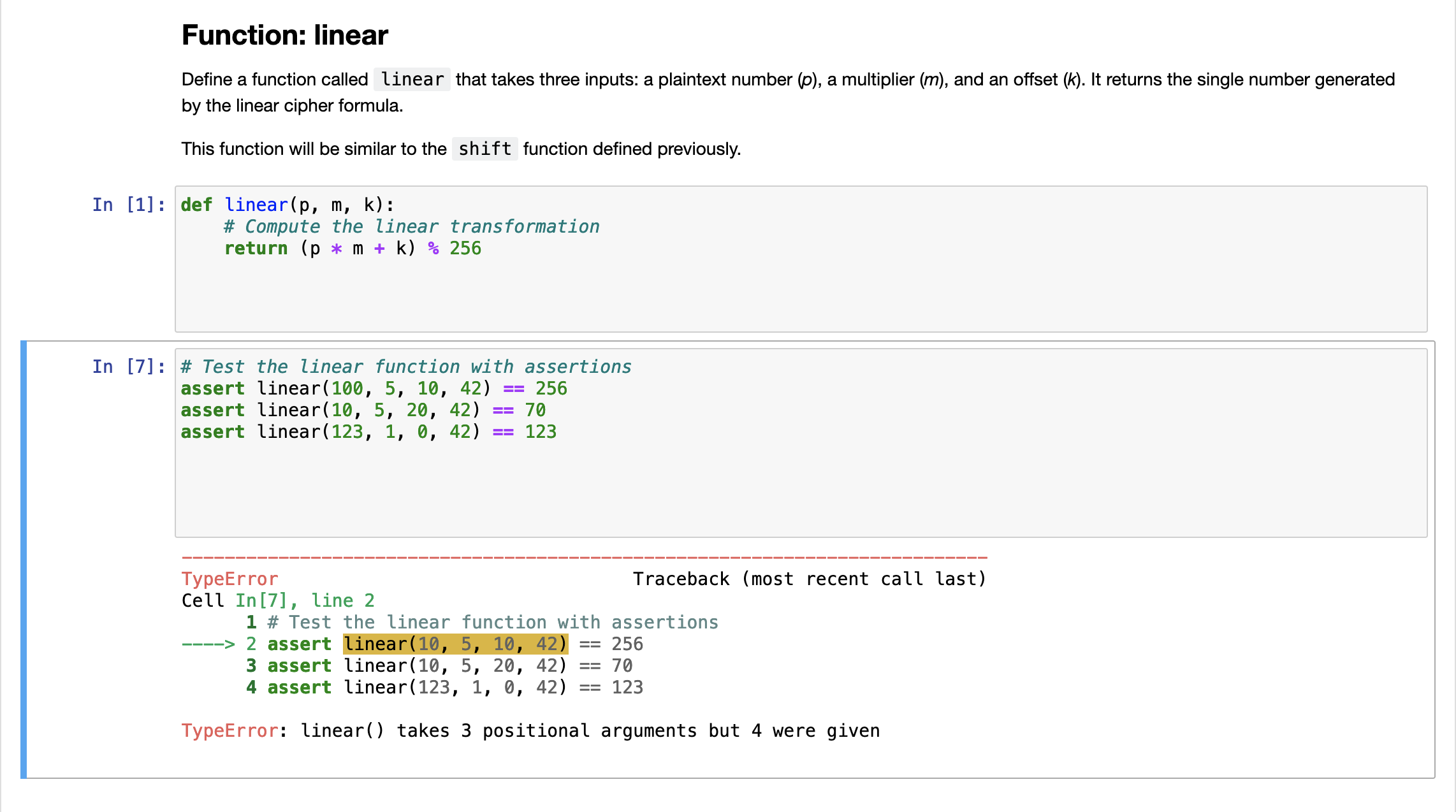
Function: linear
Define a function called linear that takes three inputs: a plaintext number p a multiplier m and an offset k It returns the single number generated by the linear cipher formula.
This function will be similar to the shift function defined previously.
def linearp m k:
# Compute the linear transformation
return p m k
# Test the linear function with assertions
assert linear
assert linear
assert linear
TypeError Traceback most recent call last
Cell In line
# Test the linear function with assertions
assert linear
assert linear
assert linear
TypeError: linear takes positional arguments but were given
Function: linearcipher
Define a function called linearCipher that takes three inputs: a multipler, an offset, and a plaintext byte string plaintext It returns the ciphertext byte string.
This function is similar to the shiftCipher function written above. Use the lambda technique to also write a helper function called linearPartial.
def linearPartialm k:
return lambda p: linearp m k
def linearCiphermultiplier offset, plaintext:
# Apply the linearPartial function to each byte in the plaintext
transformedbytes maplinearPartialm
Step by Step Solution
There are 3 Steps involved in it
1 Expert Approved Answer
Step: 1 Unlock

Question Has Been Solved by an Expert!
Get step-by-step solutions from verified subject matter experts
Step: 2 Unlock
Step: 3 Unlock
 Study Help