







Question: Minesweeper Game Implementation using C++ Throughout the semester we have been talking about how C++ works as a language. We have been using some of
 Minesweeper Game Implementation using C++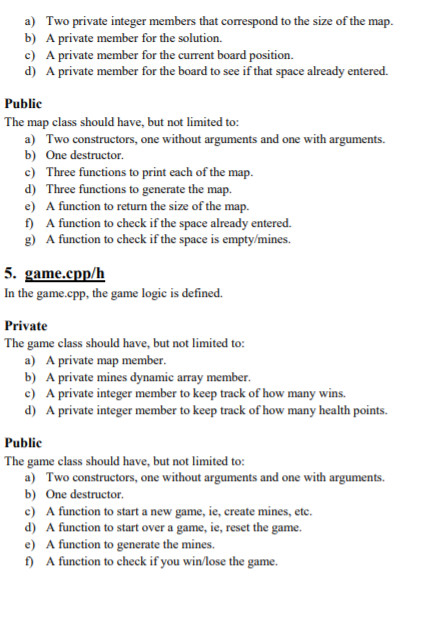
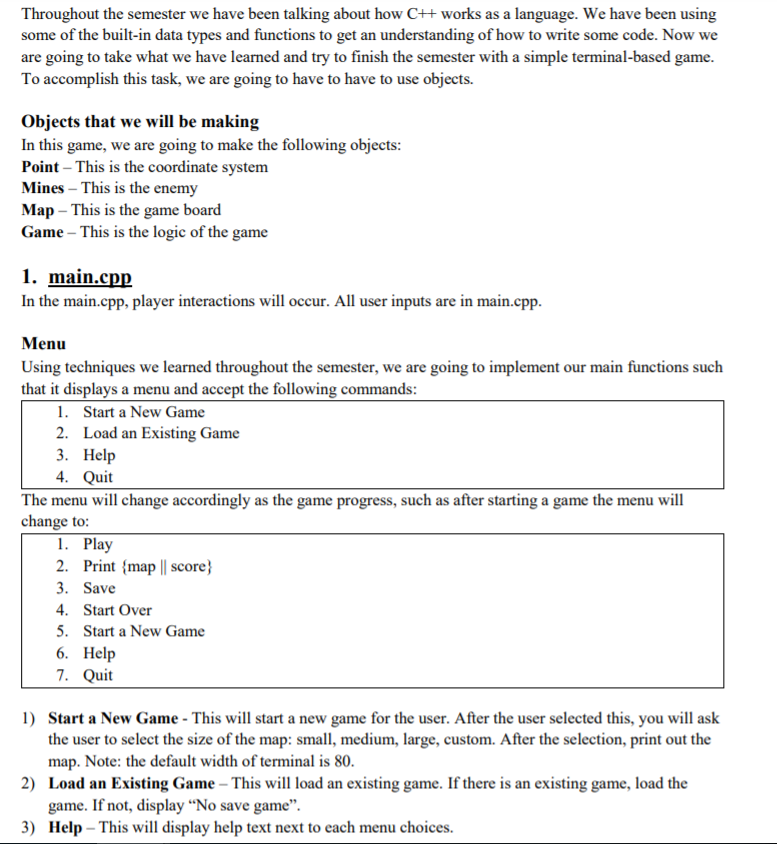
 Throughout the semester we have been talking about how C++ works as a language. We have been using some of the built-in data types and functions to get an understanding of how to write some code. Now we are going to take what we have learned and try to finish the semester with a simple terminal-based game. To accomplish this task, we are going to have to have to use objects. Objects that we will be making In this game, we are going to make the following objects: Point This is the coordinate system Mines This is the enemy Map This is the game board Game This is the logic of the game 1. main.cpp In the main.cpp, player interactions will occur. All user inputs are in main.cpp. Menu Using techniques we learned throughout the semester, we are going to implement our main functions such that it displays a menu and accept the following commands: 1. Start a New Game 2. Load an Existing Game 3. Help 4. Quit The menu will change accordingly as the game progress, such as after starting a game the menu will change to: 1. Play 2. Print {map || score} 3. Save 4. Start Over 5. Start a New Game 6. Help 7. Quit 1) Start a New Game - This will start a new game for the user. After the user selected this, you will ask the user to select the size of the map: small, medium, large, custom. After the selection, print out the map. Note: the default width of terminal is 80. 2) Load an Existing Game This will load an existing game. If there is an existing game, load the game. If not, display No save game. 3) Help This will display help text next to each menu choices.
Document is subject to change over the course of the project 2
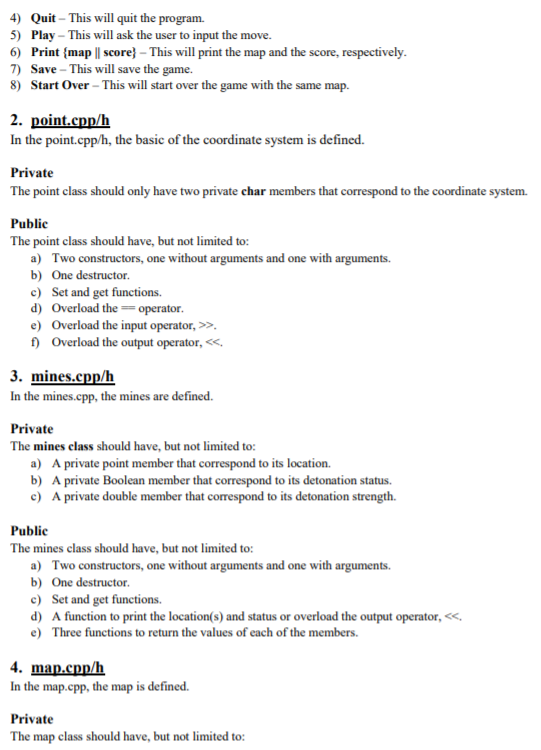
4) Quit This will quit the program. 5) Play This will ask the user to input the move. 6) Print {map || score} This will print the map and the score, respectively. 7) Save This will save the game. 8) Start Over This will start over the game with the same map. 2. point.cpp/h In the point.cpp/h, the basic of the coordinate system is defined. Private The point class should only have two private char members that correspond to the coordinate system. Public The point class should have, but not limited to: a) Two constructors, one without arguments and one with arguments. b) One destructor. c) Set and get functions. d) Overload the == operator. e) Overload the input operator, >>. f) Overload the output operator,
Document is subject to change over the course of the project 3
a) Two private integer members that correspond to the size of the map. b) A private member for the solution. c) A private member for the current board position. d) A private member for the board to see if that space already entered. Public The map class should have, but not limited to: a) Two constructors, one without arguments and one with arguments. b) One destructor. c) Three functions to print each of the map. d) Three functions to generate the map. e) A function to return the size of the map. f) A function to check if the space already entered. g) A function to check if the space is empty/mines. 5. game.cpp/h In the game.cpp, the game logic is defined. Private The game class should have, but not limited to: a) A private map member. b) A private mines dynamic array member. c) A private integer member to keep track of how many wins. d) A private integer member to keep track of how many health points. Public The game class should have, but not limited to: a) Two constructors, one without arguments and one with arguments. b) One destructor. c) A function to start a new game, ie, create mines, etc. d) A function to start over a game, ie, reset the game. e) A function to generate the mines. f) A function to check if you win/lose the game.
Document is subject to change over the course of the project 4
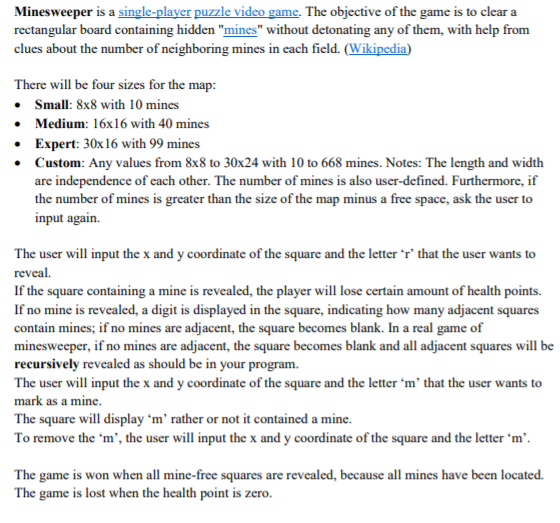
Minesweeper is a single-player puzzle video game. The objective of the game is to clear a rectangular board containing hidden "mines" without detonating any of them, with help from clues about the number of neighboring mines in each field. (Wikipedia) There will be four sizes for the map: Small: 8x8 with 10 mines Medium: 16x16 with 40 mines Expert: 30x16 with 99 mines Custom: Any values from 8x8 to 30x24 with 10 to 668 mines. Notes: The length and width are independence of each other. The number of mines is also user-defined. Furthermore, if the number of mines is greater than the size of the map minus a free space, ask the user to input again. The user will input the x and y coordinate of the square and the letter r that the user wants to reveal. If the square containing a mine is revealed, the player will lose certain amount of health points. If no mine is revealed, a digit is displayed in the square, indicating how many adjacent squares contain mines; if no mines are adjacent, the square becomes blank. In a real game of minesweeper, if no mines are adjacent, the square becomes blank and all adjacent squares will be recursively revealed as should be in your program. The user will input the x and y coordinate of the square and the letter m that the user wants to mark as a mine. The square will display m rather or not it contained a mine. To remove the m, the user will input the x and y coordinate of the square and the letter m. The game is won when all mine-free squares are revealed, because all mines have been located. The game is lost when the health point is zero.
Step by Step Solution
There are 3 Steps involved in it

Get step-by-step solutions from verified subject matter experts
 Study Help