







Question: MIPS EASY QUESTION JUST NEED SOME CODING ADJUSTMENTS .data fout: .asciiz testtext1.txt # filename for output parityok_msg: .asciiz OK paritynotok_msg: .asciiz NOT OK #buffer: .asciiz
MIPS EASY QUESTION JUST NEED SOME CODING ADJUSTMENTS
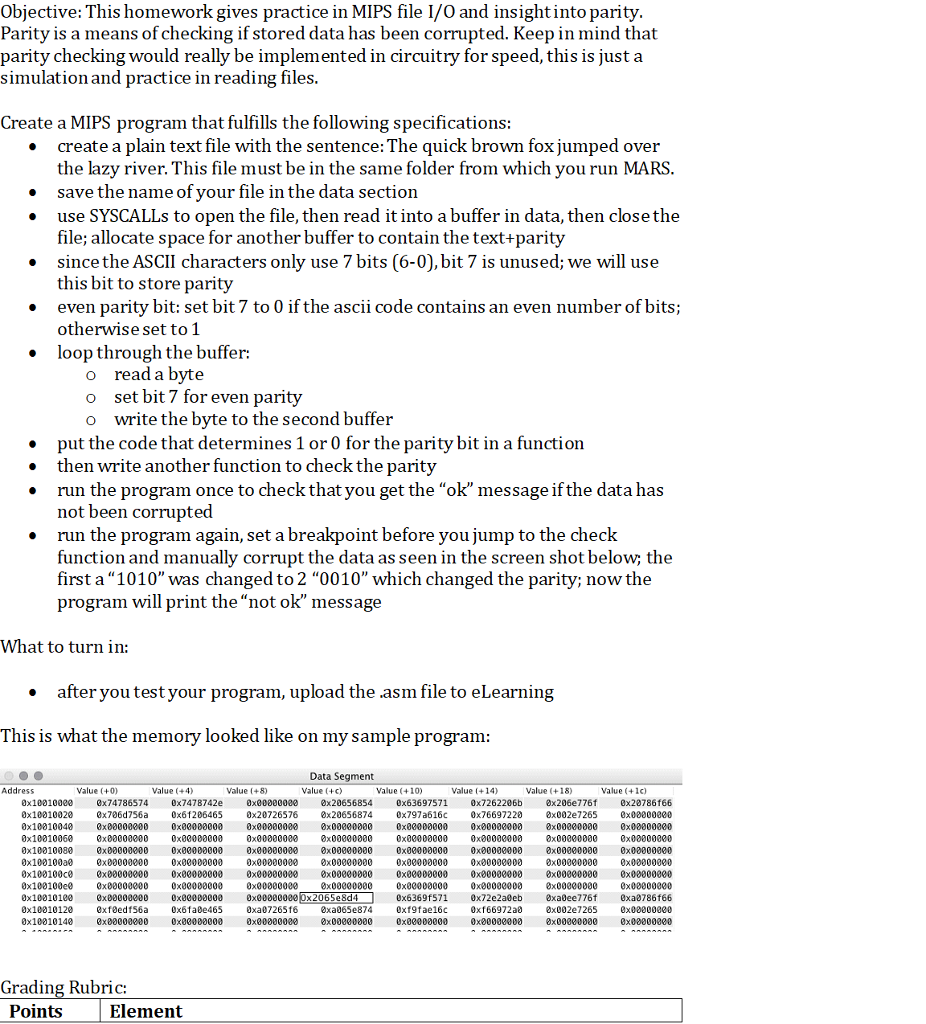
.data
fout: .asciiz "testtext1.txt" # filename for output
parityok_msg: .asciiz "OK"
paritynotok_msg: .asciiz "NOT OK"
#buffer: .asciiz "The quick brown fox jumps over the lazy dog."
buffer: .space 50 # reserve space to copy file contents for upto 50 characters
paritybuffer: .space 50 # reserve space to copy file contents with parity bit
.text
###############################################################
# Open (for writing) a file that does not exist
li $v0, 13 # system call for open file
la $a0, fout # output file name
li $a1, 0 # Open for writing (flags are 0: read, 1: write)
li $a2, 0 # mode is ignored
syscall # open a file (file descriptor returned in $v0)
move $s6, $v0 # save the file descriptor
###############################################################
# Read from file just opened
li $v0, 14 # system call for write to file
move $a0, $s6 # file descriptor
la $a1, buffer # address of buffer where to write
li $a2, 50 # hardcoded buffer length
syscall # write to file
###############################################################
# Close the file
li $v0, 16 # system call for close file
move $a0, $s6 # file descriptor to close
syscall # close file
###############################################################
# parity generator
# xor all bits to check parity and generte parity bit
la $a1, buffer # load address of buffered data
la $a2, paritybuffer # load address of target data
li $t0,0
setparity_loop:
bgt $t0,50,exit_paritygenerator
lb $t1 , ($a1)
# bit wise XOR of character read from buffer to find parity
# parity bit is set if number of 1's is odd to make the parity even
srl $t4, $t1, 16
xor $t2, $t1, $t4
srl $t4, $t2, 8
xor $t2, $t2, $t4
srl $t4, $t2, 4
xor $t2, $t2, $t4
srl $t4, $t2, 2
xor $t2, $t2, $t4
srl $t4, $t2, 1
xor $t2, $t2, $t4
and $t2, $t2, 1
sll $t2,$t2,7 # shift the parity bit to 8th bit location
or $t1,$t1,$t2 # set parity bit in the character
sb $t1, ($a2) # store the byte in buffer
add $a1,$a1,1 # increment pointers to next character
add $a2,$a2,1
addi $t0,$t0,1 # loop counter
j setparity_loop
exit_paritygenerator:
###############################################################
# parity checker
# simple xor of all bits should result in zero
la $a1, paritybuffer # load address of buffered data
li $t0,0
checkparity_loop:
bgt $t0,50,exit_paritychecker
lb $t1 , ($a1)
# bit wise XOR of character read from buffer to find parity
# parity bit is set if number of 1's is odd to make the parity even
srl $t4, $t1, 16
xor $t2, $t1, $t4
srl $t4, $t2, 8
xor $t2, $t2, $t4
srl $t4, $t2, 4
xor $t2, $t2, $t4
srl $t4, $t2, 2
xor $t2, $t2, $t4
srl $t4, $t2, 1
xor $t2, $t2, $t4
and $t2, $t2, 1
beq $t2,0,parityok # shift the parity bit to 8th bit location
li $v0, 4 #system call code for Print String
la $a0, paritynotok_msg #load address of message into $a0
syscall #print the string
b exit_paritycheckererror
parityok:
add $a1,$a1,1 # increment pointers to next character
addi $t0,$t0,1 # loop counter
j checkparity_loop
exit_paritychecker:
li $v0, 4 #system call code for Print String
la $a0, parityok_msg #load address of message into $a0
syscall #print the string
exit_paritycheckererror:
###############################################################
# Exit Gracefully
li $v0, 10
syscall
THIS CODE DOES NOT PRINT OUT "NOT OK" WHEN THE FILE IS CORRUPTED PLEASE FIX
Objective: This homework gives practice in MIPS file I/O and insightinto parity Parity is a means of checking if stored data has been corrupted. Keep in mind that parity checking would really be implemented in circuitry for speed, this is just a simulation and practice in reading files Create a MIPS program that fulfills the following specifications: create a plain text file with the sentence: The quick brown fox jumped over the lazy river. This file must be in the same folder from which vou run MARS save the name of vour file in the data section use SYSCALLs to open the file, then read it into a buffer in data, then closethe file; allocate space for another buffer to contain the text+parity since the ASCII characters only use 7 bits (6-0), bit 7 is unused; we will use this bit to store parity even parity bit: set bit 7 to 0 if the ascii code contains an even number of bits; otherwise set to 1 loop through the buffer: * * o read a byte set bit 7 for even parity write the byte to the second buffer o o * put the code that determines 1 or 0 for the parity bit in a function then write another function to check the parit;y * run the program once to check that you get the "ok" message if the data has not been corrupted run the program again, set a breakpoint before you jump to the check function and manually corrupt the data as seen in the screen shot below; the first a "1010" was changed to 2 "0010" which changed the parity; now the program will print the "not ok" message . What to turn in: after you test your program, upload the .asm file to eLearning This is what the memory looked like on my sample program Data Segment Value (+c Address Value (+0 Value (+4 Value (+8 Value (+10) Value (+14) Value +18) Value (+1c) 0x100100e0 0x74786574 0x7478742e 0x000000 x20656854 0x63697571 0x7262206b x206e776 0x20786166 0x10010020 0x706d756a 0x61206465 0x20726576 0x20656874 0x797a616c 0x76697220 0x002e7265 0x000000ee0 x00000000 0x00000000 0x00000000 0x10010000x00000000 0x00000000 0x00000000 x000000000x00000000 0x00000000 0x00000000 0x00000000 0x100100ce 0x00000000 0x00000000 0x00000000 x00000000 0x00000000 0x00000000 0x00000000 0x00000000 0x100100e 0x00000000 0x0000000 0x000000 0x00000000 0x80000000 0x00000000 0x00000000 x0000000 0x10010040 0x10010060 0x10010080 0x00000000 0x00000000 0x00000000 0x00000000 0x8 0x00000000 0x00000000 0x00000000 x0 0x00000000 0x80000000 x0 0x00000000 0x00000000 0x00000000 0x00000000 0x00000000 0x00000000 0x00000000 0x00000080 0x0800000 0x00000000 0x10010100 0x00000000 0x00000000 0x00000000 0x2065e8d4 0x10010120 0x10010140 exfedfs6a 0x00000000 0x6369f571 0x72e2a0eb xa0ee776 0xa0786166 ax002e7265 8x00e00000 0x00000000 0x6fa0e 465 0xa0726516 xa065e874 0xf9fae16c 0xf66972a0 Grading Rubric: Points Element Objective: This homework gives practice in MIPS file I/O and insightinto parity Parity is a means of checking if stored data has been corrupted. Keep in mind that parity checking would really be implemented in circuitry for speed, this is just a simulation and practice in reading files Create a MIPS program that fulfills the following specifications: create a plain text file with the sentence: The quick brown fox jumped over the lazy river. This file must be in the same folder from which vou run MARS save the name of vour file in the data section use SYSCALLs to open the file, then read it into a buffer in data, then closethe file; allocate space for another buffer to contain the text+parity since the ASCII characters only use 7 bits (6-0), bit 7 is unused; we will use this bit to store parity even parity bit: set bit 7 to 0 if the ascii code contains an even number of bits; otherwise set to 1 loop through the buffer: * * o read a byte set bit 7 for even parity write the byte to the second buffer o o * put the code that determines 1 or 0 for the parity bit in a function then write another function to check the parit;y * run the program once to check that you get the "ok" message if the data has not been corrupted run the program again, set a breakpoint before you jump to the check function and manually corrupt the data as seen in the screen shot below; the first a "1010" was changed to 2 "0010" which changed the parity; now the program will print the "not ok" message . What to turn in: after you test your program, upload the .asm file to eLearning This is what the memory looked like on my sample program Data Segment Value (+c Address Value (+0 Value (+4 Value (+8 Value (+10) Value (+14) Value +18) Value (+1c) 0x100100e0 0x74786574 0x7478742e 0x000000 x20656854 0x63697571 0x7262206b x206e776 0x20786166 0x10010020 0x706d756a 0x61206465 0x20726576 0x20656874 0x797a616c 0x76697220 0x002e7265 0x000000ee0 x00000000 0x00000000 0x00000000 0x10010000x00000000 0x00000000 0x00000000 x000000000x00000000 0x00000000 0x00000000 0x00000000 0x100100ce 0x00000000 0x00000000 0x00000000 x00000000 0x00000000 0x00000000 0x00000000 0x00000000 0x100100e 0x00000000 0x0000000 0x000000 0x00000000 0x80000000 0x00000000 0x00000000 x0000000 0x10010040 0x10010060 0x10010080 0x00000000 0x00000000 0x00000000 0x00000000 0x8 0x00000000 0x00000000 0x00000000 x0 0x00000000 0x80000000 x0 0x00000000 0x00000000 0x00000000 0x00000000 0x00000000 0x00000000 0x00000000 0x00000080 0x0800000 0x00000000 0x10010100 0x00000000 0x00000000 0x00000000 0x2065e8d4 0x10010120 0x10010140 exfedfs6a 0x00000000 0x6369f571 0x72e2a0eb xa0ee776 0xa0786166 ax002e7265 8x00e00000 0x00000000 0x6fa0e 465 0xa0726516 xa065e874 0xf9fae16c 0xf66972a0 Grading Rubric: Points Element
Step by Step Solution
There are 3 Steps involved in it

Get step-by-step solutions from verified subject matter experts
 Study Help