







Question: Mod 4 Homework - Enhanced DoublyLinkedList Doubly Linked Lists (DLLs) support O(1) addition and removal from either end, making them a great choice for queues
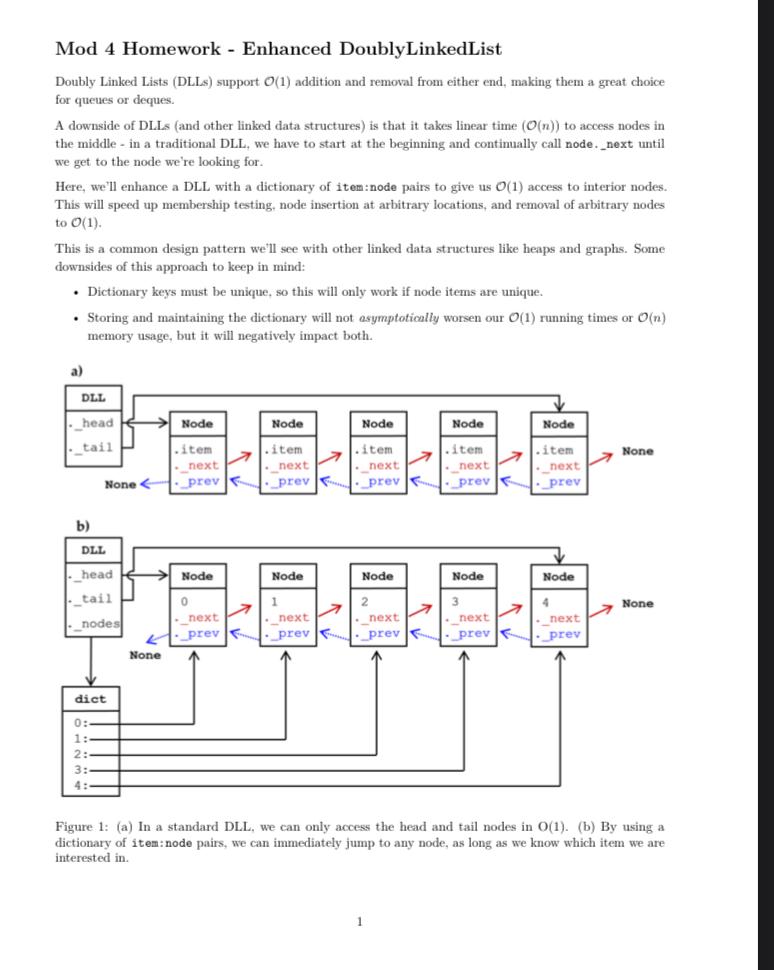
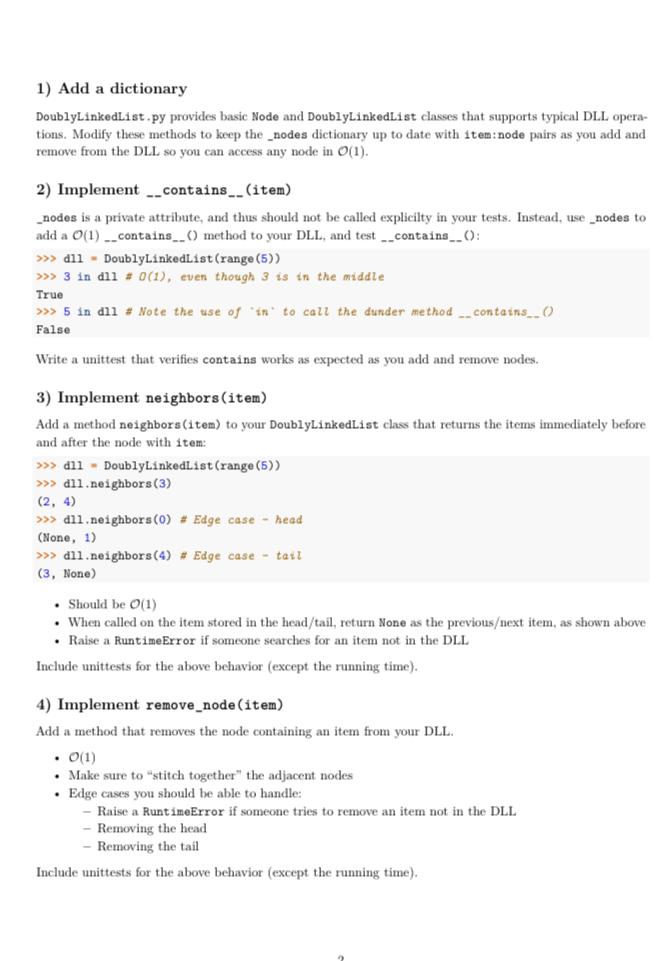
Mod 4 Homework - Enhanced DoublyLinkedList Doubly Linked Lists (DLLs) support O(1) addition and removal from either end, making them a great choice for queues or deques. A downside of DLLs (and other linked data structures) is that it takes linear time (O(n)) to access nodes in the middle - in a traditional DLL, we have to start at the beginning and continually call node. next until we get to the node we're looking for. Here, we'll enhance a DLL with a dictionary of item:node pairs to give us O(1) access to interior nodes. This will speed up membership testing, node insertion at arbitrary locations, and removal of arbitrary nodes to O(1). This is a common design pattern we'll see with other linked data structures like heaps and graphs. Some downsides of this approach to keep in mind: - Dictionary keys must be unique, so this will only work if node items are unique. - Storing and maintaining the dictionary will not asymptotically worsen our O(1) running times or O(n) memory usage, but it will negatively impact both. Figure 1: (a) In a standard DLL, we can only access the head and tail nodes in O (1). (b) By using a dictionary of item: node pairs, we can immediately jump to any node, as long as we know which item we are interested in. 1) Add a dictionary DoublyLinkedList, py provides basic Node and DoublyLinkedList classes that supports typical DLL operations. Modify these methods to keep the _nodes dictionary up to date with item:node pairs as you add and remove from the DLL so you can access any node in O(1). 2) Implement __contains__(item) - nodes is a private attribute, and thus should not be called explicilty in your tests. Instead, use _nodes to add a O(1)._contains__() method to your DLL, and test __contains_. (): > d11 = DoublyLinkedList ( range (5)) > in dil #O(1), even though 3 is in the middle True 5 in dil \# Note the use of 'in' to call the dunder method _.. contains_. O False Write a unittest that verifies contains works as expected as you add and remove nodes. 3) Implement neighbors (item) Add a method neighbors (item) to your DoublyLinkedList class that returns the items immediately before and after the node with item: d11 = DoublyLinkedList (range (5)) d11.neighbors (3) (2,4) d11.neighbors (0) \# Edge case - head (None, 1) d11.neighbors(4) \# Edge case - tait (3, None) - Should be O(1) - When called on the item stored in the head/tail, return None as the previousext item, as shown above - Raise a RuntimeError if someone searches for an item not in the DLL Include unittests for the above behavior (except the running time). 4) Implement remove_node (item) Add a method that removes the node containing an item from your DLL. - O(1) - Make sure to "stitch together" the adjacent nodes - Edge cases you should be able to handle: - Raise a RuntimeError if someone tries to remove an item not in the DLL - Removing the head - Removing the tail Include unittests for the above behavior (except the running time)
Step by Step Solution
There are 3 Steps involved in it

Get step-by-step solutions from verified subject matter experts
 Study Help