







Question: Modify or add one CSS rule for each requirement below using the specified selectors. Element selector: Change the text color from green to blue for
Modify or add one CSS rule for each requirement below using the specified selectors.
Element selector: Change the text color from green to blue for the list items.
Class selector: Set the text-decoration to underline for all HTML elements with the class name footnote.
ID selector: Set the text color to orange and the font-style to italic for the HTML element with the ID footnote-1.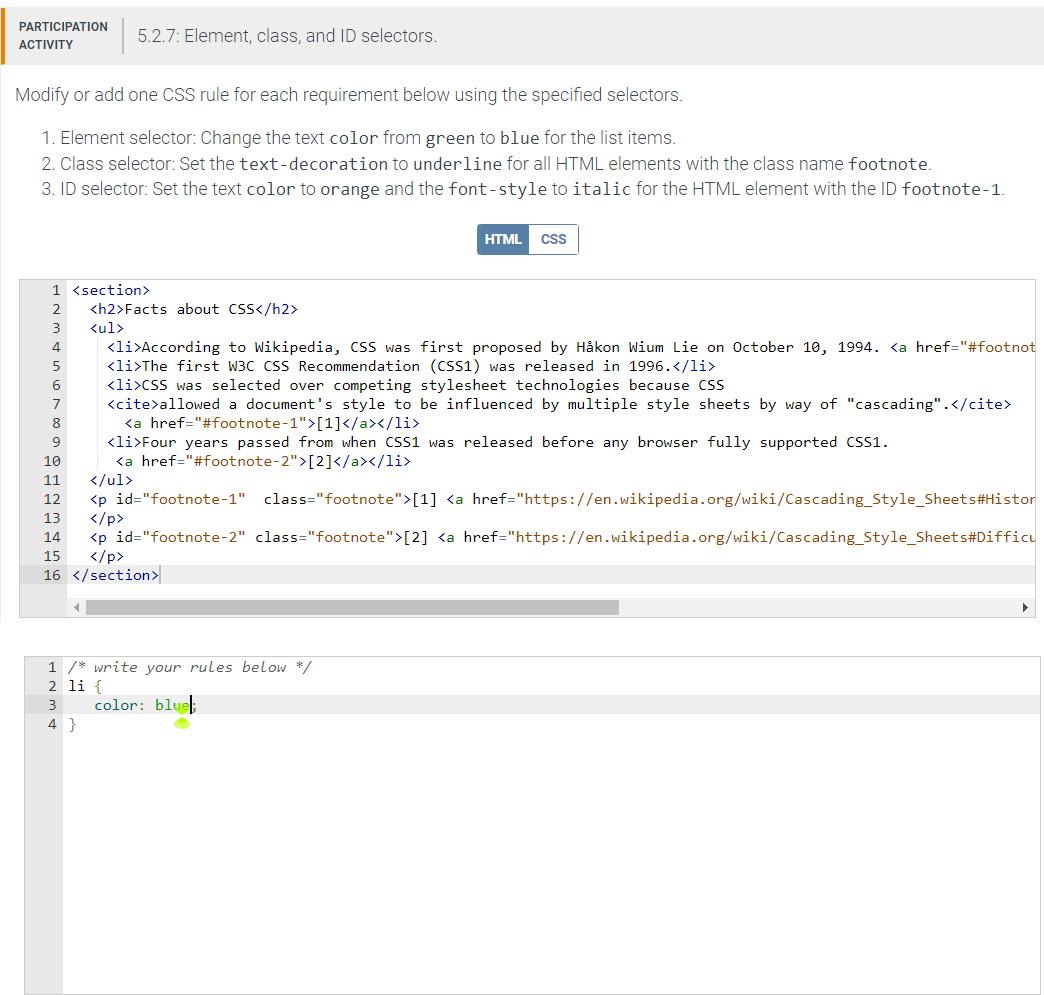
Modify or add one CSS rule for each requirement below using the specified selectors. 1. Element selector: Change the text color from green to blue for the list items. 2. Class selector: Set the text-decoration to under line for all HTML elements with the class name footnote. 3. ID selector: Set the text color to orange and the font-style to italic for the HTML element with the ID footnote-1. 123sectionh2FFactsaboutCSS/h2Lul> / write your rules below */ li{ color: blul; \}
Step by Step Solution
There are 3 Steps involved in it

Get step-by-step solutions from verified subject matter experts
 Study Help