







Question: Modify the Bash script to: 1. Create a new directory called IRmodel date&time 2. Copy the bash and python scripts into the directory 3. Move
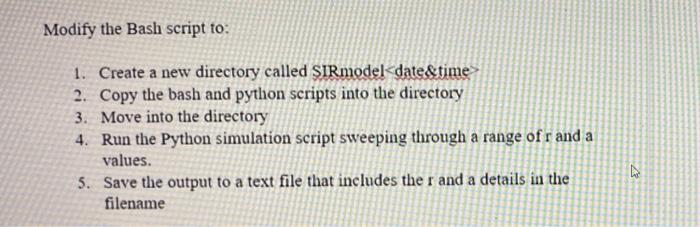
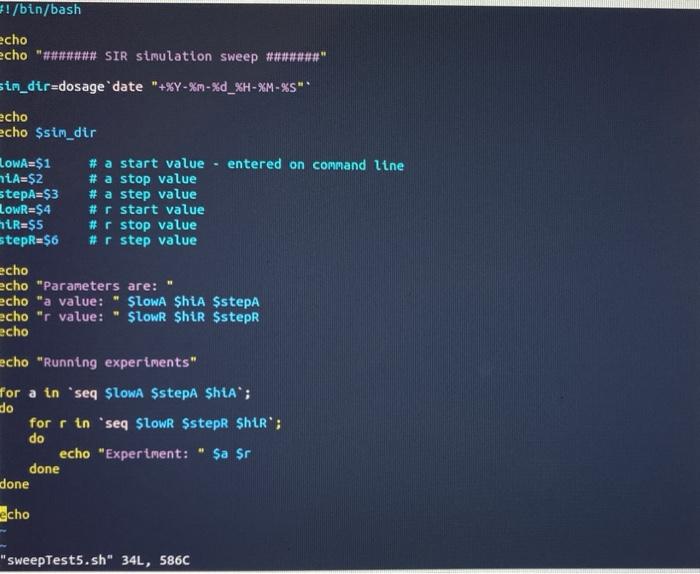
Modify the Bash script to: 1. Create a new directory called IRmodel date&time 2. Copy the bash and python scripts into the directory 3. Move into the directory 4. Run the Python simulation script sweeping through a range of r and a values. 5. Save the output to a text file that includes the r and a details in the filename 7 #!/bin/bash echo echo "###**## SIR simulation sweep #***** sim_dir=dosage date "+%Y-%m-%d_%H-%M - %S" echo echo $sim_dir LOWA=$1 # a start value - entered on command line LA=$2 # a stop value stepA=$3 # a step value LowR=$4 # r start value htRSS #r stop value StepR=$6 # r step value echo echo "Parameters are: echo "a value: "Slowa ShiA $stepa echo "r value: " $lowR $hir $steps echo echo "Running experiments" for a in 'seg SlowA $stepa Shta'; do for r in `seq SlowR $stepR Shtr'; do echo "Experiment: $a $r done done echo 1 "sweepTests.sh" 34L, 5860
Step by Step Solution
There are 3 Steps involved in it

Get step-by-step solutions from verified subject matter experts
 Study Help