







Question: Modify the code below to use a background color to highlight all the links in the page instead of displaying them in a box at
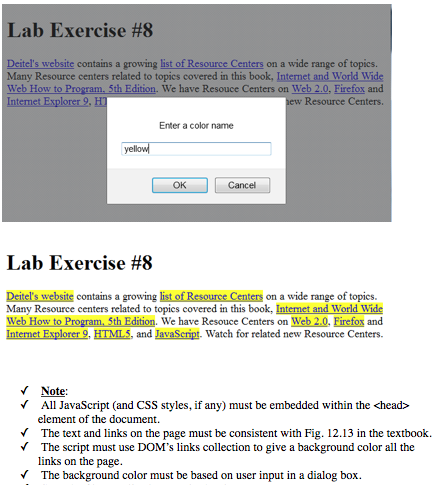
Modify the code below to use a background color to highlight all the links in the page instead of displaying them in a box at the bottom.
//CODE:
Deitel Resource Centers
Deitel's website contains a growing list of Resource Centers on a wide range of topics. Many Resource centers related to topics covered in this book, Web 2.0, Firefox and Internet Explorer 9 , HTML5 , and JavaScript. Watch for related new Resource Centers.
Links in this page:
Lab Exercise #8 Deitel's website contains a growing list of Resource Centers on a wide range of topics. Many Resource centers related to topics covered in this book, Internet and Worldwide Web How to Program. 5th Edition. We have Resouce Centers on Web 2.0, Firefox and Internet Explorer 9. hew Resource Centers Enter a color name yellow OK Cancel Lab Exercise #8 Deitel's website contains a growing list of Resource Centers on a wide range of topics. Many Resource centers related to topics covered in this book, Internet and World Wide Web How to Program, 5th Edition. We have Resouce Centers on Web 2.0. Firefox and Internet Explorer 9, HTMLS, and JavaScript. Wateh for related new Resource Centers Note: All JavaScript (and CSS styles, if any) must be embedded within the element of the document The text and links on the page must be consistent with Fig. 12.13 in the textbook. The script must use DOM's links collection to give a background color all the links on the page The background color must be based on user input in a dialog box
Step by Step Solution
There are 3 Steps involved in it

Get step-by-step solutions from verified subject matter experts
 Study Help