







Question: Modify the diagram below to support a new instruction called jsa, or jump to stored address. (This is NOT an actual MIPS instruction) The instruction
Modify the diagram below to support a new instruction called "jsa", or "jump to stored address". (This is NOT an actual MIPS instruction)
The instruction works as follows: The format is I-type, similar to lw or sw: jsa offset(register)
jsa 20($s0) jsa 0($t1) ...etc...
The instruction is a jump instruction that jumps to another address. The destination address is stored in memory, so this instruction first reads from memory, then it uses the data from memory as the destination address. During execution, jsa reads the value from the specified register, then adds the offset to this value. This forms a memory address. The processor reads the data from this memory address. This data is then used as the new PC (program counter) for the following instruction. This instruction would allow you to build (in memory) tables of program addresses. You could then jump to programs by looking up the program address that is stored in the table in memory. (Polymorphic function calls in C++ does exactly this.)
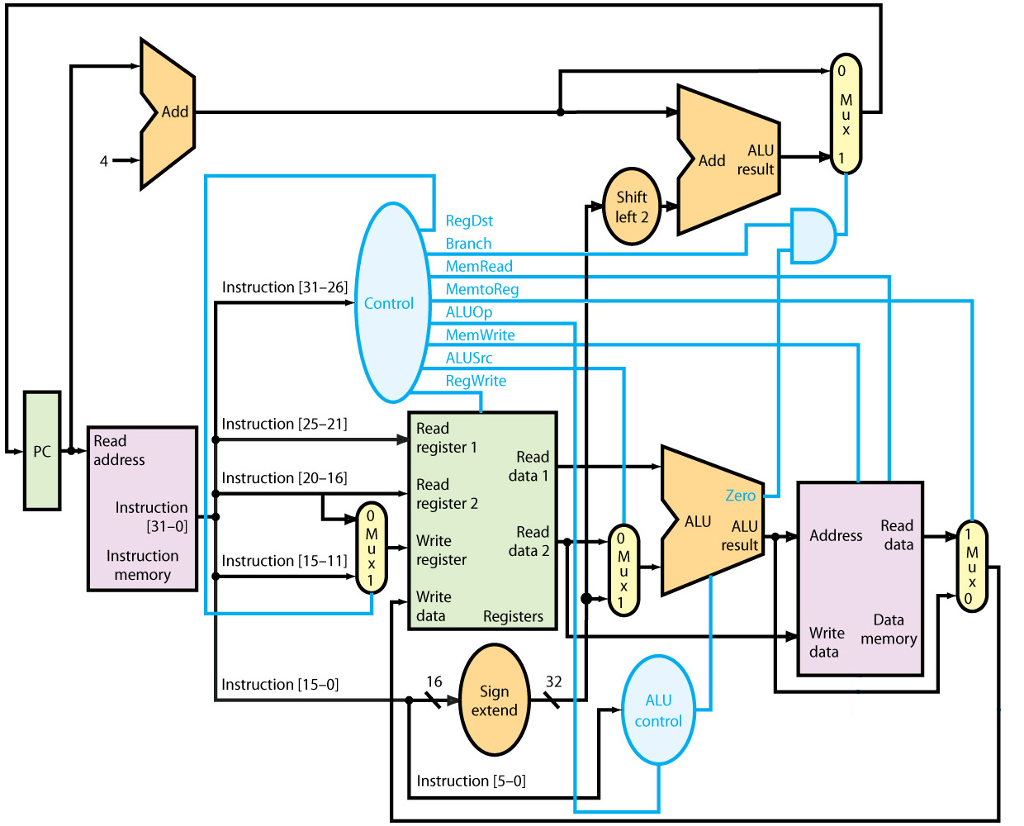
Add Add ALU result Shift left 2 RegDst Branch MemRead MemtoReg Instruction [31-26] Control ALUOp MemWrite ALUSrc RegWrite Instruction [25-21] Read address Read register 1 PC Read data 1 Instruction [20-16] Read register 2 Instruction (31-0] Zero ALU ALU result Read data 2 MWrite Address data Instruction Instruction [1register memory Write data Registers Data Write memory data Sign 32 extend Instruction [15-0] ALU control Instruction [5-0] Add Add ALU result Shift left 2 RegDst Branch MemRead MemtoReg Instruction [31-26] Control ALUOp MemWrite ALUSrc RegWrite Instruction [25-21] Read address Read register 1 PC Read data 1 Instruction [20-16] Read register 2 Instruction (31-0] Zero ALU ALU result Read data 2 MWrite Address data Instruction Instruction [1register memory Write data Registers Data Write memory data Sign 32 extend Instruction [15-0] ALU control Instruction [5-0]
Step by Step Solution
There are 3 Steps involved in it

Get step-by-step solutions from verified subject matter experts
 Study Help