







Question: Modify the following code to draw a canvas pressing the button click me as shown below. X ITORIOS ITOR1105 X 1 G Search Google or
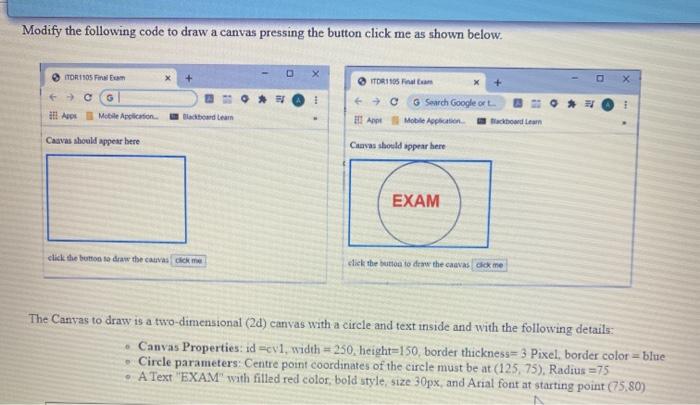
Modify the following code to draw a canvas pressing the button click me as shown below. X ITORIOS ITOR1105 X 1 G Search Google or i dit Apps Mobile Application Apt Mobile Application odam Canvas should appear here Curves should appear here EXAM click the button to draw the cauvas dick me click the button to doww the cravas lok ne The Canvas to draw is a two-dimensional (24) canvas with a circle and text inside and with the following details: Canvas Properties: id cv1, width = 250, height=150, border thickness=3 Pixel, border color=blue Circle parameters: Centre point coordinates of the circle must be at (125 75), Radius 75 A Text "EXAM" with filled red color bold style, size 30px and Arial font at starting point (75.80)
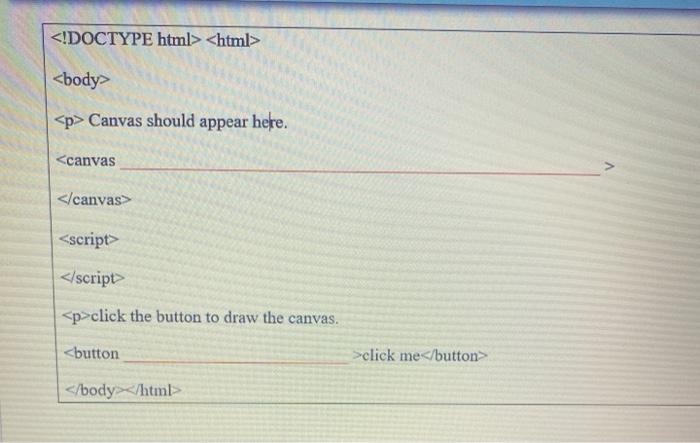
Canvas should appear here.
Step by Step Solution
There are 3 Steps involved in it

Get step-by-step solutions from verified subject matter experts
 Study Help