







Question: Modify your project from step 2 to use a function to do range checks. For retail price the range is from $9.99 to $1,999.99 and
Modify your project from step 2 to use a function to do range checks. For retail price the range is from $9.99 to $1,999.99 and discount should be from one to ten percent. I will attached the program interface 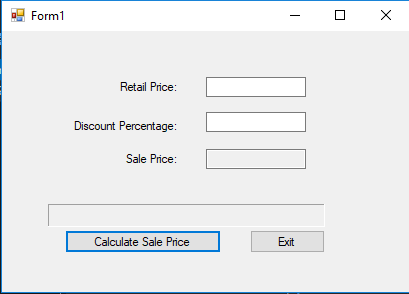
This is the code I use un program :
Public Class Form1 Private decRetail As Decimal ' To hold the retail price Private decPercentage As Decimal ' To hold the discount percentage
Private Function ValidateInputFields() As Boolean 'Try to convert each of the input fields. Return False if 'any field is invalid, and display a suitable error message.
If Not Decimal.TryParse(txtRetailPrice.Text, decRetail) Then lblMessage.Text = "Retail price must be numeric" Return False End If
If Not Decimal.TryParse(txtDiscountPercent.Text, decPercentage) Then lblMessage.Text = "Discount percentage must be numeric"
Return False End If
Return True End Function Function CalculateSalePrice(ByVal decRetail As Decimal, ByVal decPercentage As Decimal) As Decimal ' Calculate and return the sale price. Dim decSalePrice As Decimal
decSalePrice = decRetail - (decRetail * decPercentage) Return decSalePrice End Function
Private Sub btnCalculate_Click(sender As Object, e As EventArgs) Handles btnCalculate.Click Dim decSalePrice As Decimal
' Clear any previous message. lblMessage.Text = String.Empty
' If the input is valid, display the sale price. If ValidateInputFields() Then decSalePrice = CalculateSalePrice(decRetail, decPercentage) txtSalePrice.Text = decSalePrice.ToString("c") End If
End Sub
Private Sub btnExit_Click(sender As Object, e As EventArgs) Handles btnExit.Click Me.Close() End Sub End Class
Form1 Retail Price: Discount Percentage: Sale Price: Calculate Sale Price Exit
Step by Step Solution
There are 3 Steps involved in it

Get step-by-step solutions from verified subject matter experts
 Study Help