







Question: Modifying a Presentation PPT 2-22Visual WorkshopOpen the presentation IL_PPT_2-5.pptx from the location where you store your Data Files, and save it as IL_PPT_2_LaSalle. Create the
Modifying a Presentation PPT 2-22Visual WorkshopOpen the presentation IL_PPT_2-5.pptx from the location where you store your Data Files, and save it as IL_PPT_2_LaSalle. Create the presentation shown in FIGURE 2-22 and FIGURE 2-23. Add todays date as the date on the title slide. Create and duplicate the merged shape, which is made with an Arrow: Bent-Up shape and a Rectangle: Rounded Corners shape. The shapes are 1 " proportional shapes with the Subtle EffectDark Purple, Accent 2 applied to them. (Hint: The arrow shape is rotated 90 degrees before its merged with the square shape.) Set the horizontal guide to 1 and the vertical guide to 3, as shown in FIGURE 2-22. The SmartArt graphic in FIGURE 2-23 is created with the Basic Matrix layout and has the Moderate Effect style applied to it. Review your slides in Slide Show view, then add your name as a footer to the slides. Submit your presentation to your instructor, save your changes, close the presentation, then exit PowerPoint.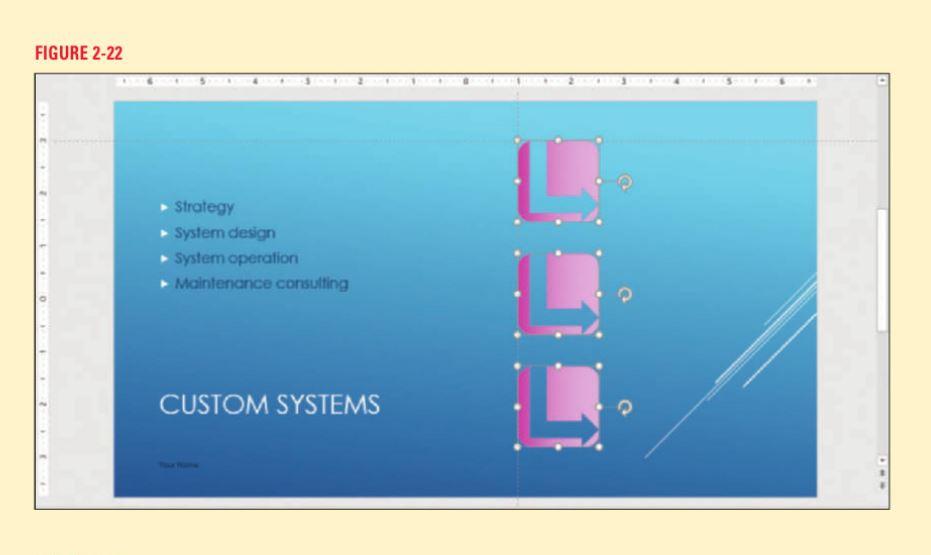

Step by Step Solution
There are 3 Steps involved in it

Get step-by-step solutions from verified subject matter experts
 Study Help