







Question: Modifying Variables Replace the question marks in the code below with increment (+-) statements to modify the track and start variables. Use the screenshot below
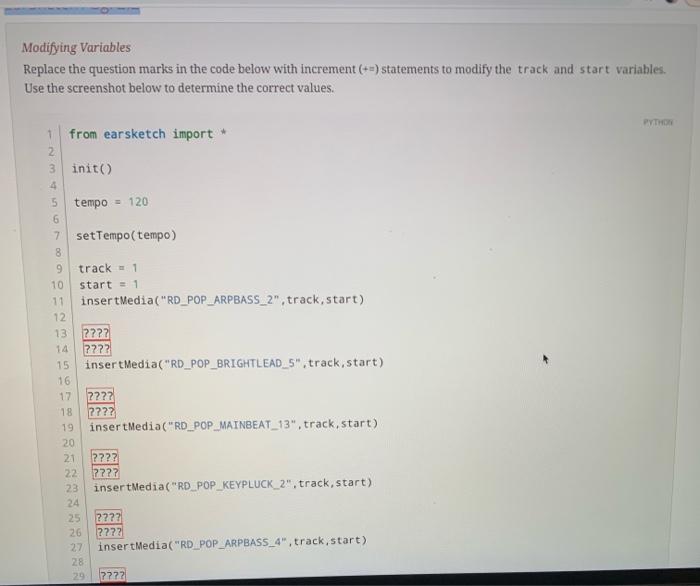
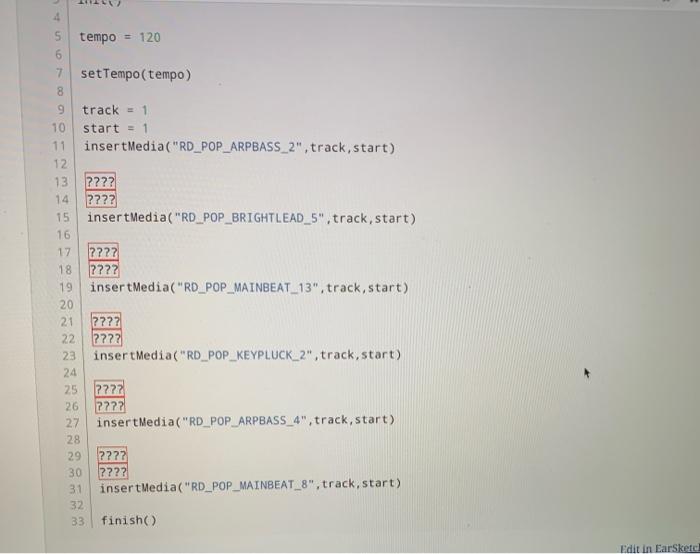
Modifying Variables Replace the question marks in the code below with increment (+-) statements to modify the track and start variables. Use the screenshot below to determine the correct values. PYTHON 1 from earsketch import 2 3 init() 4 5 tempo = 120 6 7 setTempo(tempo) 8 9 track - 1 10 start 1 11 insertMedia("RD_POP_ARPBASS_2", track,start) 12 13 ???? 14 7272 15 insert Media("RD_POP_BRIGHTLEAD_5", track,start) 16 17 ???? 18 2??? 19 insertMedia("RD_POP_MAINBEAT_13", track,start) 20 24 ???? 22 2727 23 insertMedia("RD_POP_KEYPLUCK_2". track,start) 24 25 ???? 26 ???? 27 insertMedia("RD_POP_ARPBASS_4", track,start) 28 29 7772 4 tempo = 120 6 7 setTempo(tempo) 8 9 track = 1 10 start = = 1 11 insertMedia("RD_POP_ARPBASS_2", track,start) 12 13 ???? 14 ???? 15 insertMedia("RD_POP_BRIGHTLEAD_5", track,start) 16 17 2??? 18 2722 19 insertMedia("RD_POP_MAINBEAT_13", track,start) 20 21 ???? 22 ???? 22 insert Media("RD_POP_KEYPLUCK_2", track, start) 24 25 2222 26 2222 27 insert Media("RD_POP_ARPBASS_4", track,start) 28 2222 ???? 31 insertMedia("RD_POP_MAINBEAT_8", track, start) 32 33 finish 29 30 Edit in EarSketc
Step by Step Solution
There are 3 Steps involved in it

Get step-by-step solutions from verified subject matter experts
 Study Help