







Question: Module 7 Excel Activity First, download the excel template and open it, view the excel video and complete the activity. Then, save the file on
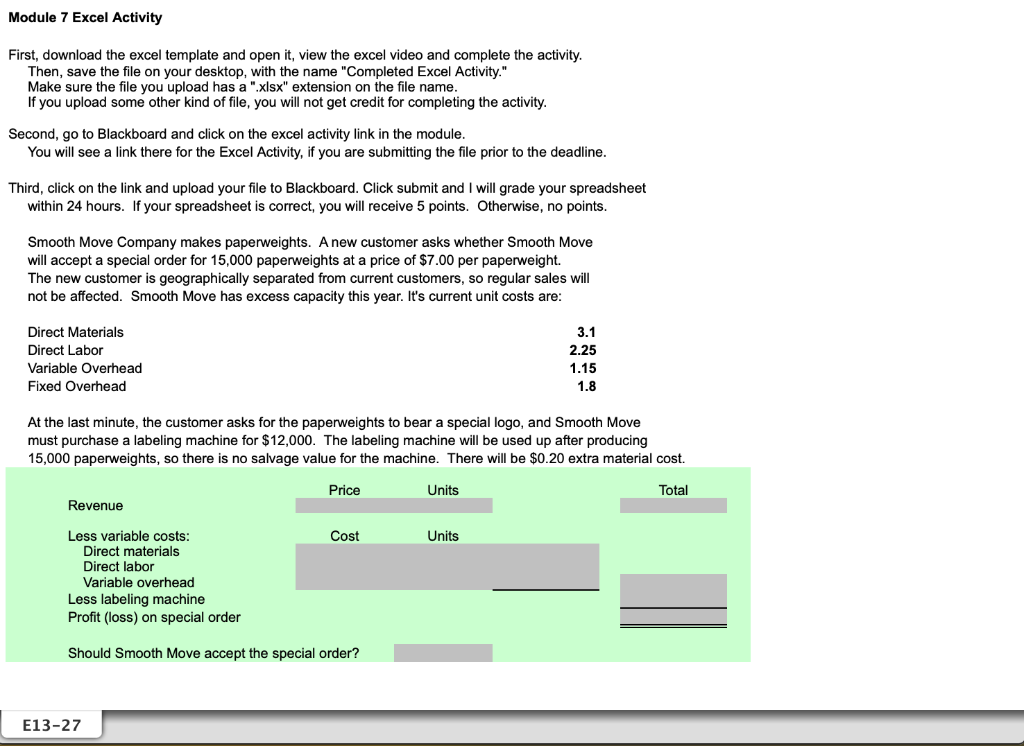
Module 7 Excel Activity First, download the excel template and open it, view the excel video and complete the activity. Then, save the file on your desktop, with the name "Completed Excel Activity." Make sure the file you upload has a ".xlsx" extension on the file name. If you upload some other kind of file, you will not get credit for completing the activity. Second, go to Blackboard and click on the excel activity link in the module. You will see a link there for the Excel Activity, if you are submitting the file prior to the deadline. Third, click on the link and upload your file to Blackboard. Click submit and I will grade your spreadsheet within 24 hours. If your spreadsheet is correct, you will receive 5 points. Otherwise, no points. Smooth Move Company makes paperweights. A new customer asks whether Smooth Move will accept a special order for 15,000 paperweights at a price of $7.00 per paperweight. The new customer is geographically separated from current customers, so regular sales will not be affected. Smooth Move has excess capacity this year. It's current unit costs are: At the last minute, the customer asks for the paperweights to bear a special logo, and Smooth Move must purchase a labeling machine for $12,000. The labeling machine will be used up after producing 15,000 paperweights, so there is no salvage value for the machine. There will be $0.20 extra material cost
Step by Step Solution
There are 3 Steps involved in it

Get step-by-step solutions from verified subject matter experts
 Study Help