





Question: Multiproduct Break-Even Analysis Student Name Date 1) Start on the left with the given inputs in the orange colored column cells Viite them down on
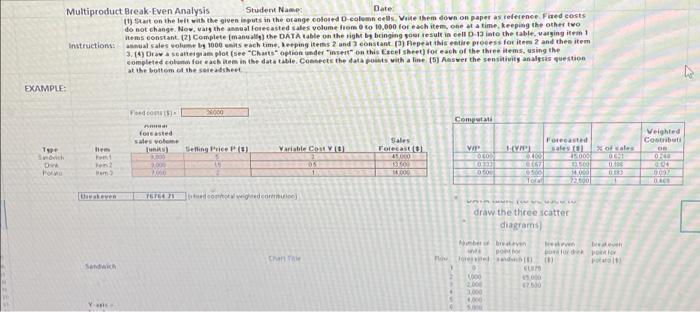
Multiproduct Break-Even Analysis Student Name
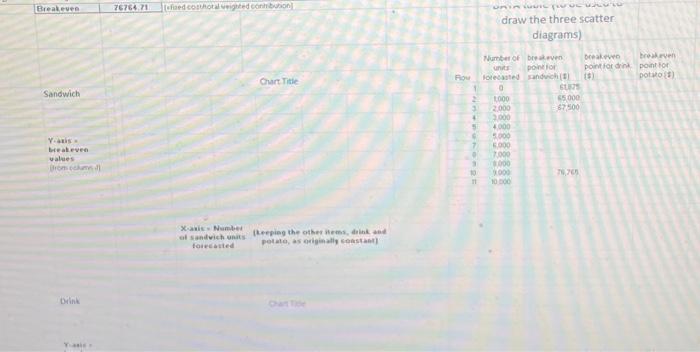
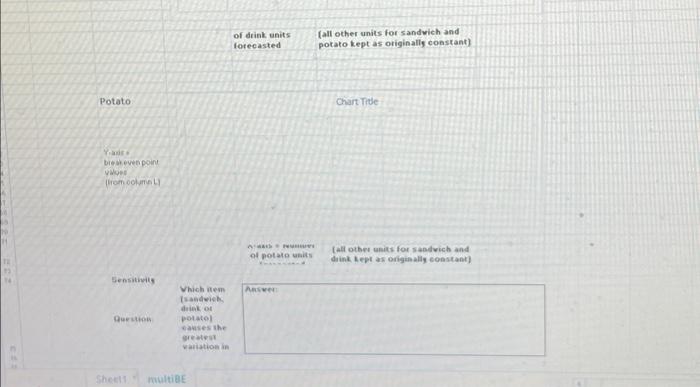
Multiproduct Break-Even Analysis Student Name Date 1) Start on the left with the given inputs in the orange colored column cells Viite them down on paper as reference Fired costs do not change. Now, vars the annual forecasted sales volume from 0 to 10,000 for each item, one at a time. keeping the other two Mems constant (2) Complete (manually the DATA table on the rigt by bringing your result in cell D-19 into the table. varging Hem 1 Instruction al sales volume 1000 units wachtime, Weeping Kemis 2 and 3 constant. Repeat this entire process for item 2 and the item 3.4 Draw a scanteigiam plot (see "Chantsoption under "insert on this Excel Sheet for each of the three items, using the completed count for each item in the datatable. Connect the data points with a line (5) Answer the sensitivity analysis question at the bottom of the sereadsheet EXAMPLE: F Computati 19 ocasted sates volume Tunis) 300 tre Selling Price PCO) Variable Col VO Sales Forecast 45 Veighted Contributi ON 0 VIP DO IVET Forecast sestol of cales th TO wem 00 contado draw the three scatter diagrams be th po wi CE Port 2000 3,000 CO YE Breakeven 7676471 Todohral Vigned con URIR TOUT draw the three scatter diagrams) Drake broken potion point DOW) Chart Title Row Sandwich Number of brave ponto forecast anch 60 1000 45.000 2000 7500 3000 4000 5000 5000 1000 000 7.70 10500 7 Yatis weave values Dom 11 Xa Nume of sandwicheeping the others drink forecasted potato, as originally constant Diin of drink units forecasted (all other units for sandwich and potato kept as originally constant) Potato Chart Title Ya breven point Word from ook A of potatis all other units for sandwich and drink lept as originally constant) Sensitivits AR Duo Which item sandwich ko pool causes the great wariation in Shoot multiBE Multiproduct Break-Even Analysis Student Name Date 1) Start on the left with the given inputs in the orange colored column cells Viite them down on paper as reference Fired costs do not change. Now, vars the annual forecasted sales volume from 0 to 10,000 for each item, one at a time. keeping the other two Mems constant (2) Complete (manually the DATA table on the rigt by bringing your result in cell D-19 into the table. varging Hem 1 Instruction al sales volume 1000 units wachtime, Weeping Kemis 2 and 3 constant. Repeat this entire process for item 2 and the item 3.4 Draw a scanteigiam plot (see "Chantsoption under "insert on this Excel Sheet for each of the three items, using the completed count for each item in the datatable. Connect the data points with a line (5) Answer the sensitivity analysis question at the bottom of the sereadsheet EXAMPLE: F Computati 19 ocasted sates volume Tunis) 300 tre Selling Price PCO) Variable Col VO Sales Forecast 45 Veighted Contributi ON 0 VIP DO IVET Forecast sestol of cales th TO wem 00 contado draw the three scatter diagrams be th po wi CE Port 2000 3,000 CO YE Breakeven 7676471 Todohral Vigned con URIR TOUT draw the three scatter diagrams) Drake broken potion point DOW) Chart Title Row Sandwich Number of brave ponto forecast anch 60 1000 45.000 2000 7500 3000 4000 5000 5000 1000 000 7.70 10500 7 Yatis weave values Dom 11 Xa Nume of sandwicheeping the others drink forecasted potato, as originally constant Diin of drink units forecasted (all other units for sandwich and potato kept as originally constant) Potato Chart Title Ya breven point Word from ook A of potatis all other units for sandwich and drink lept as originally constant) Sensitivits AR Duo Which item sandwich ko pool causes the great wariation in Shoot multiBE
Step by Step Solution

There are 3 Steps involved in it

1 Expert Approved Answer
Step: 1 Unlock blur-text-image

Question Has Been Solved by an Expert!

Get step-by-step solutions from verified subject matter experts

Step: 2 Unlock
Step: 3 Unlock

Students Have Also Explored These Related General Management Questions!