







Question: Must be able to complie on Netbeans. Code which needs to be converted to GUI: public class Exercise05_21 { // Main method public static void
Must be able to complie on Netbeans.
Code which needs to be converted to GUI:
public class Exercise05_21 { // Main method public static void main(String[] args) { java.util.Scanner input = new java.util.Scanner(System.in);
// Enter loan amount System.out.print("Enter loan amount, for example 120000.95: "); double loanAmount = input.nextDouble();
// Enter number of years System.out.print("Enter number of years as an integer, for example 5: ");
// Convert string to int int numOfYears = input.nextInt();
// Display the header System.out.printf("%-20s%-20s%-20s ", "Interest Rate", "Monthly Payment", "Total Payment");
for (double annualInterestRate = 3.0; annualInterestRate
// Compute mortgage double monthlyPayment = loanAmount * monthlyInterestRate / (1 - (Math.pow(1 / (1 + monthlyInterestRate), numOfYears * 12))); double totalPayment = monthlyPayment * numOfYears * 12;
// Display results System.out.printf("%5.3f%c %20.2f %20.2f ", annualInterestRate, '%', monthlyPayment, totalPayment); } } }
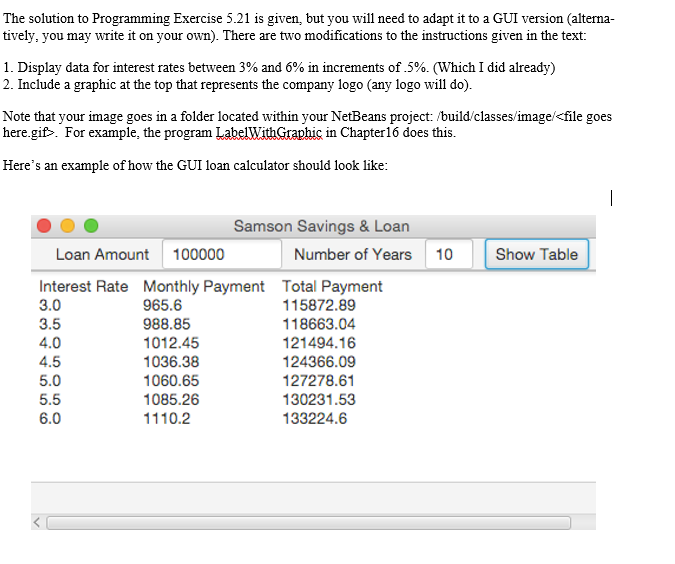
The solution to Programming Exercise 5.21 is given, but you will need to adapt it to a GUI version (alterna tively, you may write it on your own). There are two modifications to the instructions given in the text: 1. Display data for interest rates between 3% and 6% in increments of.5%. (WhichIdid already) 2. Include a graphic at the top that represents the company logo (any logo will doO Note that your image goes in a folder located within yourNetBeans project: /build classes image
Step by Step Solution
There are 3 Steps involved in it

Get step-by-step solutions from verified subject matter experts
 Study Help