







Question: MUST USE C NOT (C++ or java) MUST show matching screen shot. DO NOT COPY and paste answer from the C++ solution. Write a program
MUST USE C NOT (C++ or java) MUST show matching screen shot. DO NOT COPY and paste answer from the C++ solution.
Write a program to assist travelers in completing their travel expense claim.
When you travel for business your company will reimburse you for your travel expenses. To be reimbursed,
you must submit a claim that specifies the expenses incurred on each day of travel in various categories.
For this program, we will have 6 categories: Airfare, Hotel, Breakfast, Lunch, Dinner, and Taxi. You can
create a 2-D array to define these categories:
char category[6][10] = {"Airfare", "Hotel", "Breakfast", "Lunch", "Dinner", "Taxi"};
We will assume that you can travel up to 30 days. You should create a two-dimensional array to store the
expenses per day in each category.
Program Requirement:
Prompt the user for the actual number of days traveled.
For each day, prompt the user for the expenses in each category and store the expenses in your
2-D array.
Compute the total expenses per day and store that in another array variable.
Compute the total expenses per category and store that in another array variable.
Check to see if the sum of the total expenses per day is equal to the sum of the total expenses per
category. If not, it should display:
"Internal error: total daily sum does not match total category sum."
This is an internal error because if you implement your program properly, the sums should be
equal. These sums equal the expense claim total. Note, since you should be using float to store
your costs, you cannot directly compare the two sums as there may be round-off errors when
summing floating point numbers. Thus, you need to check that the two sums differ by less than
some epsilon. Since we are dealing with money, a reasonable epsilon would be 0.009.
Prompt the user to view various aspects of the expense claim including: expense claim total,
category totals, daily totals, and expense claim details (actual expenses per day in each category).
It should also offer the option to exit.
Here are some sample screen shots of the program running (assuming a person is traveling for 2 days with
one hotel stay). You can use your own style for the interface but the functionality should be the same.
SCREEN SHOT MUST MATCHING picture below
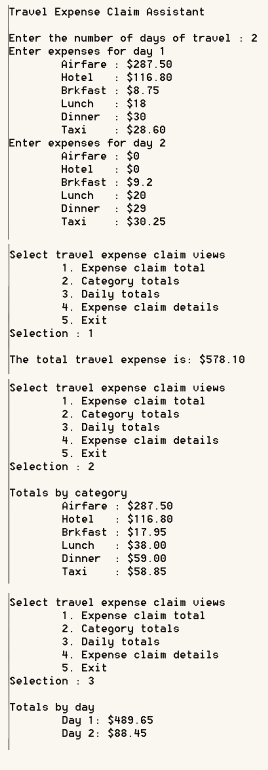
Travel Expense Claim Assistant nter the number of days of travel 2 Enter expenses for day 1 Airfare $287.50 Hotel $116.80 Brkfast $8.75 $18 Lunch $30 Dinner $28.60 Taxi Enter expenses for day 2 Airfare $0 Hotel $0 Brkfast $9.2 Lunch $20 Dinner $29 Taxi $30.25 Select travel expense claim views 1. Expense claim total 2. Category totals 3. Daily totals 4. Expense claim details Exit Selection 1 The total travel expense is $578.10 Select travel expense claim views 1. Expense claim total 2. Category totals 3. Daily totals 4. Expense claim details Exit Selection 2 Totals by category Airfare $287.50 Hotel $116.80 Brkfast $17.95 Lunch $38.00 Dinner $59.00 $58.85 Taxi Select travel expense claim views 1. Expense claim total 2. Category totals 3. Daily totals 4. Expense claim details 5, Exit Selection 3 Totals by day Day 1: $489.65 Day 2: $88.45
Step by Step Solution
There are 3 Steps involved in it

Get step-by-step solutions from verified subject matter experts
 Study Help