







Question: My code for 2dArray, in C++ //declare 2 constants for the sizes of the 2 dimensional array const int NUM_STU = 5; const int NUM_TEST
My code for 2dArray, in C++
//declare 2 constants for the sizes of the 2 dimensional array
const int NUM_STU = 5;
const int NUM_TEST = 3;
//prototype
void showTable(const int scores[][NUM_TEST]);
int main()
{
//declare the 2 dimensional array and initialize the array using the initiali\
zation list
int scores[NUM_STU][NUM_TEST] = { {45, 67, 78}, {78, 88, 56}, {86, 96, 78}, {\
78, 77, 67}, {67, 57, 57} };
//Call showTable here
showTable(scores);
return 0;
}
void showTable(const int scores[][NUM_TEST])
{
int total;
//Show the lables for the table
cout
tw(10)
verage"
//Show the table using a nested for loop here
for(int test = 0; test
{
total = 0;
cout
for(int student = 0; student
{
cout
total += scores[student][test];
}
cout
cout
}
}
void fillArray()
{
???
}
I need to add the given below elements

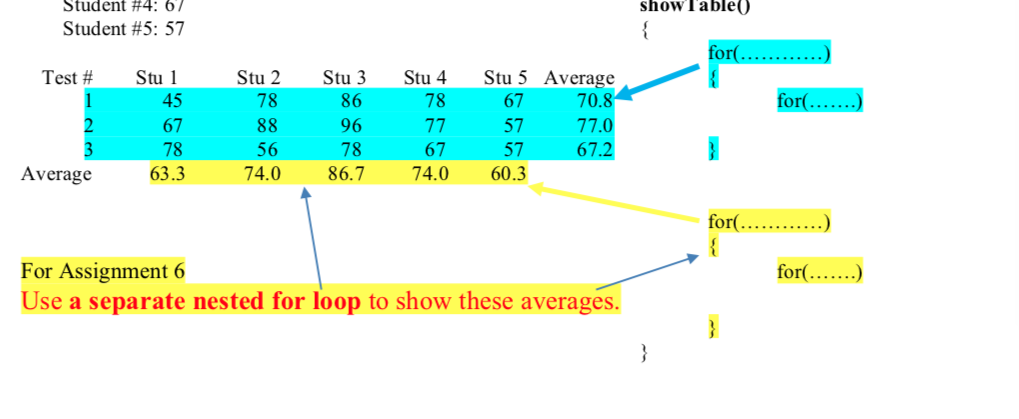
In your lab program, the 2 dimensional array was filled using the initialization list. In your h do not use the initialization list any more, instead create a separate function called fillArray that will fill the 2- dimensional array with the scores entered from the keyboard in the same format as the sample run below. program, check pages 3 to 5 in "Lecture Notes 6-2: 2-dimensional arrays" In showTable0, add more code so it will also show the average score for each student as in the sample run below. check pages 3 to 5 in "Lecture Notes 6-2: 2-dimensional arrays
Step by Step Solution
There are 3 Steps involved in it

Get step-by-step solutions from verified subject matter experts
 Study Help