







Question: My code: My code: My code: import java.util.Scanner; public class FileNameAndType { /** * Returns of the name of the file. Hint: look up indexOf
My code:
My code:
My code:
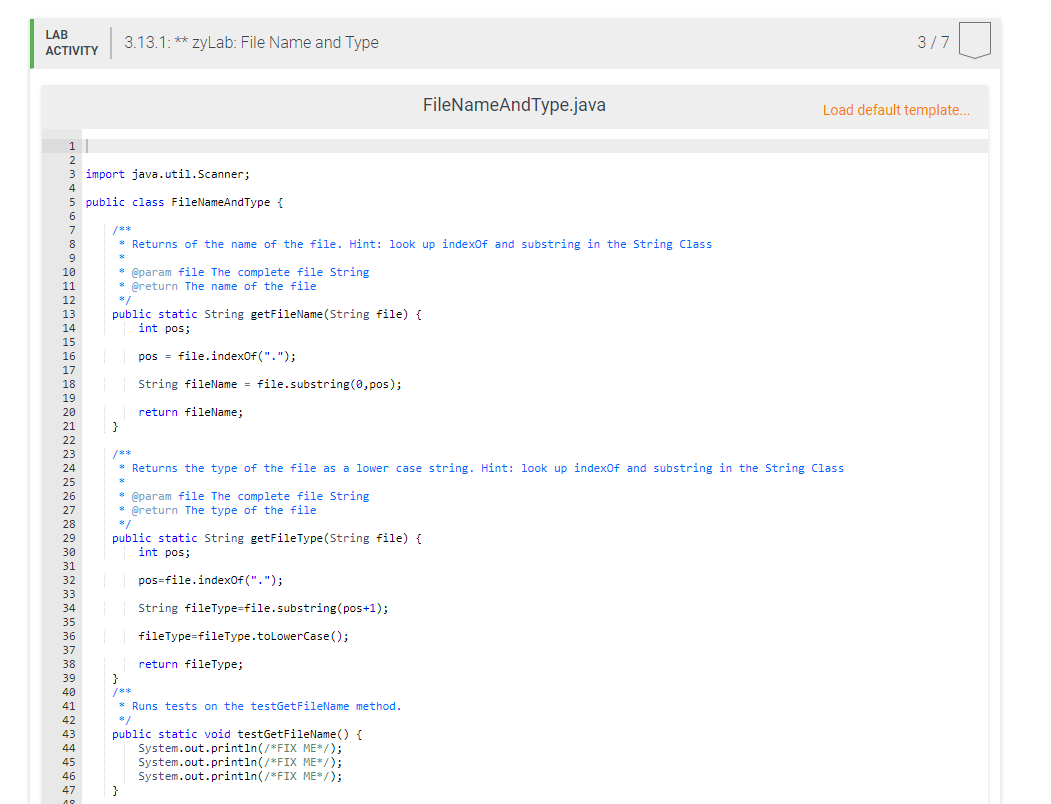
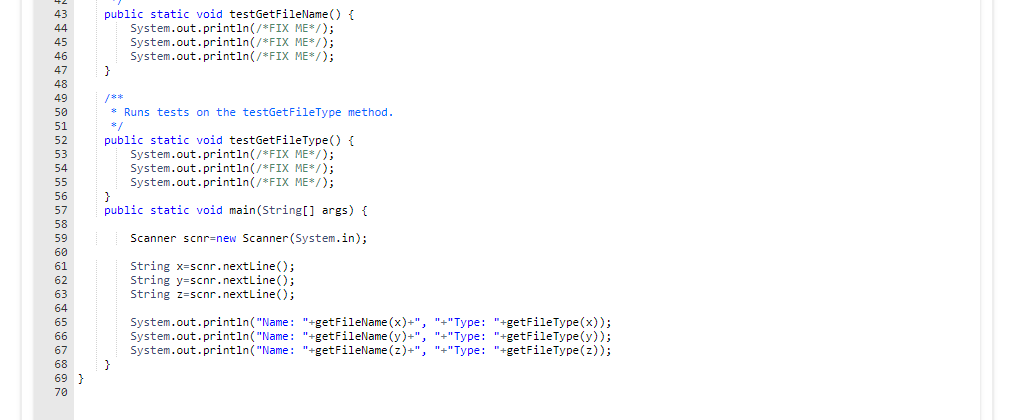
import java.util.Scanner; public class FileNameAndType { /** * Returns of the name of the file. Hint: look up indexOf and substring in the String Class * * @param file The complete file String * @return The name of the file */ public static String getFileName(String file) { int pos; pos = file.indexOf("."); String fileName = file.substring(0,pos); return fileName; } /** * Returns the type of the file as a lower case string. Hint: look up indexOf and substring in the String Class * * @param file The complete file String * @return The type of the file */ public static String getFileType(String file) { int pos; pos=file.indexOf("."); String fileType=file.substring(pos+1); fileType=fileType.toLowerCase(); return fileType; } /** * Runs tests on the testGetFileName method. */ public static void testGetFileName() { System.out.println(/*FIX ME*/); System.out.println(/*FIX ME*/); System.out.println(/*FIX ME*/); } /** * Runs tests on the testGetFileType method. */ public static void testGetFileType() { System.out.println(/*FIX ME*/); System.out.println(/*FIX ME*/); System.out.println(/*FIX ME*/); } public static void main(String[] args) { Scanner scnr=new Scanner(System.in); String x=scnr.nextLine(); String y=scnr.nextLine(); String z=scnr.nextLine(); System.out.println("Name: "+", "+"Type: "+getFileType(x)); System.out.println("Name: "+", "+"Type: "+getFileType(y)); System.out.println("Name: "+", "+"Type: "+getFileType(z)); } }
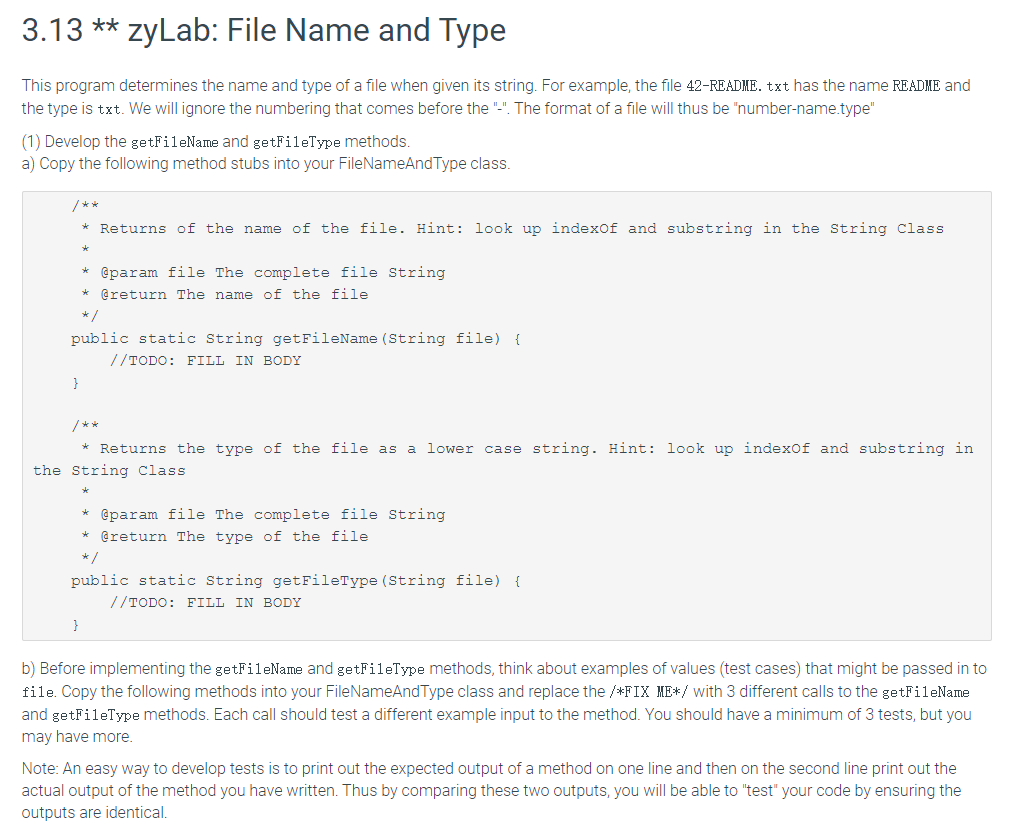
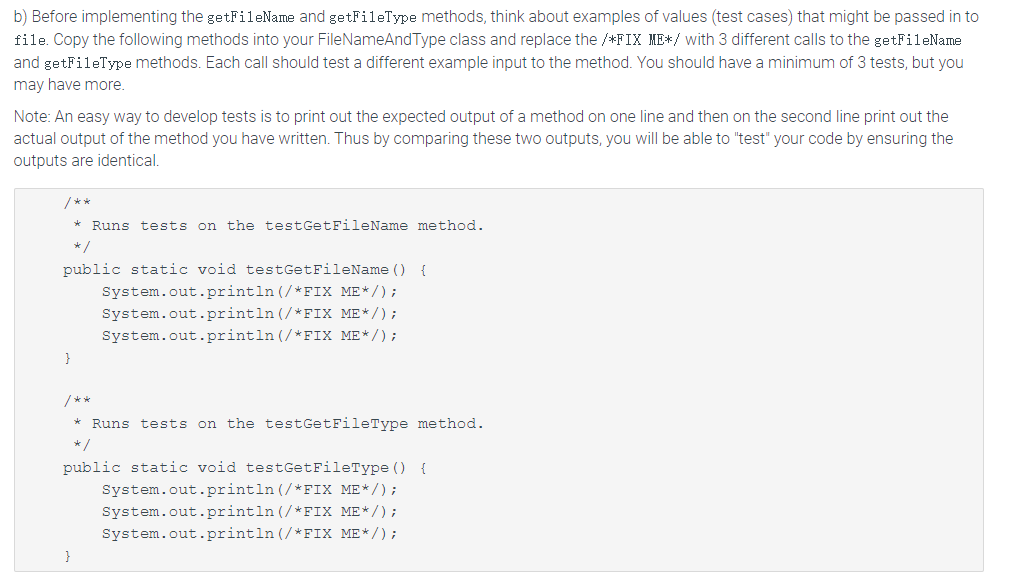
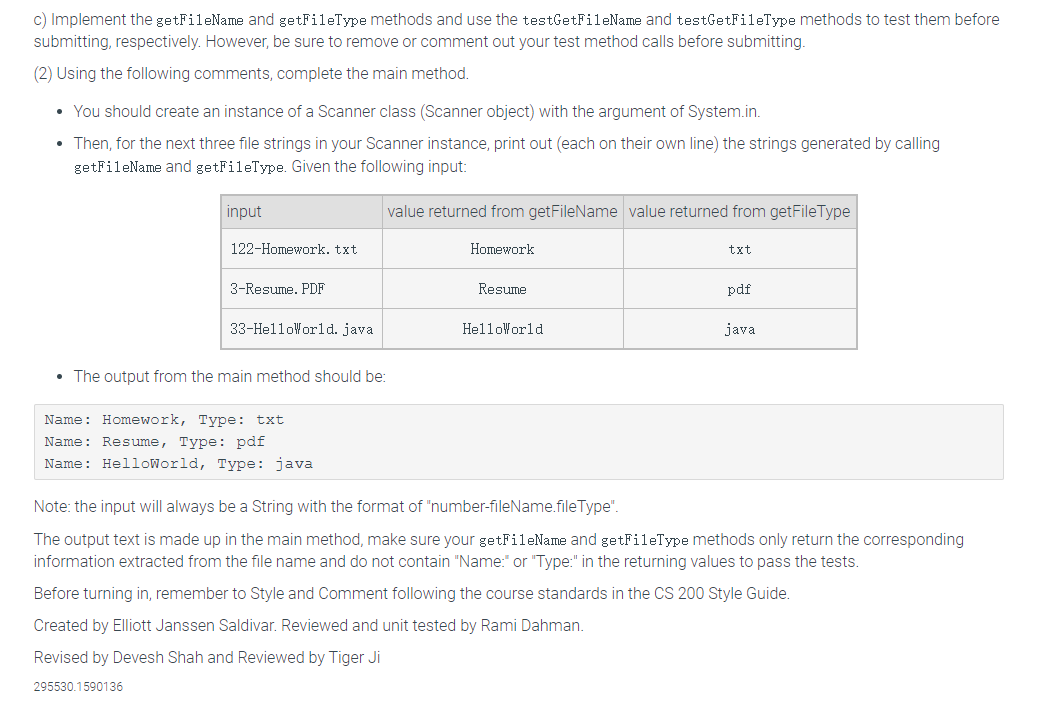
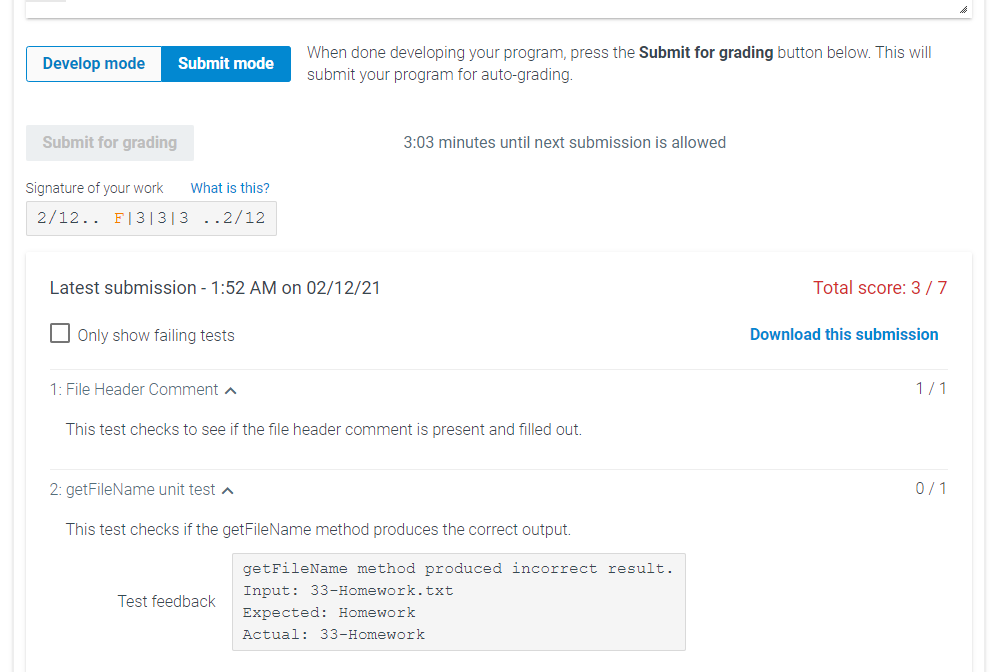
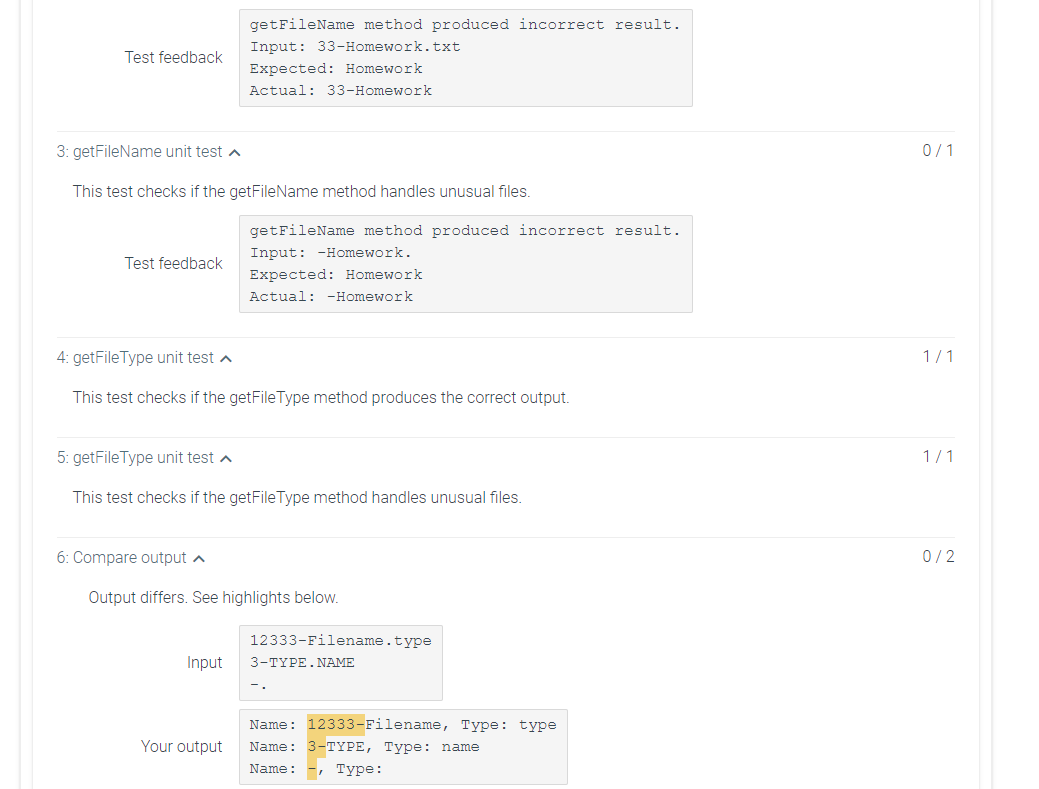
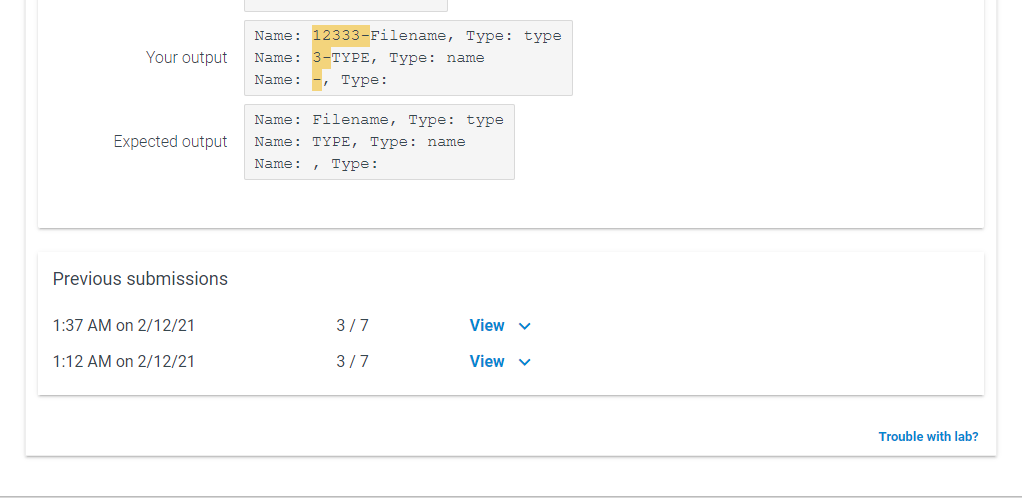
3.13 ** zyLab: File Name and Type This program determines the name and type of a file when given its string. For example, the file 42-README. txt has the name README and the type is txt. We will ignore the numbering that comes before the "-". The format of a file will thus be "number-name.type" (1) Develop the getFileName and getFileType methods. a) Copy the following method stubs into your FileNameAndType class. * Returns of the name of the file. Hint: look up indexof and substring in the String class * @param file The complete file String @return the name of the file * public static String getFileName (String file) { //TODO: FILL IN BODY } /** * Returns the type of the file as a lower case string. Hint: look up indexof and substring in the String class * @param file The complete file String * @return the type of the file public static String getFileType (String file) { //TODO: FILL IN BODY } b) Before implementing the getFileName and getFileType methods, think about examples of values (test cases) that might be passed in to file. Copy the following methods into your FileNameAndType class and replace the /*FIX ME*/ with 3 different calls to the getFileName and getFileType methods. Each call should test a different example input to the method. You should have a minimum of 3 tests, but you may have more Note: An easy way to develop tests is to print out the expected output of a method on one line and then on the second line print out the actual output of the method you have written. Thus by comparing these two outputs, you will be able to "test" your code by ensuring the outputs are identical. b) Before implementing the getFileName and getFileType methods, think about examples of values (test cases) that might be passed in to file. Copy the following methods into your FileNameAndType class and replace the /*FIX ME*/ with 3 different calls to the getFileName and getFileType methods. Each call should test a different example input to the method. You should have a minimum of 3 tests, but you may have more. Note: An easy way to develop tests is to print out the expected output of a method on one line and then on the second line print out the actual output of the method you have written. Thus by comparing these two outputs, you will be able to "test" your code by ensuring the outputs are identical. /** * Runs tests on the testGetFileName method. */ public static void testGetFileName() { System.out.println(/*FIX ME*/); System.out.println(/*FIX ME*/); System.out.println(/*FIX ME*/); } /** * Runs tests on the testGetFileType method. public static void testGetFileType() { System.out.println(/*FIX ME*/); System.out.println(/*FIX ME*/); System.out.println(/*FIX ME*/); c) Implement the getFileName and getFileType methods and use the testGetFileName and testGetFileType methods to test them before submitting, respectively. However, be sure to remove or comment out your test method calls before submitting. (2) Using the following comments, complete the main method. You should create an instance of a Scanner class (Scanner object) with the argument of System.in. Then, for the next three file strings in your Scanner instance, print out (each on their own line) the strings generated by calling getFileName and getFileType. Given the following input: input value returned from getFileName value returned from getFile Type 122-Homework, txt Homework txt 3-Resume. PDF Resume pdf 33-HelloWorld. java HelloWorld java The output from the main method should be: Name: Homework, Type: txt Name: Resume, Type: pdf Name: HelloWorld, Type: java Note: the input will always be a String with the format of "number-fileName.fileType". The output text is made up in the main method, make sure your getFileName and getFileType methods only return the corresponding information extracted from the file name and do not contain "Name" or "Type:" in the returning values to pass the tests. Before turning in, remember to Style and Comment following the course standards in the CS 200 Style Guide. Created by Elliott Janssen Saldivar Reviewed and unit tested by Rami Dahman. Revised by Devesh Shah and Reviewed by Tiger Ji 295530.1590136 LAB ACTIVITY 3.13.1: ** zyLab: File Name and Type 3/7 FileNameAndType.java Load default template... * int pos; 1 2 3 import java.util.Scanner; 4 5 public class FileNameAndType { 6 7 /** 8 Returns of the name of the file. Hint: look up indexof and substring in the String Class 9 19 * @param file The complete file String 11 * @return The name of the file 12 */ 13 public static String getFileName(String file) { 14 15 16 pos = file.indexOf("."); 17 18 String fileName = file.substring(0,pos); 19 20 return fileName; 21 } 22 23 /** 24 Returns the type of the file as a lower case string. Hint: look up indexOf and substring in the String Class 25 26 * @param file The complete file String 27 * @return the type of the file 28 */ 29 public static String getFileType(String file) { 30 int pos; 31 32 pos=file.indexOf("."); 33 34 String fileType=file.substring(pos+1); 35 36 fileType=fileType.toLowerCase(); 37 38 return fileType; 39 } + 40 ** 41 * Runs tests on the testGetFileName method. 42 */ 43 public static void testGetFileName() { 44 System.out.println(/*FIX ME*/); 45 System.out.println(/*FIX ME*/); 46 System.out.println(/*FIX ME*/); 47 } 40 public static void testGetFileName() { System.out.println(/*FIX ME*/); System.out.println(/*FIX ME*/); System.out.println(/*FIX ME*/); } 43 44 45 46 47 48 49 50 51 52 53 54 55 56 57 58 59 60 61 62 63 64 65 66 67 68 69} 79 * Runs tests on the testGetFileType method. public static void testGetFileType() { System.out.println(/*FIX ME*/); System.out.println(/*FIX ME*/); System.out.println(/*FIX ME*/); } public static void main(String[] args) { Scanner scnr=new Scanner(System.in); String x=scnr.nextLine(); String y=scnr.nextLine(); String z=scnr.nextLine(); System.out.println("Name: "+getFileName (x)+", "+"Type: "+getFileType(x)); System.out.println("Name: "+getFileName (y)+", ""Type: "+getFileType(y)); System.out.println("Name: "getFileName (z)+", "-"Type: "+getFileType(z)); } Develop mode Submit mode When done developing your program, press the Submit for grading button below. This will submit your program for auto-grading Submit for grading 3:03 minutes until next submission is allowed Signature of your work What is this? 2/12.. F131313 ..2/12 Latest submission - 1:52 AM on 02/12/21 Total score: 3/7 U Only show failing tests Download this submission 1: File Header Comment A 1/1 This test checks to see if the file header comment is present and filled out. 2: getFileName unit test A 0/1 This test checks if the getFileName method produces the correct output. Test feedback getFileName method produced incorrect result. Input: 33-Homework.txt Expected: Homework Actual: 33-Homework Test feedback getFileName method produced incorrect result. Input: 33-Homework.txt Expected: Homework Actual: 33-Homework 3: getFileName unit test ^ 0/1 This test checks if the getFileName method handles unusual files. Test feedback getFileName method produced incorrect result. Input: -Homework. Expected: Homework Actual: -Homework 4: getFile Type unit test A 1/1 This test checks if the getFile Type method produces the correct output. 5: getFile Type unit test A 1/1 This test checks if the getFile Type method handles unusual files. 6: Compare output A 0/2 Output differs. See highlights below. 12333-Filename.type 3-TYPE.NAME Input Your output Name: 12333-Filename, Type: type Name: 3-TYPE, Type: name Name : - Type: Your output Name: 12333-Filename, Type: type Name: 3-TYPE, Type: name Name : - Type: Expected output Name: Filename, Type: type Name: TYPE, Type: name Name: Type: Previous submissions 1:37 AM on 2/12/21 3/7 View v 1:12 AM on 2/12/21 3/7 View Trouble with lab
Step by Step Solution
There are 3 Steps involved in it

Get step-by-step solutions from verified subject matter experts
 Study Help