







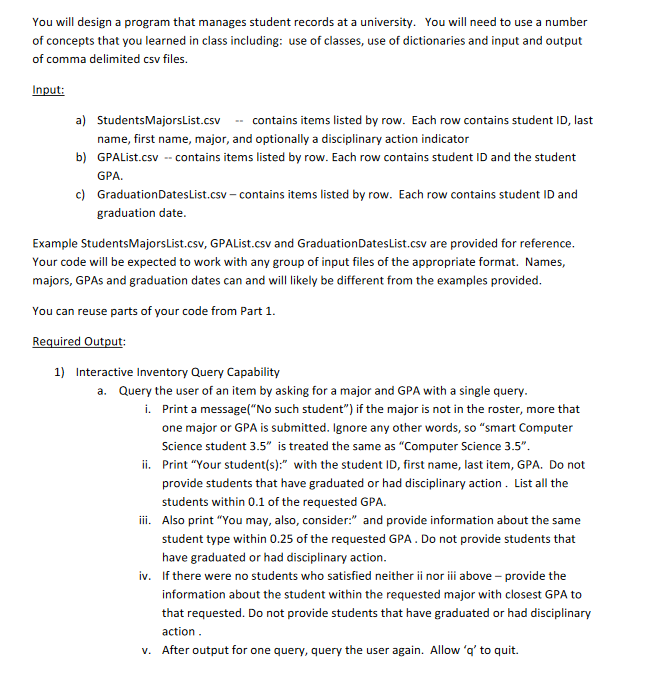
Question: My code so far: import csv # Create a class named Student # This class is used to store the student details in the form
My code so far:
import csv
# Create a class named Student
# This class is used to store the student details in the form of object
class Student:
def initself studentid lastname, firstname, major, disciplinaryactionFalse:
self.studentid studentid
self.lastname lastname
self.firstname firstname
self.major major
self.disciplinaryaction disciplinaryaction
self.gpa None
self.graduationdate None
def setgpaself gpa:
self.gpa gpa
def setgraduationdateself graduationdate:
self.graduationdate graduationdate
# Read the Students Majors List file
def readstudentmajorsfilename:
students
with openfilename moder newline as file:
reader csvreaderfile
for row in reader:
studentid lastname, firstname, major, disciplinaryaction row
disciplinaryaction True if disciplinaryaction.upperY else False
studentsstudentid Studentstudentid lastname, firstname, major, disciplinaryaction
return students
# Read the GPAList file
def readgpafilename students:
with openfilename moder newline as file:
reader csvreaderfile
for row in reader:
studentid gpa row
if studentid in students:
studentsstudentidsetgpafloatgpa
# Read the Graduation Dates List file
def readgraduationdatesfilename students:
with openfilename moder newline as file:
reader csvreaderfile
for row in reader:
studentid graduationdate row
if studentid in students:
studentsstudentidsetgraduationdategraduationdate
# a
def sortbylastnamestudent:
return student.lastname
# Create a function named generatefullroster to generate the complete student information sorted alphabetically by student last name.
def generatefullrosterstudents:
# Sort students dictionary values alphabetically by last name
sortedstudents sortedstudentsvalues keysortbylastname
# Write data to FullRoster.csv
with openFullRostercsv modew newline as file:
writer csvwriterfile
# Write header
writer.writerow
studentid "major", "firstname", "lastname", "GPA", "graduationdate", "disciplinaryaction"
# Write student data
for student in sortedstudents:
writer.writerowstudentstudentid student.major, student.firstname, student.lastname, student.gpa,
student.graduationdate, Y if student.disciplinaryaction else N
# b
def sortbystudentidstudent:
return student.studentid
# Create a function named generatemajorlists to generate the student information sorted by student id
def generatemajorlistsstudents:
# Create separate CSV files for each major
for major in setstudentmajor for student in students.values:
# Remove spaces in major name for the file name
filename fmajorreplaceStudentscsv
# Filter students by major
majorstudents student for student in students.values if student.major major
# Sort students by their student ID
majorstudents.sortkeysortbystudentid
# Write data to CSV file
with openfilename modew newline as file:
writer csvwriterfile
# Write header
writer.writerowstudentid "lastname", "firstname", "graduationdate", "disciplinaryaction"
# Write student data
for student in majorstudents:
writer.writerowstudentstudentid student.lastname, student.firstname, student.graduationdate,
Y if student.disciplinaryaction else N
# c
def sortbygpastudent:
return student.gpa
# Create a function named generatescholarshipcandidates to generate the student information sorted by gpa.
def generatescholarshipcandidatesstudents:
# Filter eligible students with GPAs who haven't graduated or had disciplinary action taken
eligiblestudents student for student in students.values if
student.gpa and not student.disciplinaryaction
# Sort eligible students by GPA from highest to lowest
eligiblestudents.sortkeysortbygpa, reverseTrue
# Write data to ScholarshipCandidates.csv
with openScholarshipCandidatescsv modew newline as file:
writer csvwriterfile
# Write header
writer.writerowstudentid "lastname", "firstname", "major", "GPA"
# Write student data
for student in eligiblestudents:
writer.writerowstudentstudentid student.l
Step by Step Solution
There are 3 Steps involved in it
1 Expert Approved Answer
Step: 1 Unlock

Question Has Been Solved by an Expert!
Get step-by-step solutions from verified subject matter experts
Step: 2 Unlock
Step: 3 Unlock
 Study Help