







Question: my css: body{ background: rgb(62, 130, 159); } .clock{ font-size: 4em; text-align: center; margin: 200px auto; color: rgb(47, 5, 62); font-family: arial; } .clock span{
my css:
body{
background: rgb(62, 130, 159);
}
.clock{
font-size: 4em;
text-align: center;
margin: 200px auto;
color: rgb(47, 5, 62);
font-family: arial;
}
.clock span{
padding: 20px;
background: rgb(183, 235, 157);
}
.text{
font-family: arial;
font-size: 4em;
text-align: center;
}
my JS:
const clock = document.querySelector('.clock');
const tick = () => {
const now = new Date();
const h = now.getHours();
const m = now.getMinutes();
const s = now.getSeconds();
const html = `
${h} :
${m} :
${s}
`;
clock.innerHTML = html;
};
setInterval(tick, 1000);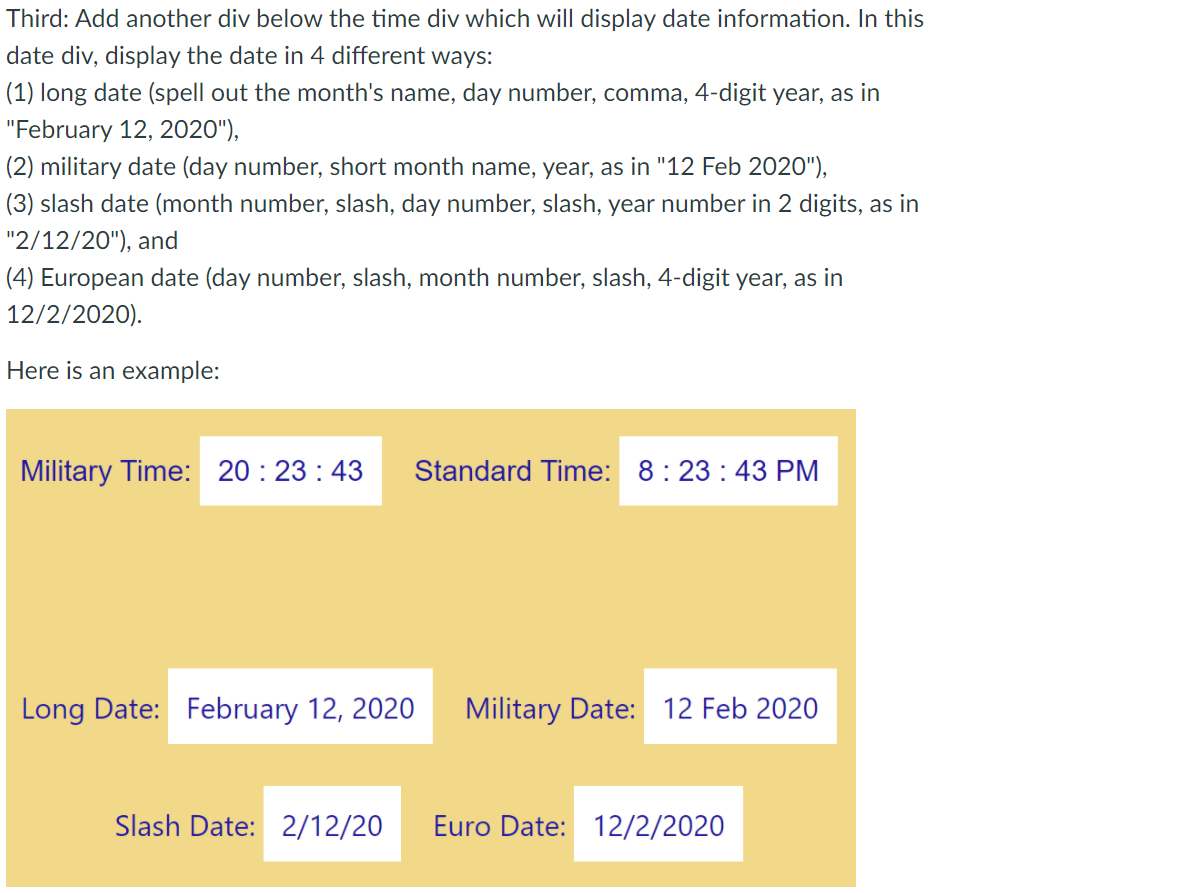
I need help adding the labels as well as the other time formats
Third: Add another div below the time div which will display date information. In this date div, display the date in 4 different ways: (1) long date (spell out the month's name, day number, comma, 4-digit year, as in "February 12, 2020"), (2) military date (day number, short month name, year, as in "12 Feb 2020"), (3) slash date (month number, slash, day number, slash, year number in 2 digits, as in "2/12/20"), and (4) European date (day number, slash, month number, slash, 4-digit year, as in 12/2/2020). Here is an example: Military Time: 20:23:43 Standard Time: 8:23:43 PM Long Date: February 12, 2020 Military Date: 12 Feb 2020 Slash Date: 2/12/20 Euro Date: 12/2/2020
Step by Step Solution
There are 3 Steps involved in it

Get step-by-step solutions from verified subject matter experts
 Study Help