







Question: my model is representing a fuel cell connecting grid using and optimization technique to get the optimum kp and ki in order to get the
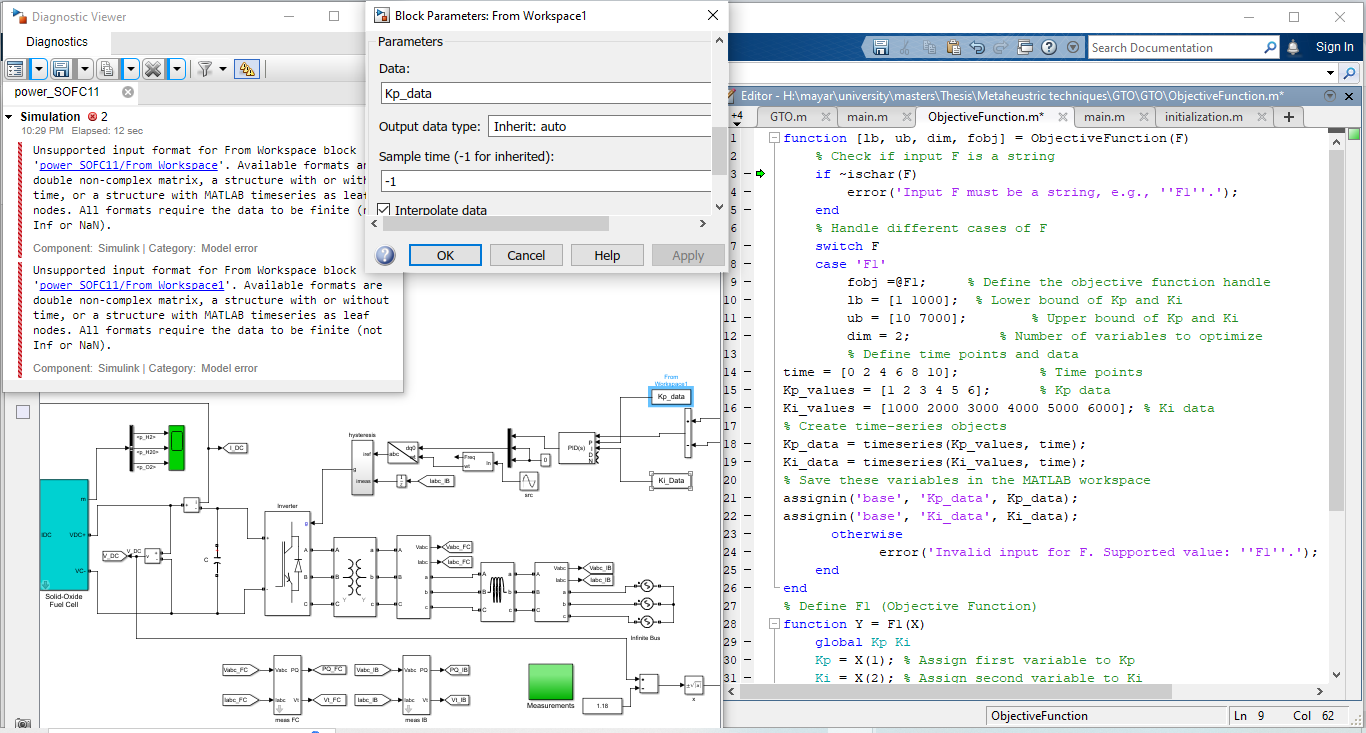
my model is representing a fuel cell connecting grid using and optimization technique to get the optimum kp and ki in order to get the optimum current from the fuel cell and the optimization method used is GTO and now i am having an error in the matlab code of the GTO so i need from you the correction of code in order to link GTO to my fuel cell model and it could be read the error is at the line of if ~ischarF i am having an error in the model of the fuel cell for the blocks kp and ki and i need to solve the error as seen and i want to know the correct setting for these constant blocks kp and ki please guide me with the exact setting alignment to remove the error of the blocks i think am having a problem for making the files the m file and the model to read each other, please tell be step by step how to solve each problem i had attached a picture of the error, the model and the m file and copied to you the code in the m file and i waiting from you step by step and exact and specific answer how to solve the error that appear and how to make both files read each other need the exact steps and matlab code please find the attached picture and atttached code below of m file
function lb ub dim, fobj ObjectiveFunctionF
Check if input F is a string
if ~ischarF
errorInput F must be a string, egF;
end
Handle different cases of F
switch F
case F
fobj @F; Define the objective function handle
lb ; Lower bound of Kp and Ki
ub ; Upper bound of Kp and Ki
dim ; Number of variables to optimize
Define time points and data
time ; Time points
Kpvalues ; Kp data
Kivalues ; Ki data
Create timeseries objects
Kpdata timeseriesKpvalues, time;
Kidata timeseriesKivalues, time;
Save these variables in the MATLAB workspace
assigninbaseKpdata', Kpdata;
assigninbaseKidata', Kidata;
otherwise
errorInvalid input for F Supported value: F;
end
end
Define FObjective Function
function Y FX
global Kp Ki
Kp X; Assign first variable to Kp
Ki X; Assign second variable to Ki
Simulate the Simulink model
simOut simpowerSOFCslx 'SimulationMode', 'normal',
'StopTime', Ensure this matches your model's configuration
'SaveOutput', on
'OutputSaveName', Y;
Extract the performance metric current error, etc.
simData simOut.getY; Ensure Y matches the variable configured in the model
Y trapzsimData; Example: Use the integral of squared error
end
Unsupported input format for From Workspace block 'power SOFCFrom Workspace'. Available formats at double noncomplex matrix, a structure with or wit time, or a structure with MATLAB timeseries as leat nodes. All formats require the data to be finite I Inf or NaN
Component: Simulink Category: Model error
Unsupported input format for From Workspace block
Parameters
Data:
Kpdata
Output data type: Inherit: auto
Sample time for inherited:
Interbolate data
OK Cancel
Help
are 'power SOFCFrom Workspace Available formats are time, or a structure with MATLAB timeseries as leaf nodes. All formats require the data to be finite not Inf or NaN
Component: Simulink Category: Model error
Editor HimayaruniversitymastersThesisMetaheustric techniquesGTOGTOObjectiveFunctionm
GTO.m
main.m
x
ObjectiveFunction.m
main.m
initialization.m
function lb ub dim, fobj ObjectiveFunctionF
Check if input F is a string
if ~ischarF
errorInput F must be a string, egFl;
end
Handle different cases of F
switch F
case Fl
fobj @Fl; Define the objective function handle
lb ; & Lower bound of Kp and Ki
ub ; Upper bound of Kp and Ki
dim ; Number of variables to optimize
Define time points and data
time llllll
Kpvalues llllll
Kivalues ; Ki data
Create timeseries objects
Kpdata timeseriesKpvalues, time;
Kidata timeseriesKivalues, time;
Save these variables in the MATLAB workspace
assigninbaseKpdata', Kpdata;
assigninbaseKidata', Kidata;
otherwise
errorInvalid input for F Supported value: Fl;
end
end
Define Fl Objective Function
~unction Y FlX
global Kp Ki
Kp Xl; Assign first variable to Kp
Ki X; Assign second variable to Ki
Step by Step Solution
There are 3 Steps involved in it
1 Expert Approved Answer
Step: 1 Unlock

Question Has Been Solved by an Expert!
Get step-by-step solutions from verified subject matter experts
Step: 2 Unlock
Step: 3 Unlock
 Study Help