Question: My program.java isn't working to spec, and I feel I'm missing something from the exercise directions, could you help me: Here is my program: import
My program.java isn't working to spec, and I feel I'm missing something from the exercise directions, could you help me:
Here is my program:
import java.io.*;
public class Program {
private int cityCount; private City cityArray[]; private CompressedArray array; public Program(String fileName, boolean showMap) throws IOException { File file=new File(fileName); FileReader fr=new FileReader(file); BufferedReader br=new BufferedReader(fr); StringBuffer sb=new StringBuffer(); String line; int i=0; while((line=br.readLine())!=null) { String ar[]=line.split(" "); City arr=new City(ar[0],Integer.parseInt(ar[1]),Integer.parseInt(ar[2])); cityCount += 1; cityArray[i++]=arr; } fr.close(); }
public City[] getCityArray() { return cityArray; } public void expandCapacity() { City temp[]=cityArray; City cityArray[]=new City[temp.length+3]; for(int i=0;i for(int i=0;i 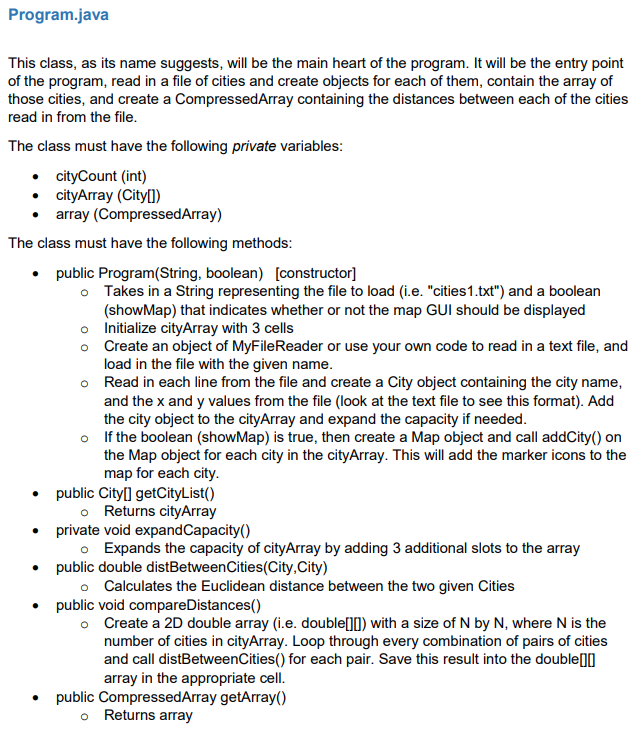
Program.java This class, as its name suggests, will be the main heart of the program. It will be the entry point of the program, read in a file of cities and create objects for each of them, contain the array of those cities, and create a CompressedArray containing the distances between each of the cities read in from the file. The class must have the following private variables: cityCount (int) cityArray (City) array (CompressedArray) The class must have the following methods: public Program(String, boolean) [constructor] o Takes in a String representing the file to load (i.e. "cities1.txt") and a boolean (show Map) that indicates whether or not the map GUI should be displayed o Initialize cityArray with 3 cells o Create an object of MyFileReader or use your own code to read in a text file, and load in the file with the given name. o Read in each line from the file and create a City object containing the city name, and the x and y values from the file (look at the text file to see this format). Add the city object to the cityArray and expand the capacity if needed. o If the boolean (show Map) is true, then create a Map object and call addCity() on the Map object for each city in the cityArray. This will add the marker icons to the map for each city. public Cityll getCityList() o Returns cityArray private void expandCapacity) o Expands the capacity of cityArray by adding 3 additional slots to the array public double distBetween Cities(City, City) o Calculates the Euclidean distance between the two given Cities public void compare Distances() Create a 2D double array (i.e. double[]0) with a size of N by N, where N is the number of cities in cityArray. Loop through every combination of pairs of cities and call distBetweenCities() for each pair. Save this result into the double[10] array in the appropriate cell. public CompressedArray getArray() Returns array . . Program.java This class, as its name suggests, will be the main heart of the program. It will be the entry point of the program, read in a file of cities and create objects for each of them, contain the array of those cities, and create a CompressedArray containing the distances between each of the cities read in from the file. The class must have the following private variables: cityCount (int) cityArray (City) array (CompressedArray) The class must have the following methods: public Program(String, boolean) [constructor] o Takes in a String representing the file to load (i.e. "cities1.txt") and a boolean (show Map) that indicates whether or not the map GUI should be displayed o Initialize cityArray with 3 cells o Create an object of MyFileReader or use your own code to read in a text file, and load in the file with the given name. o Read in each line from the file and create a City object containing the city name, and the x and y values from the file (look at the text file to see this format). Add the city object to the cityArray and expand the capacity if needed. o If the boolean (show Map) is true, then create a Map object and call addCity() on the Map object for each city in the cityArray. This will add the marker icons to the map for each city. public Cityll getCityList() o Returns cityArray private void expandCapacity) o Expands the capacity of cityArray by adding 3 additional slots to the array public double distBetween Cities(City, City) o Calculates the Euclidean distance between the two given Cities public void compare Distances() Create a 2D double array (i.e. double[]0) with a size of N by N, where N is the number of cities in cityArray. Loop through every combination of pairs of cities and call distBetweenCities() for each pair. Save this result into the double[10] array in the appropriate cell. public CompressedArray getArray() Returns array









 Study Help