







Question: MY QUESTION IS: Why expert team does not answer the question as the question is exactly needed? I sent my question fourth time and every
MY QUESTION IS: Why expert team does not answer the question as the question is exactly needed? I sent my question fourth time and every time the answers do not meet the question requirements
============================================================================
Please answer my question because it is an assessment class:
===============================================
PLEASE Read the question well and then answer
I do not need an octagon I need to solve this question as it is required. The program needs hexagon (angle = 60 and units = 50) please answer the
question as it needs (please) and the output must as the shown figure in the question:
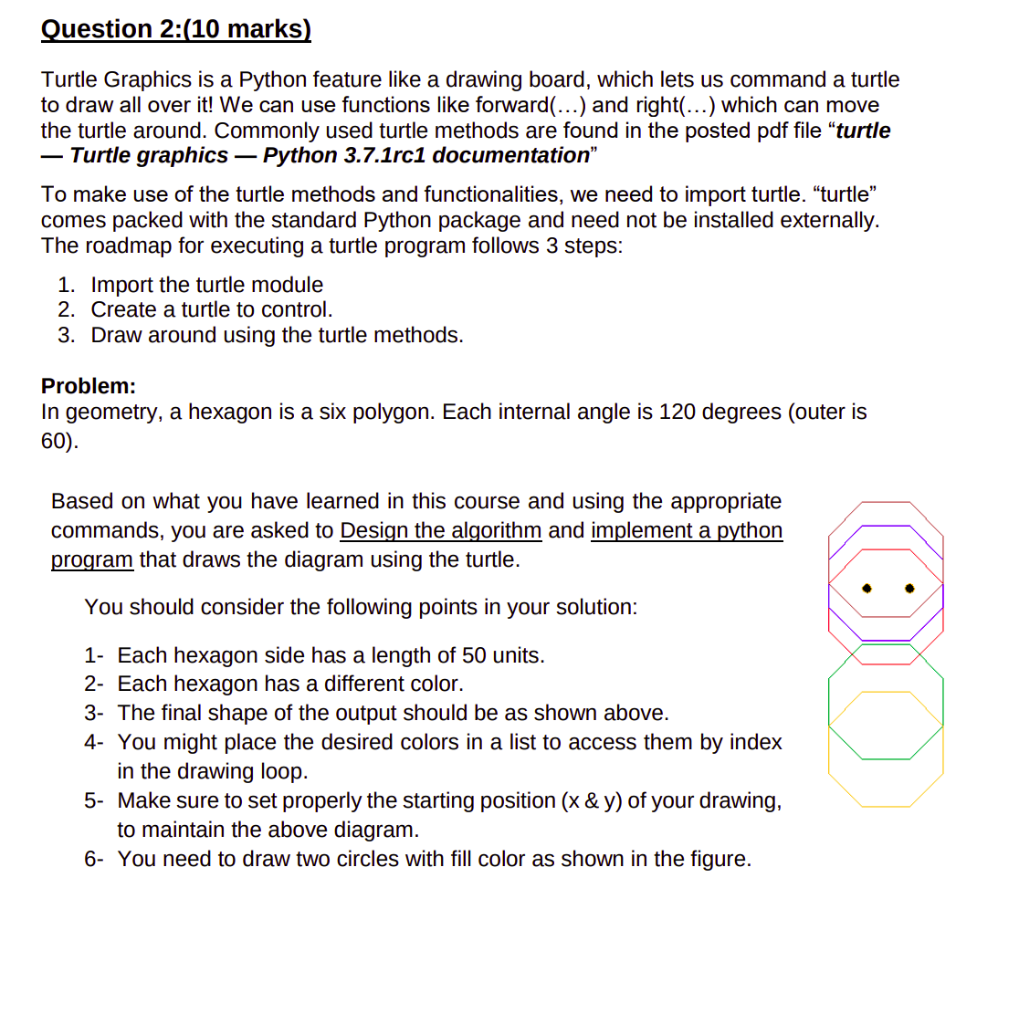
Question 2:(10 marks) Turtle Graphics is a Python feature like a drawing board, which lets us command a th to draw all over it! We can use functions like forward(...) and right(...) which can mov the turtle around. Commonly used turtle methods are found in the posted pdf file "tur - Turtle graphics - Python 3.7.1rc1 documentation" To make use of the turtle methods and functionalities, we need to import turtle. "turtle comes packed with the standard Python package and need not be installed externall The roadmap for executing a turtle program follows 3 steps: 1. Import the turtle module 2. Create a turtle to control. 3. Draw around using the turtle methods. Problem: In geometry, a hexagon is a six polygon. Each internal angle is 120 degrees (outer is 60). Based on what you have learned in this course and using the appropriate commands, you are asked to Design the algorithm and implement a python program that draws the diagram using the turtle. You should consider the following points in your solution: 1- Each hexagon side has a length of 50 units. 2- Each hexagon has a different color. 3- The final shape of the output should be as shown above. 4- You might place the desired colors in a list to access them by index in the drawing loop. 5- Make sure to set properly the starting position ( x&y ) of your drawing, to maintain the above diagram. 6- You need to draw two circles with fill color as shown in the figure
Step by Step Solution
There are 3 Steps involved in it

Get step-by-step solutions from verified subject matter experts
 Study Help