



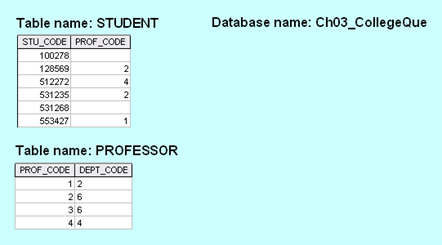
Question: My questions relate to this. 4 . Explain the steps needed ( there are three ) to JOIN the two tables shown above and show
My questions relate to this.
Explain the steps needed there are three to JOIN the two tables shown above and show the results in table format rowscolumns
Explain how the full OUTERJOIN would work when applied to the two tables shown above and show the results in table format rowscolumns
Show the results of a left OUTERJOIN of student to professor:
Show the results of a right OUTERJOIN of student to professor:
Create the table that would result from pi stucodestudent
Create the table that would result from pi stucode,deptcodestudent professor
Create the relational diagram for the database shown in Figure Q aboveTable name: STUDENT
Database name: ChCollegeQue
Table name: PROFESSOR
Step by Step Solution
There are 3 Steps involved in it
1 Expert Approved Answer
Step: 1 Unlock

Question Has Been Solved by an Expert!
Get step-by-step solutions from verified subject matter experts
Step: 2 Unlock
Step: 3 Unlock