







Question: MySQL Database Please be aware that the tables for PATIENT, PHYSICIAN and TREATMENT entities in the ERD below have already been created. Question 1- Create
MySQL Database
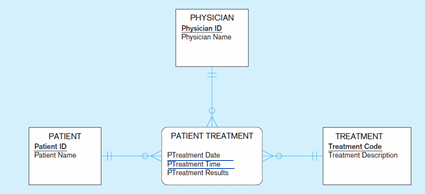
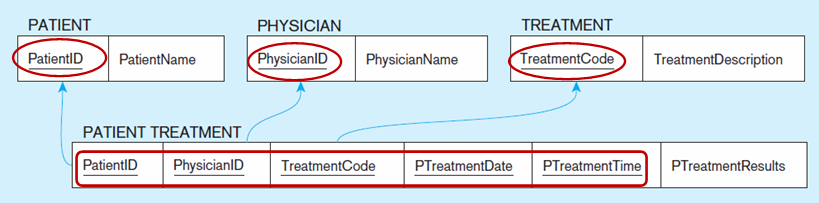
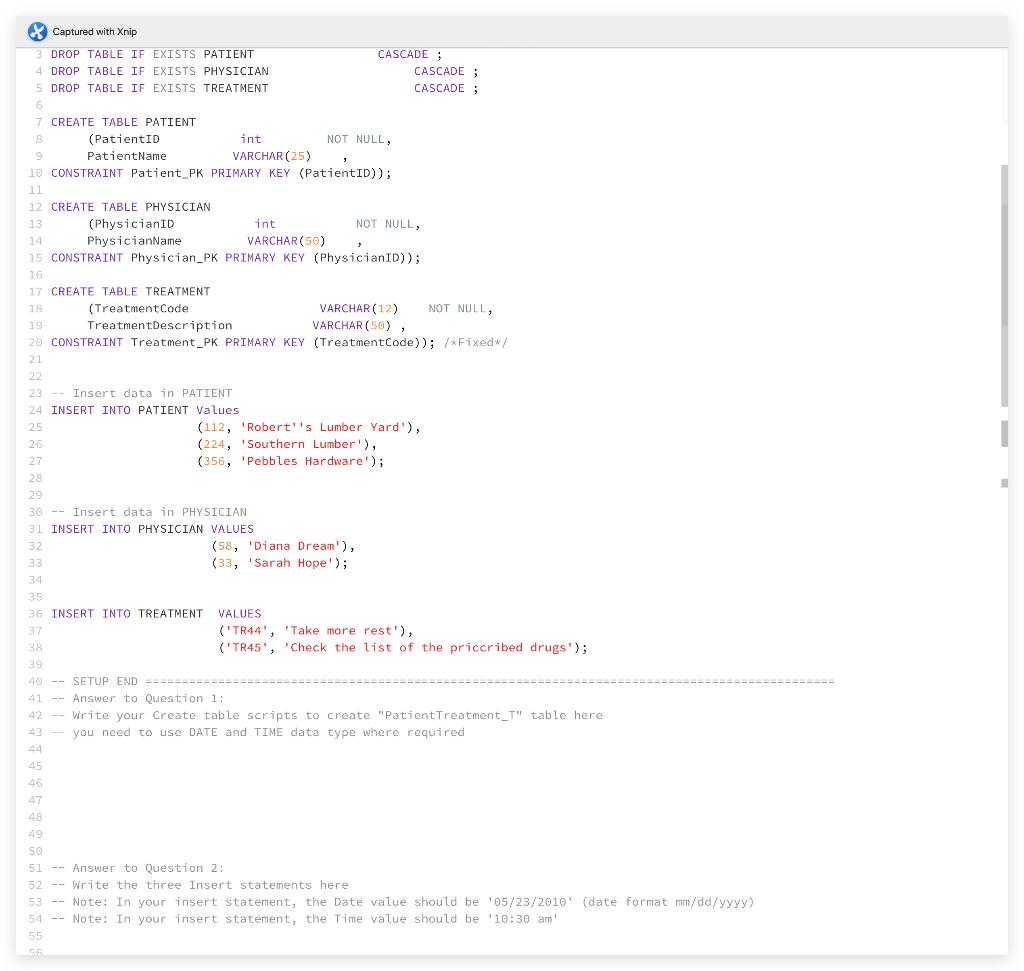
Please be aware that the tables for PATIENT, PHYSICIAN and TREATMENT entities in the ERD below have already been created.
Question 1- Create "PatientTreatment_T " table for the "PATIENT TREATMENT " entity in the ERD.
Note: Use the following data types and names for some attributes you need:
-
DATE data type for PatientTreatmentDate attribute,
-
TIME data type for PatientTreatmentTime attribute, and
-
VARCHAR(50) data type for PatientTreatmentResults attribute.
Question 2- Insert 3 rows in the PatientTreatment_T table as follows:
-
a row for patient 112 that had an appointment with physician 58 on 23 May 2010, at 10:30 am, and he has received the treatment code TR45 (the value for the rest of the attributes need to be determined by you )
-
a row for patient 112 that had an appointment with physician 58 on 23 May 2010, at 10:30 am (the value for the rest of the attributes need to be determined by you )
-
a row for a patient that had an appointment with physician 58 on 23 May 2010, at 10:30 am and he has received the treatment code TR45 (the ID of the patient and the value for rest of the attributes need to be determined by you)
Note 1: be careful about the data type of the attributes, and Pk constraints and FK constraints of the tables.
Note 2: You need to use DATE data type (format mm/dd/yyyy) and TIME data type where required.
-
In your insert statement, the Date value should be '05/23/2010' (date format mm/dd/yyyy) , and the Time value should be '10:30 am'.
Note 3: use PatientTreatment_T name for your table
Note 4: Use the same name for your FKs and the related PKs (e.g. if PK of PATIENT table is a FK in your PatientTreatment_T table, then use PatientID as the name for your FK).
Note 5: Check the generated ERD based on your Code. The ERD will be generated under the console.
PHYSICIAN Physician ID Physician Name PATIENT TREATMENT PATIENT Patient ID Patient Name TREATMENT Treatment Code Treatment Description PTreatment Date Pureatment me PTreatment Results PATIENT PHYSICIAN TREATMENT PatientID PatientName PhysicianID PhysicianName TreatmentCode TreatmentDescription PATIENT TREATMENT PatientID PhysicianID TreatmentCode PTreatment Date PTreatment Time PTreatment Results X Captured with Xnip 3 DROP TABLE IF EXISTS PATIENT CASCADE; 4 DROP TABLE IF EXISTS PHYSICIAN CASCADE ; 5 DROP TABLE IF EXISTS TREATMENT CASCADE; 6 7 CREATE TABLE PATIENT (PatientID int NOT NULL, PatientName VARCHAR (25) 10 CONSTRAINT Patient_PK PRIMARY KEY (PatientID)); 11 12 CREATE TABLE PHYSICIAN 13 (PhysicianID int NOT NULL, 14 PhysicianName VARCHAR(50) 15 CONSTRAINT Physician_PK PRIMARY KEY (PhysicianID)); 15 17 CREATE TABLE TREATMENT 19 (Treatment Code VARCHAR(12) NOT NULL, 29 Treatment Description VARCHAR(50), 20 CONSTRAINT Treatment_PK PRIMARY KEY (Treatment Code)); /*Fixed*/ 21 22 23 Insert data in PATIENT 24 INSERT INTO PATIENT Values 25 (112, Robert'is Lumber Yard), 26 (224, Southern Lumber'), 27 (356, Pebbles Hardware'); 28 29 30 -- Insert data in PHYSICIAN 31 INSERT INTO PHYSICIAN VALUES 32 (58, Diana Dream), 33 (33, Sarah Hope'); 35 36 INSERT INTO TREATMENT VALUES 37 ('TR44', 'Take more rest'), 39 ('TR45', 'Check the list of the priccribed drugs'); 39 40 -- SETUP END 41 Answer to Question 1: 42 -- Write your create table scripts to create "PatientTreatment_" table here 43 you need to use DATE and TIME data type where required 45 46 47 48 49 50 Answer to Question 2: 52 Write the three Insert statements here 53 -- Note: In your insert statement, the Date value should be '05/23/2010' (date format mm/dd/yyyy) 54 -- Note: In your insert statement, the Time value should be '10:30 am 55 56
Step by Step Solution
There are 3 Steps involved in it

Get step-by-step solutions from verified subject matter experts
 Study Help