







Question: MySQL Database Simple Schema I need help on creating a database through mysql and the basic schema that needs to be written in notepad. I
MySQL Database Simple Schema
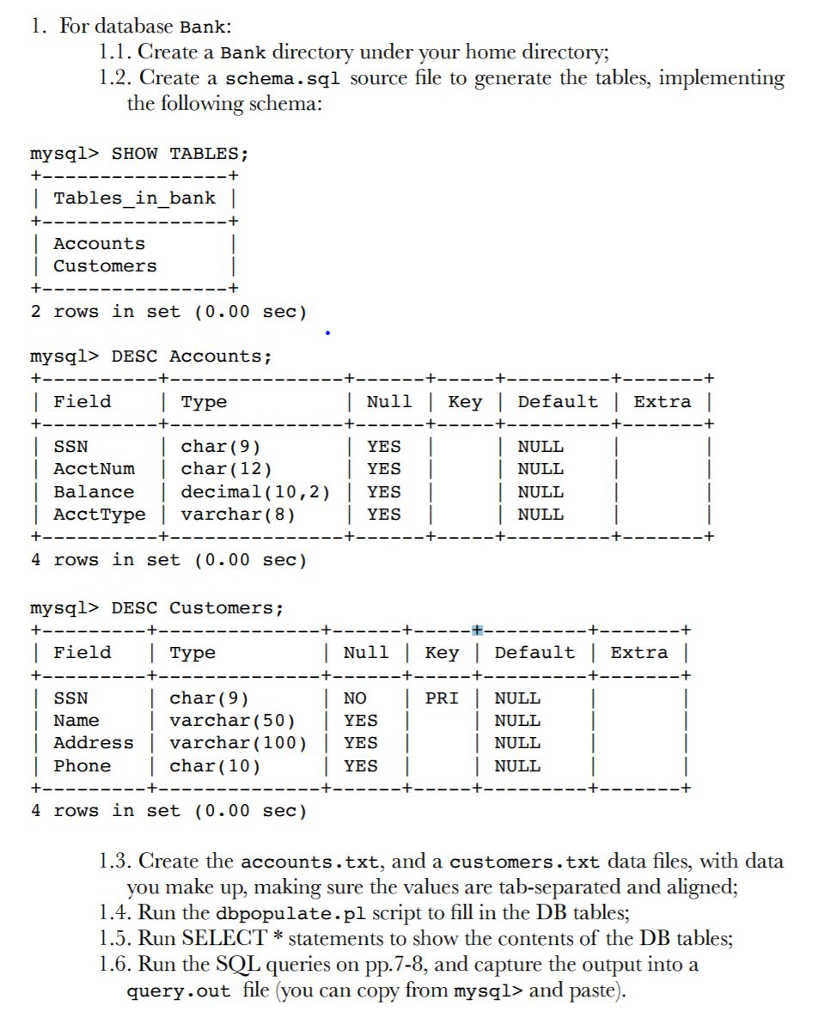
I need help on creating a database through mysql and the basic schema that needs to be written in notepad. I have something like this so far but I am not sure how to do the rest. Ignore the dbpopulate.pl, I have that file, I just am not sure how to use it to fill the DB. Thanks
mysql> CREATE DATABASE Bank;
USE Bank;
CREATE TABLE Tables_in_bank (
Accounts
Customers
)
CREATE TABLE Accounts (
SSN CHAR (9)
AcctNum CHAR (12)
Balance DECIMAL (10,2)
AcctType VARCHAR (8)
);
CREATE TABLE Customers (
SSN CHAR (9)
Name VARCHAR (50)
Address VARCHAR (100)
Phone CHAR (10)
Primary Key (SSN)
)
Show tables;
1. For database Bank: 1.1. Create a Bank directory under your home directory; 1.2. Create a schema.sql source file to generate the tables, implementing the following schema: mysql> SHOWTABLES; | Tables in bankI Accounts Customers 2 rows in set (0.00 sec) mysql> DESC Accounts; | Field Type | Null | Key | Default | Extra | | char (9) SSN | AcctNum | char(12) | Balance decimal (10,2) YES | YES YES NULL AcctType | varchar(8) 4 rows in set (0.00 sec) mysql> DESC Customers; | Field Type YES NULL Null | Key|Default |Extra | SSN char(9) | Name varchar (50) YES | | Address varchar (100)|YES | PRI | NULL NULL NULL NULL NO Phone | char (10) YES 4 rows in set (0.00 sec) 1.3. Create the accounts.txt, and a customers.txt data files, with data you make up, making sure the values are tab-separated and aligned; 1.4. Run the dbpopulate.pl script to fill in the DB tables; 1.5. Run SELECT statements to show the contents of the DB tables; 1.6. Run the SOL queries on pp.7-8, and capture the output into a query.out file (you can copy from mysql> and paste
Step by Step Solution
There are 3 Steps involved in it

Get step-by-step solutions from verified subject matter experts
 Study Help