







Question: MySQL help QUESTION: Write an UPDATE statement that modifies two columns within the row that you added in Question 3 above. This statement should change
MySQL help
QUESTION:
Write an UPDATE statement that modifies two columns within the row that you added in Question 3 above. This statement should change the list price to $689.99 and the discount percent to 40%. BE SURE to have the $ and % in the updated values.
"Question 3":
Write an INSERT statement using a column list to add this row to the products_copy table. Pay careful attention to the comments below.
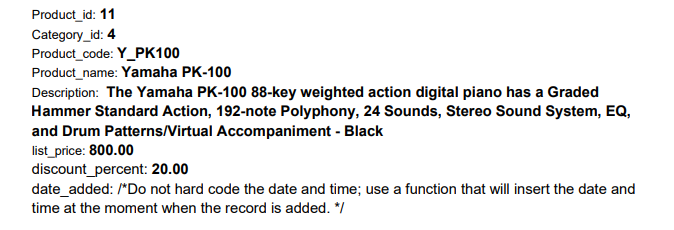
My code for question 3:
INSERT INTO products_copy (Product_id, Category_id, Product_code, Product_name, Description, list_price, discount_percent, date_added) VALUES( 11, 4, 'Y_PK100', 'YAMAHA PK-100', 'The Yamaha PK-100 88-key weighted action digital piano has a Graded Hammer Standard Action, 192-note Polyphony, 24 Sounds, Stereo Sound System, EQ, and Drum Patterns/Virtual Accompaniment - Black', 800.00, 20.00, NOW());
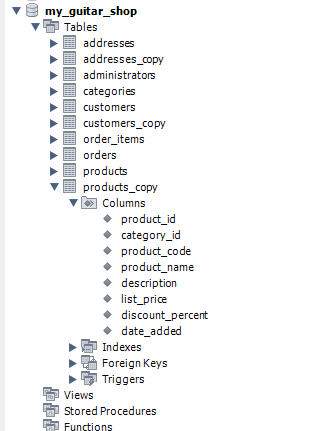
Product_id: 11 Category_id: 4 Product_code: Y_PK100 Product_name: Yamaha PK-100 Description: The Yamaha PK-100 88-key weighted action digital piano has a Graded Hammer Standard Action, 192-note Polyphony, 24 Sounds, Stereo Sound System, EQ, and Drum Patterns/Virtual Accompaniment - Black list_price: 800.00 discount_percent: 20.00 date_added: /*Do not hard code the date and time; use a function that will insert the date and time at the moment when the record is added. */ my_guitar_shop Tables addresses addresses_copy administrators categories customers customers_copy order_items orders products products_copy Columns product_id category_id product_code product_name description list_price discount_percent date_added Indexes Foreign Keys Triggers Views Stored Procedures Functions
Step by Step Solution
There are 3 Steps involved in it

Get step-by-step solutions from verified subject matter experts
 Study Help