







Question: mySQL issue with executing source file... so, in cloud9 using mySQL... Im trying to execute this source command source Instagram/ig_clone.sql but to no avail. I
mySQL issue with executing source file...
so, in cloud9 using mySQL...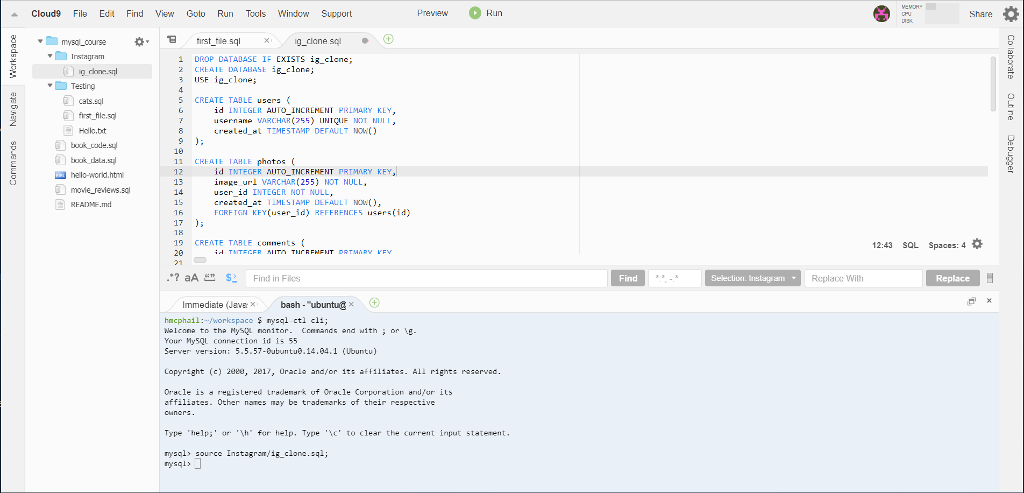 Im trying to execute this source command source Instagram/ig_clone.sql but to no avail. I tried both with a ; and without at the end. I dont understand what is happening. It doesnt execute and just enters a new line with mysql>. Appreciate any assistance very much. Thank you
VE Cloud9 File Edit Find View Golo Run Tools Window Support Preview Run 0 Share - 8 , Werkspace - first_file sal X ig_clone sal 1 DROP DATABASE IF EXISTS is_clenc; CREATE DATABASE igclone; 3 USF inclone; Colaborate - 5 Newgate myso_course Instagram o g kone.cul Testing cats.sal first_fille sal Hello.it book_code.se book_klasy hello-world.html movie_reviews.sal README.md CREATE TABLE users ( id INTEGER AUTO INCREMENT PRIMARY KEY, username VARCHAR(255) LINIQUE NOT NULL, Created at TIMESTAMP DEFAULT NOW() Outne 7 Commerds Debugger CREATE TABLE photos ( id INTEGER AUTO_INCREMENT PRIMARY KEY, inage url VARCHAR ( 255) NOT NULL. user_id INTEGER NOT NULL, created_at TIMESTAMP DEFAULT NOWO), FOREIGN KFY(user_id) REFERENCES Users(id) . 15 17 18 19 CREATE TABLE comments ( id TUTEGER MUITO TIGRENENT DRTMARY KEV 12:43 SOL Spaces: 4 6 .*? aA * $2 Find in Files Find Selection. Instagram Replace Wilh Replace OX Immediate (Javex bash - "ubuntug x + hucphail: /workspace $ nysal ctl cli; Welcome to the Nystu nonitor. Conands and with ; or Your MySQL connection id is 55 Server version 5.5.57-Oubuntu 14.04. 1 (Ubuntul g- Copyright (c) 2008, 2017, Oracle and/or its affiliates. All rights reserved. Oracle is a resistered trademark of Oracle Corporation and/or its affiliates. Other na may be trademarks of their respective ouners. Type 'help;' or '\h' for help. Type '\c' to clear the current input staterent. mysql> source Instagram/is_clone.sel; nysql> )
Step by Step Solution
There are 3 Steps involved in it

Get step-by-step solutions from verified subject matter experts
 Study Help